
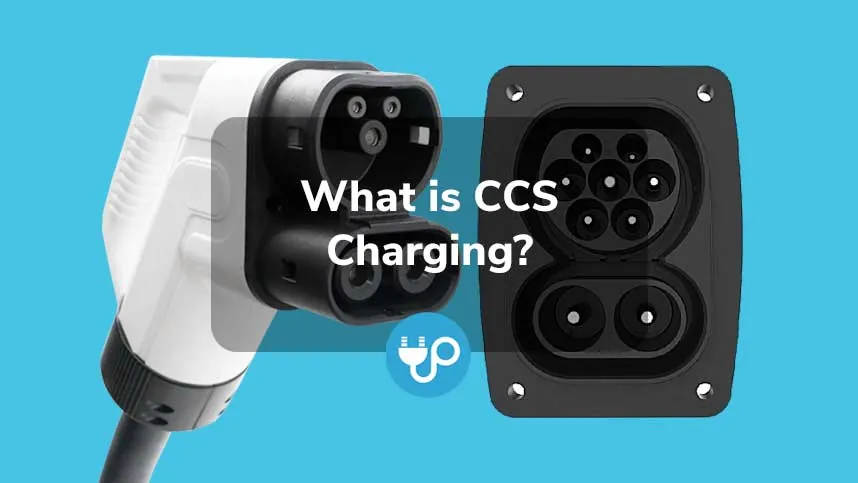
A CCS charger is a fast-charging plug for electric cars that sends direct current straight to the battery, bypassing the car’s own charger so the vehicle fills up much quicker than on a standard outlet. It uses one socket that takes both slow alternating-current charging and fast direct-current charging, with two extra pins that only activate during a fast session. Combined Charging System — CCS — is the open standard behind most public fast chargers in North America and Europe, and it’s the plug most new non-Tesla electric vehicles ship with today.
The single thing that decides whether a CCS session goes well is whether your car’s port matches the charger’s output. CCS comes in two versions: CCS1 in North America and CCS2 in Europe, and they aren’t interchangeable without an adapter.
The most common mistake people make before they start is assuming every public fast charger fits every electric car; a CCS plug won’t work on a vehicle that only takes CHAdeMO or Tesla’s older connector, and forcing an incompatible plug can damage the port or leave you stranded. Check your car’s charging port before you drive to a station.
Finding a CCS charger and starting a session
-
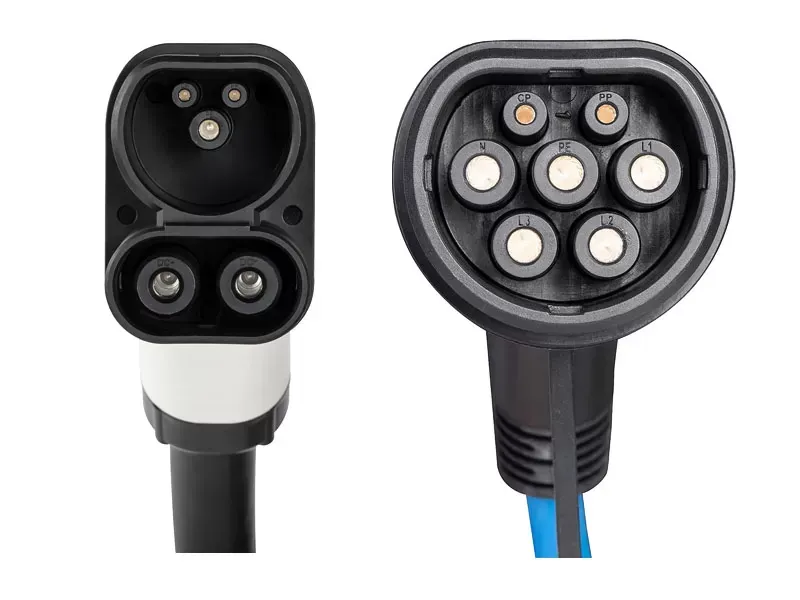
Look at your car’s charging port and confirm it has the CCS shape — the larger oval inlet with two extra pins below the main socket.
-
Use a charging network app or your car’s built-in navigation to find nearby stations that list CCS or combined charging system compatibility.
Filter for chargers rated at 50 kW or higher if you want a meaningful stop. A 25 kW unit uses the same plug but takes twice as long.
- Drive up so the port faces the charger, then open the charge door and remove any dust cover from the inlet.
Check the cable length before you park too far from the pedestal. Most CCS cables are under ten feet long. Backing in is usually easier than pulling forward.
- Take the CCS cable from the holster and push the plug firmly into the port until it clicks and locks.
Lift the heavy handle slightly while inserting it to keep the pins aligned. Letting the full weight drag down can bend them.
- Start the session through the app, the station screen, or your car’s infotainment display, then wait for the charge to begin.
If nothing happens after thirty seconds, unplug and restart the sequence. The handshake between the car and the station times out quickly.
- Monitor the session on the app or station screen, and stop charging when you reach your target level or the rate slows sharply.
Tip: If the plug won’t seat fully, don’t force it — some stations use CCS1 cables that won’t lock into a CCS2 port, and forcing it can break the inlet.
Tip: Many networks require an account and a payment card on file before they will unlock the cable, so set that up at home rather than at the station.
Where a station’s software fails or the plug locks in place, use the station’s emergency release or call the number on the unit — never pull on the cable or try to pry the plug out yourself.
How long CCS charging takes
A CCS fast charger can add roughly 100 miles of range in 20 to 40 minutes. The actual time depends on your car, the station’s power, and how full the battery already is.
Cold batteries charge slowly. If you arrive at a station after driving only five minutes in winter, expect the first ten minutes to deliver very little power. Cars with battery preconditioning avoid this by warming the pack while you navigate to the plug.
| Situation | How long | What changes it | What to watch for |
|---|---|---|---|
| 10% to 80% at 150 kW | About 20 to 40 minutes | Your car’s maximum charge rate and battery size | The rate drops sharply after 80% |
| 10% to 80% at 50 kW | About 60 to 90 minutes | Lower station output limits speed even if the car can take more | The session may cost the same per minute as a faster charger |
| Top-up from 40% to 80% | About 15 to 25 minutes | Starting state of charge matters more than the station | You pay for time plugged in on some networks |
Staying past 80% wastes time. Charging from 80% to 100% often takes as long as the entire 10% to 80% stretch because the car restricts current to protect the cells.
When a session takes far longer than the table shows, stop and restart the charge or try a different stall. A stalled session usually means a software handshake failed between the car and the station.
Check whether the cabinet feeds two cables. Stations that share one 150 kW supply will split that power when both stalls are occupied.
Signs your CCS charge is working

You should see the car’s dashboard or instrument screen show a charging status and an estimated time remaining. The station’s screen or the network app should display power flowing in kilowatts. The cable’s handle often has a light that turns solid or changes color when the lock engages.
You may hear a faint click when the plug locks. Some cars chirp or flash the charge-port light when the session starts.
The one test that settles it’s the kilowatt reading on the station screen or app. If it shows zero after two minutes, the session never began.
A common mistake here is watching only the battery percentage on your phone app. That number updates slowly at low states of charge. Relying on it makes drivers unplug a working charger to try another stall.
If your car expects 150 kW but the screen reads 40 kW, the connection is real but limited. Cold batteries or a nearly full pack cause this drop.
The Society of Automotive Engineers publishes the CCS standard that governs how the car and charger communicate. Any reading that matches your car’s expected rate confirms the connection is real.
Mistakes that ruin a CCS session
Arriving with a nearly empty battery and expecting a full charge quickly is a common trap. Battery management systems throttle power input as you approach capacity to protect the cells. The final 20% often takes as long as the initial 50% of the session. Plan to stop at 80% to maintain your momentum.
Assuming every fast charger uses CCS leads to stranded drivers. While CCS is the standard for most modern EVs, older stations or specific regional networks still rely on CHAdeMO or Tesla NACS plugs. Always verify the connector type in your charging app before committing to a route.
Leaving the car plugged in after hitting 80% carries a hidden financial cost. Most networks trigger idle fees once the charging rate drops below a certain threshold. These penalties can exceed five dollars per hour. Beyond the expense, you block access for other drivers who need that high-speed stall. If your car reaches its target, move it immediately to avoid these unnecessary charges and keep the station moving for everyone else.
Frequently asked questions
Can any electric car use a CCS charger?
No. Only vehicles with a CCS inlet can plug in directly, and CCS1 and CCS2 aren’t interchangeable without an adapter; check your car’s port before you go.
Why does charging slow down after 80%?
The car’s battery management system reduces power to protect the battery cells as they fill, so the final 20% can take nearly as long as the first 60%.
How long does a CCS charge take?
About 20 to 40 minutes from 10% to 80% at a 150 kW station, assuming your car can accept that rate; slower stations or smaller batteries take longer.
Is it safe to charge in the rain?
Yes. CCS connectors and stations are sealed and tested for outdoor use in wet weather, though you should never use a cable with cracked or exposed wiring.
What happens if I leave the car plugged in after it finishes?
The session stops automatically, but many networks then charge an idle fee by the minute, and you keep a fast charger occupied that someone else could use.
Conclusion
A CCS fast charge works best when you treat it like a pit stop rather than an overnight fill — plan for 80%, not 100%, and you’ll spend less time waiting and more time driving.
