
Auxiliary equipment is any secondary device or machine that supports the operation of a primary production system to improve efficiency, safety, or output quality. These tools don’t perform the main task themselves but manage inputs, monitor conditions, or handle waste products. For instance, a conveyor belt feeding raw materials into a large industrial press is a common example of auxiliary equipment used in manufacturing.
The primary factor determining if you need these devices is your production volume and the specific requirements of your main machine. If your machine runs at high speeds, you need automated feeders to keep up; if it runs slowly, manual loading often suffices. A frequent mistake is buying expensive support systems before optimizing the main machine’s settings. This costs money and creates unnecessary maintenance tasks that slow down your team.
How auxiliary equipment works in practice
Assess the bottleneck in your current workflow by timing how long the main machine sits idle while waiting for material or cleaning.
Select the specific device that addresses this delay. Use an automatic loader for material handling if your bottleneck is manual loading time, or a dedicated chiller for thermal control if your cycle times spike due to overheating.
Connect the power supply and communication cables between the primary unit and the auxiliary system according to the manufacturer’s wiring diagram. Always verify that the power supply matches the voltage requirements listed on the machine’s data plate. Mismatched voltage often causes silent, long-term degradation of sensitive control boards that remains hidden until a total system failure occurs.
Calibrate the sync settings so the auxiliary device starts and stops exactly when the main machine demands it.
Run a test cycle with 10% of your normal material load to ensure the timing is perfect before full-scale production. Never bypass safety interlocks on auxiliary machines to save time. This shortcut is the leading cause of industrial workplace injuries and can result in catastrophic equipment damage. If the interlock triggers, stop the line immediately to inspect the alignment rather than overriding the sensor.
Time requirements for system integration
The time needed to integrate these tools varies based on the complexity of the interface and your existing infrastructure. Simple, standalone units require much less time than systems that must communicate with a central computer.
| Situation | How long | What changes it | What to watch for |
|---|---|---|---|
| Simple loader | 30-60 minutes | Mounting requirements | Alignment accuracy |
| Thermal chiller | 2-4 hours | Plumbing complexity | Leakage at joints |
| Robotic arm | 8-16 hours | Software integration | Sensor calibration |
Expect to add 50% to these estimates if your facility uses legacy hardware that requires custom adapter plates. These plates often need precision machining to ensure the mechanical tolerances stay within the manufacturer’s specified range.
If the setup process takes significantly longer than these ranges, check for loose electrical connections or firmware mismatches between the primary and auxiliary units. A common mistake is failing to update the central controller’s driver library before the physical installation.
If your integration involves a network-connected device, prioritize testing the handshake signal before you finalize the physical mounting. If the signal fails, you must verify the IP configuration immediately rather than continuing with the mechanical assembly. This rule prevents you from having to disassemble the unit to access hidden diagnostic ports.
Signs of successful operation
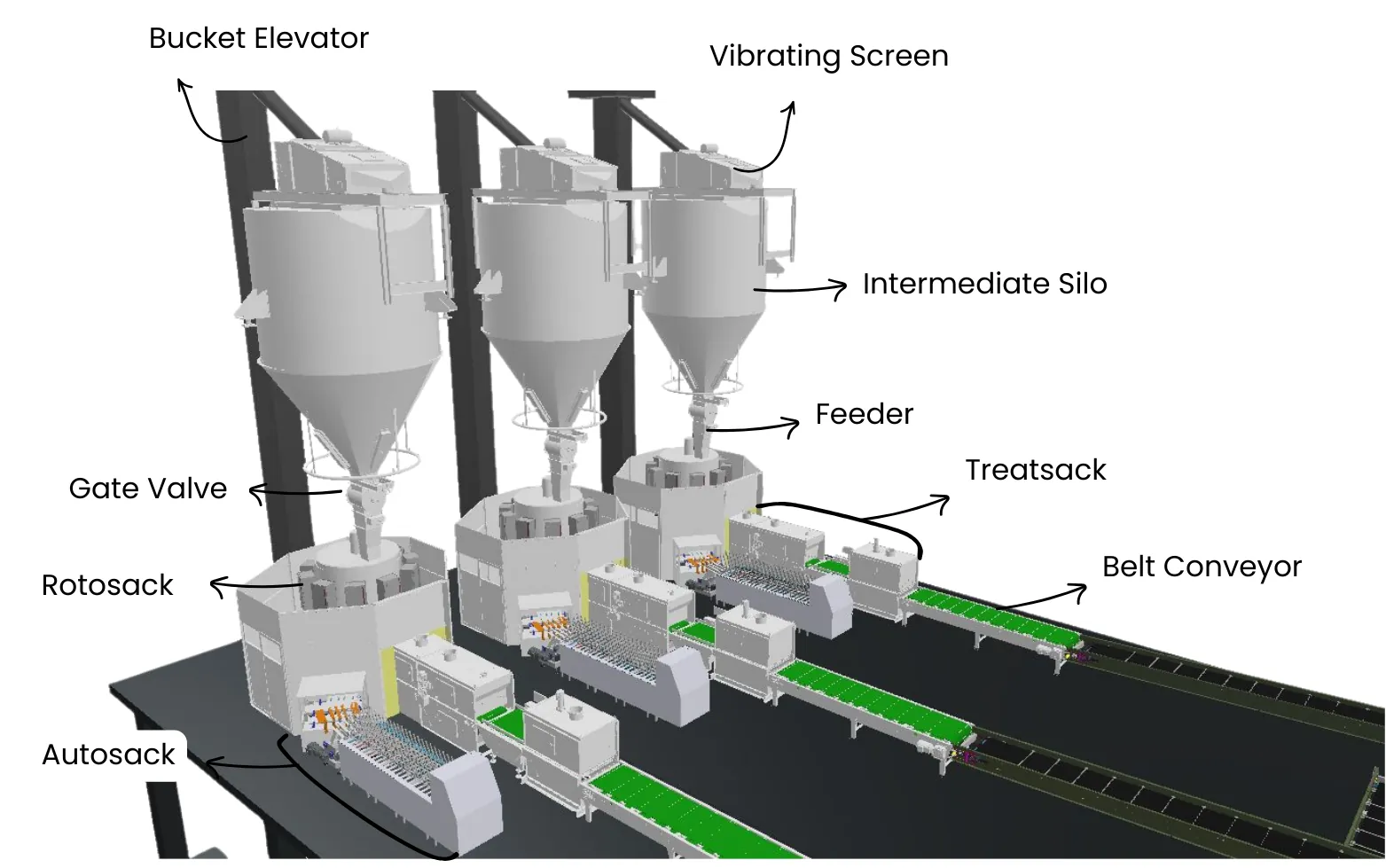
You can tell the system is working correctly when the primary machine operates without stopping for manual input or temperature adjustments. The auxiliary device should trigger automatically based on the primary machine’s state, such as a conveyor starting when the sensor detects a part. If the system is working, you’ll see consistent flow rates and fewer error codes on your main control panel.
The ultimate test is a continuous hour of production where the auxiliary device keeps the primary machine supplied or cooled without human intervention. If the primary machine stops because it’s waiting for the auxiliary unit, the sync settings are likely off.
A common mistake is ignoring minor latency during the first ten minutes of startup. If the lag persists beyond this window, you’re likely dealing with a sensor calibration drift rather than a mechanical failure. You can distinguish between these by checking the diagnostic log for “Wait State” flags.
If you’re unsure about the specific performance metrics for your model, check the owner’s manual for the cycle time specifications provided by the manufacturer.
Common errors to avoid
- Ignoring power load limits: Connecting too many auxiliary devices to a single circuit can trip your breakers and halt production. Always calculate the total amperage of all devices and ensure it stays below the circuit’s rated capacity.
- Neglecting routine maintenance: These support systems often collect dust or debris that leads to overheating and mechanical failure. Clean all filters and moving parts at the interval recommended in your maintenance schedule to keep the system reliable.
- Overloading the system: Forcing an auxiliary machine to move more material than it was designed for will cause premature wear on motors and belts. Stick to the maximum weight or speed ratings listed on the machine’s specification tag to avoid costly repairs.
Related guides
- 5 Best Shrubs to Hide Pool Equipment for Quick Privacy in 2026
- Best Pipe Threading Tools: How to Choose the Right Equipment in 2026
- 6 Best Pool Automation Systems for Easy Equipment Management in 2026
Frequently Asked Questions
How do I know which auxiliary equipment I need?
You need to identify the specific task that keeps your main machine idle, such as material handling, cooling, or waste removal. If your primary machine is constantly waiting for parts, you need a feeder; if it shuts down due to heat, you need a cooling system. Compare your current output against the machine’s rated capacity to see where the loss happens.
Can I use universal auxiliary equipment?
Yes, some equipment like basic conveyors or cooling fans can work with many machines, provided the power and control interfaces are compatible. You must verify that the voltage and signal types match your primary equipment. If the signals don’t match, you’ll need a signal converter, which adds cost and complexity to your setup.
Is it safe to install these machines myself?
Yes, it’s safe to install most auxiliary equipment if you follow the manual and have basic mechanical skills. However, if the installation requires hard-wiring into a high-voltage main panel or modifying the primary machine’s safety systems, you must hire a licensed electrician. Never attempt electrical work if you lack the proper training to avoid fire hazards or voiding your equipment warranty.
How long does auxiliary equipment last?
Most industrial support equipment has a finite service life when you follow the manufacturer’s recommended maintenance schedule. The actual lifespan depends on the intensity of use and the environment, such as high heat or dust levels. You can check the expected service life in the technical documentation provided by the manufacturer.
What happens if the auxiliary equipment fails?
If your auxiliary equipment fails, the primary machine will usually trigger an alarm or stop automatically to prevent damage. You should immediately check the error code on the control panel to see if the issue is a sensor error, a power loss, or a mechanical jam. If you can’t fix the issue by clearing a jam or resetting the power, contact the manufacturer’s support line for your specific model.
Conclusion
Investing in these supporting systems is a smart way to help your business grow. You shouldn’t wait for a breakdown to upgrade your setup; start by identifying one bottleneck in your current workflow today. You’ll find that even small additions can make a huge difference in how smoothly your team works.

2 thoughts on “What Is Auxiliary Equipment and How Does It Work Explained”