
The Onkyo DX C390 is a six-disc CD changer that has maintained a loyal following among audiophiles who still prefer physical media. However, like any complex mechanical device with moving parts, owners occasionally encounter onkyo dx c390 problems that can interrupt a listening session. These issues generally stem from the mechanical carousel mechanism, the laser pickup assembly, or the internal belt drives that facilitate disc rotation and tray movement. By understanding the common failure points, you can often perform basic maintenance or diagnostic steps to restore functionality without needing a professional technician.
Key Takeaways
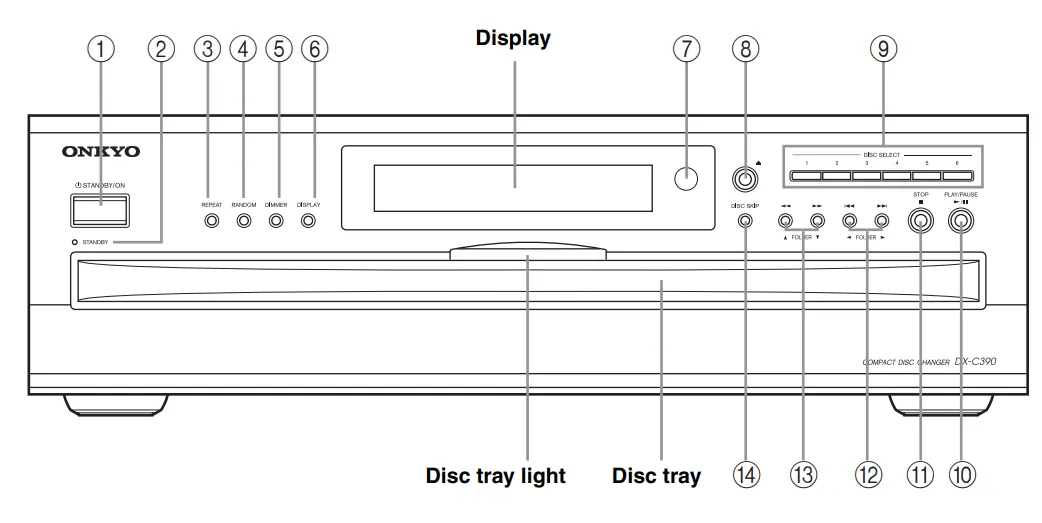
- Perform a hard reset by unplugging the unit for ten minutes to clear minor logic errors.
- Clean the laser lens using a dry, soft brush or a specific CD lens cleaner disc to resolve skipping.
- Inspect the internal drive belt for signs of stretching or cracking, as this is the primary cause of tray jams.
- Ensure the unit sits on a level surface to prevent the carousel from misaligning during disc transitions.
- Use compressed air to remove dust accumulation from the internal sensor eyes to prevent false tray errors.
Why Does the Tray Jam?
The most frequent complaint involves the carousel failing to rotate or the tray refusing to open. This is almost exclusively due to the rubber drive belt losing its elasticity over time. When the belt stretches, the motor spins, but it lacks the friction required to drive the mechanical gears that move the tray.
How to Fix Mechanical Errors
To address these mechanical failures, you must open the chassis. Always ensure the unit is disconnected from the power source before removing the cover. Once inside, locate the small drive belt near the motor. If it appears loose or has become brittle, you must source a replacement of the exact diameter.
| Component | Common Issue | Potential Fix |
|---|---|---|
| Drive Belt | Slipping or stretching | Replace with new rubber belt |
| Carousel Motor | Weak torque | Clean motor contacts |
| Gear Train | Dried lubricant | Apply silicone-based grease |
| Tray Guides | Misalignment | Gently reset the tray position |
Laser Pickup and Skipping Issues
If your device reads some discs but skips on others, the optical pickup unit may be struggling. This is often caused by dust settling on the lens, which obscures the laser’s ability to focus on the disc surface. You can use a dedicated Onkyo support page to verify your specific model’s maintenance guidelines for lens cleaning.
Addressing Onkyo C390 Playback Problems
When cleaning the lens, avoid using harsh chemicals. A simple, dry, lint-free cloth or a specialized lens cleaning disc is usually sufficient. If skipping persists, the laser diode itself might be failing, which is a more advanced repair requiring specific calibration tools and replacement parts.
Is the Carousel Misaligned?
A misaligned carousel is a common byproduct of moving the unit while the tray is engaged. The internal mechanism uses optical sensors to determine the position of the carousel. If the carousel is bumped, the sensors may lose their reference point, causing the player to stop or cycle indefinitely as it searches for the correct disc slot.
Pro Tip: If the unit seems stuck, try to gently rotate the carousel by hand while the power is off to see if it moves freely or feels caught on a mechanical obstruction.
Electrical and Power Failures
Sometimes the problem isn’t mechanical but electrical. If the device fails to power on, check the internal fuse located near the power supply input. Power surges can blow this safety component, protecting the delicate internal circuitry from further damage.
Troubleshooting Power Supply Issues
- Check the wall outlet for steady voltage.
- Inspect the power cable for fraying.
- Test the unit on a different circuit.
- Verify the standby mode settings.
Cleaning the Internal Sensors

The DX C390 relies on tiny sensors to detect the presence of a disc and the position of the tray. Over years of use, fine dust can build up on these sensors, leading to “No Disc” errors even when a disc is loaded correctly. Using a can of compressed air, blow out the interior of the disc chamber, focusing on the small sensor eyes located near the lens assembly and the carousel edge.
Maintaining the Carousel Mechanism
The carousel mechanism requires minimal but consistent lubrication. Over time, the factory-applied grease can dry out or collect dust, turning into a thick paste that creates drag on the moving parts. Using a high-quality, silicone-based lubricant, you can lightly coat the plastic gear teeth to ensure smooth operation.
Warning: Never use petroleum-based lubricants, such as WD-40, as they can degrade the plastic gears and attract more dust, leading to further mechanical failure.
Managing Disc Compatibility
While the DX C390 is robust, it’s an older design. It may struggle with certain types of recordable media (CD-R/CD-RW) that have lower reflectivity than factory-pressed discs. If the player consistently refuses to read home-burned discs, the issue is likely the laser’s age rather than a defect in the player itself.
| Media Type | Success Rate | Notes |
|---|---|---|
| Commercial CD | High | Standard reflective surface |
| CD-R (Silver) | Medium | Requires clean burn |
| CD-RW | Low | May not be supported |
| MP3 CDs | Low | Depends on file encoding |
Common Error Message Codes
The front display may occasionally show error messages that provide clues to the internal state of the machine. These codes are designed to indicate specific failures in the logic board or the mechanical cycle.
- Error 01: Mechanical timeout during tray movement.
- Error 02: Laser focus failure on initial spin-up.
- Error 03: Carousel positioning sensor error.
If you encounter these codes, perform a power cycle. Unplug the unit for at least fifteen minutes. This allows the capacitors on the internal board to discharge fully, which often resets the microprocessor and clears temporary software glitches that might be causing the error.
Dealing With Tray Obstructions
If the tray won’t open, it could be physically obstructed. Check the front faceplate for any debris that might be preventing the drawer from sliding forward. Sometimes, the front panel clips can lose their tension, causing the drawer to snag on the chassis frame.
Steps to Clear Obstructions
- Power down the unit completely.
- Use a thin, flat tool to gently push the tray frame.
- Ensure no internal discs have slipped off the carousel.
- Verify the drawer tracks are clear of debris.
How to Prevent Future Issues
To keep your CD changer running for years, treat it as a precision instrument. Avoid placing heavy objects on top of the player, as this can warp the chassis and cause the carousel to drag. Furthermore, keep the unit in a well-ventilated area to prevent heat buildup, which is the primary enemy of the internal drive belt and the laser diode.
Related guides
- Aqua Genie Skimmer Problems: 3 Common Causes and Fixes in 2026
- Why Is My Pool Cloudy? 8 Common Causes and Quick Fixes in 2026
- Pentair Globrite Problems: Top 10 Issues and Complaints in 2026
Frequently Asked Questions
Why does my unit display “No Disc” for all slots?
This usually indicates that the laser lens is dirty or the laser diode has reached the end of its life. First, try cleaning the lens with a dry, soft brush. If that fails, the laser assembly may need to be replaced. Ensure the discs you’re using are standard, clean, and not heavily scratched, as the DX C390 is sensitive to surface damage.
Can I replace the drive belt myself?
Yes, replacing the belt is a manageable task for someone comfortable with basic electronics repair. You’ll need to remove the top cover, identify the belt near the carousel motor, and replace it with an identical size. Many generic belt kits are available online, though you should measure the diameter of the original belt before ordering to ensure a proper fit.
Is it worth repairing an older CD player?
Whether it’s worth the cost depends on your attachment to your physical music collection and the specific nature of the failure. Minor repairs like belt replacements or cleaning are very cost-effective. However, if the main controller board or the laser assembly is faulty, the cost of parts and labor might exceed the value of a used replacement unit in good condition.
How do I reset the carousel mechanism?
If the carousel is stuck, you can perform a manual reset. With the unit powered off, check the underside of the carousel for a manual release lever or gear that can be turned. Carefully rotate the mechanism until the tray is aligned with the front opening. Once you power the unit back on, it should re-index its position and return to normal operation.
Why does the player skip during playback?
Skipping is often caused by vibration, a dirty lens, or a scratched disc. Ensure the player is on a stable, vibration-free surface. If the skipping occurs on every disc, clean the laser lens. If the skipping is localized to specific tracks, the disc itself is likely damaged. Persistent skipping across all discs despite cleaning usually points to a failing laser pickup assembly.
Where can I find replacement parts?
Replacement parts for older Onkyo equipment are primarily found through specialized vintage electronics repair shops or online marketplaces that sell salvaged parts. Since the DX C390 is a legacy product, official parts from the manufacturer are often discontinued. Look for electronic component suppliers that stock common rubber belts, gears, and optical pickup units compatible with the DX series.
Conclusion
Regular maintenance is the most effective way to extend the lifespan of your equipment. By keeping the unit clean, ensuring it rests on a stable surface, and addressing minor mechanical issues like belt wear early, you can enjoy high-quality audio for years. If your player continues to malfunction after these steps, consult a local professional technician to evaluate the internal components further.
