
If you own a Pentair Intelliflo VSF pump, you know how important it is to get the settings just right. The wrong setup can waste energy, cause wear and tear, or leave your pool less than perfect.
But don’t worry—this guide will walk you through the recommended settings that help your pump run smoothly and efficiently. By tuning your Intelliflo VSF correctly, you’ll save money, protect your equipment, and enjoy a cleaner, clearer pool. Keep reading to discover the simple adjustments that make a big difference for your pool system.

Credit: www.poolwarehouse.com
Intelliflo Vsf Features
The Pentair Intelliflo VSF offers advanced features for pool pump control. It helps improve pool performance and reduce energy use. This pump uses variable speed technology to adjust water flow. Users can customize settings for best results. Understanding these features helps get the most from the pump.
Its design focuses on efficiency and ease of use. The Intelliflo VSF fits many pool sizes and types. It provides quiet operation and reliable performance. Below, key features explain why this pump stands out.
Variable Speed Benefits
The Intelliflo VSF changes speed to match pool needs. It runs slower during low demand times. This reduces wear on the motor. Faster speeds activate for cleaning or heating. Variable speed saves energy and lowers noise. It also extends pump life by reducing stress.
Energy Savings Potential
This pump uses less electricity than single-speed models. Adjusting speed cuts power use by up to 90%. Lower speeds mean less energy is needed. This reduces monthly electric bills. Energy savings help protect the environment. The pump also meets strict energy codes and standards.
User Interface Overview
The Intelliflo VSF features a simple control panel. It has a clear display and easy buttons. Users can set speeds, schedules, and timers quickly. The interface shows real-time pump status. Settings can be saved and adjusted anytime. This makes operation straightforward for all users.

Credit: aquapoolsupply.com
Key Settings To Adjust
Adjusting the key settings on your Pentair Intelliflo VSF pump helps it run efficiently. Proper settings save energy and extend the pump’s life. Focus on three main areas: pump speed, timer, and special modes. Each setting controls how the pump works daily. Understanding these settings makes pool care easier and better.
Pump Speed Configuration
Set the pump speed to match your pool’s needs. Use lower speeds for regular filtering to save energy. Higher speeds are good for cleaning or running water features. The pump allows multiple speed settings. Choose speeds that balance power with energy use. Adjust speeds based on pool size and equipment.
Timer And Scheduling Options
Use the timer to control when the pump runs. Schedule the pump to operate during off-peak hours to reduce electric bills. You can set different run times for each day. This helps keep the water clean without wasting power. Choose times that fit your pool usage and local electricity rates.
Priming And Cleaning Modes
Priming mode helps the pump remove air before starting. Use this mode after maintenance or installation. Cleaning mode increases speed to help remove debris quickly. It is useful during heavy pool use or after storms. These modes protect the pump and improve pool water quality.
Optimizing For Pool Size
Optimizing the Pentair Intelliflo VSF for your pool size improves efficiency and saves energy. Setting the right parameters ensures smooth operation and better water quality. Each pool is unique, so adjusting the settings to match your pool’s volume is essential.
Flow Rate Recommendations
Choose a flow rate that suits your pool’s size. Smaller pools need lower flow rates, usually between 20 to 30 gallons per minute. Larger pools require higher flow rates, often 40 to 60 gallons per minute. Matching the flow rate prevents strain on the pump and reduces energy costs.
Turnover Rate Guidelines
Turnover rate means how often the pump circulates all pool water in a day. Aim for a turnover every 8 to 12 hours. Smaller pools may need faster turnover, around 8 hours. Bigger pools can have slower turnover, close to 12 hours. Correct turnover keeps water clean and balanced.
Filter Compatibility Tips
Check that your filter matches your pump’s flow rate. Filters work best within a specific flow range. Too much flow can damage the filter or reduce cleaning efficiency. Too little flow means the filter won’t clean properly. Match the filter size to your pool and pump for best results.
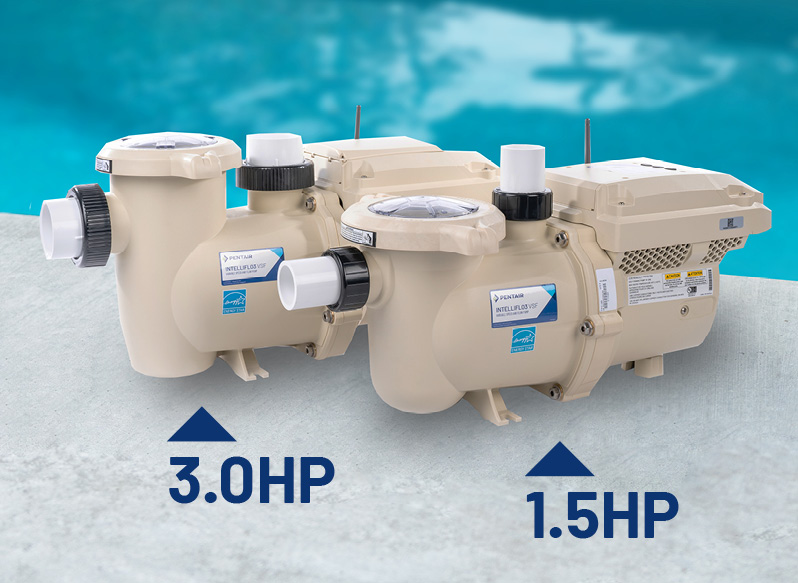
Credit: www.pentair.com
Energy Efficiency Tips
Saving energy with the Pentair Intelliflo VSF pump is simple. Small changes in settings help reduce electricity use. This section shares easy tips to make your pump run efficiently. Follow these steps to lower power bills and keep your pool clean.
Setting Low And High Speeds
Use low speed for daily pool circulation. Low speed uses less energy and still cleans well. Set high speed only for heavy tasks like vacuuming. Running the pump mostly at low speed saves energy and extends pump life.
Using Off-peak Hours
Run your pump during off-peak hours when electricity costs less. Many electric companies charge lower rates at night or early morning. Use the pump’s timer to schedule these times. This simple step cuts energy bills significantly without losing pool performance.
Regular Maintenance Checks
Check your pump and pool system often. Clean filters and remove debris regularly. A clean system works better and uses less power. Look for leaks or worn parts that may cause extra energy use. Regular care keeps your pump efficient and saves money over time.
Common Mistakes To Avoid
Setting up the Pentair Intelliflo VSF pump correctly is key to its performance and lifespan. Many users make simple errors that cause problems. Avoiding these mistakes saves time and keeps your pool running smoothly.
Here are common errors to watch for when adjusting your pump settings.
Overrunning The Pump
Running the pump for too long wastes energy and wears it out faster. Many think more run time means better cleaning. Not true. Set the pump to run only as long as needed. Check your pool size and usage to find the right schedule. Overuse can lead to high electric bills and early pump failure.
Ignoring Manufacturer Guidelines
Skipping the manufacturer’s instructions causes incorrect settings. Pentair provides specific recommendations for speed and duration. These guidelines ensure efficiency and protect the pump. Follow the manual carefully. Avoid guessing or copying settings from others. Each pool is different, so the correct setup depends on your system.
Neglecting Software Updates
Software updates improve pump functions and fix bugs. Many users overlook updating the Intelliflo VSF. This can limit performance and cause errors. Check for updates regularly through the Pentair app or website. Installing the latest software keeps your pump running smoothly and efficiently.
Advanced Customization
The Pentair Intelliflo VSF pump offers advanced customization options. These settings help you control your pool pump efficiently. You can tailor the pump’s performance to meet your exact needs. This section covers integration, remote monitoring, and firmware updates. Understanding these features can improve your pool’s energy use and maintenance.
Integration With Automation Systems
The Intelliflo VSF easily connects with many pool automation systems. This allows you to control the pump through a single device. Automated schedules help save energy by running the pump only when needed. Integration supports popular brands and protocols. It simplifies managing your pool’s functions remotely or onsite.
Remote Monitoring Features
Remote monitoring lets you check the pump’s status from anywhere. You can track speed, runtime, and energy use through an app or web portal. Alerts notify you if the pump needs attention or service. This feature reduces downtime and helps keep your pool clean. It also allows quick adjustments without visiting the pool area.
Firmware Update Process
Keeping the pump’s firmware updated ensures smooth operation. Updates fix bugs and add new features for better performance. The process is user-friendly and can be done remotely or via USB. Regular updates improve energy efficiency and system reliability. Pentair provides clear instructions to guide you through updates safely.
Frequently Asked Questions
What Are The Ideal Speed Settings For Pentair Intelliflo Vsf?
The ideal speed varies by pool size and pump use. Most users set low speed around 800-1200 RPM and high speed around 3000 RPM.
How Do I Program The Intelliflo Vsf For Energy Savings?
Set longer run times at low speed and shorter at high speed. This reduces energy use while keeping water clean.
What Is The Best Timer Schedule For The Intelliflo Vsf?
Run the pump 8-12 hours daily. Use low speed during the day and high speed for cleaning cycles.
Can I Customize Speed Settings For Different Pool Features?
Yes, you can set different speeds for features like heaters, cleaners, or waterfalls. This improves efficiency.
How Often Should I Adjust The Pump Speed Settings?
Adjust speeds seasonally or when pool use changes. This helps maintain performance and save energy.
What Is The Recommended High Speed For Pool Cleaning?
Set high speed between 3000-3450 RPM for cleaning. This ensures strong water flow to remove debris.
How Do I Reset The Intelliflo Vsf To Factory Settings?
Press and hold the reset button for 5 seconds. This clears all custom settings and restores defaults.
Conclusion
Setting the Pentair Intelliflo VSF correctly saves energy and protects your pool. Use the recommended settings for best pump performance. Adjust speeds based on your pool size and usage. Watch your energy bills drop while your pool stays clean. Regular checks keep the pump running smoothly.
Simple steps lead to better efficiency and longer pump life. Follow these tips to enjoy a well-maintained pool without extra costs.
