
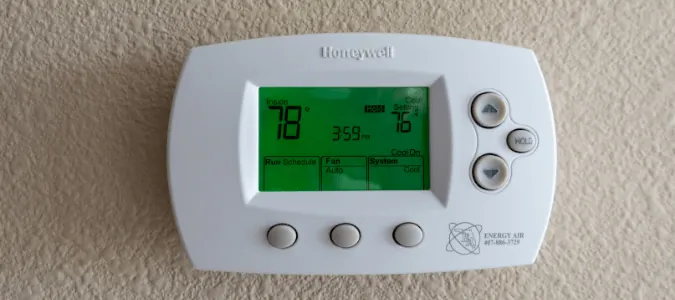
A blinking “Cool On” message means your system is in a delay mode to protect the compressor from short cycling. You’re seeing a honeywell thermostat cool on blinking because the internal timer is holding the signal to prevent rapid power restarts that could damage the cooling unit. This delay lasts for 5 minutes once the power is interrupted or the temperature set point is changed. You don’t need to call a technician unless the message stays on for more than 10 minutes without the air conditioner starting.
Fixing a blinking Honeywell thermostat

You can stop the system from struggling by taking these steps to reset the environment for your unit. Following this sequence prevents unnecessary strain on your electrical components and keeps the compressor safe.
-
Turn the system mode to “Off” at the thermostat and wait for 5 minutes. This pause allows the internal pressure of the refrigerant lines to equalize, which prevents the motor from stalling during the next startup.
-
Check that the thermostat batteries aren’t low or leaking by opening the cover. If the display flickers or dims when the fan kicks on, the voltage drop is likely causing the logic board to reboot mid-cycle.
-
Set the temperature at least 5 degrees higher than the current room temperature.
-
Switch the system mode back to “Cool” and lower the set point slowly. If you hear a rapid clicking sound, stop immediately. That noise indicates a failing contactor that requires professional replacement before it welds shut and damages the compressor.
-
Verify the air filter is clean, as a dirty filter restricts airflow and causes pressure issues.
Why the system waits
The blinking indicator is a safety feature designed to ensure the longevity of your HVAC equipment. When a compressor shuts off, the pressure inside the cooling lines remains high for a short period. If the unit tries to restart immediately, the motor must work against this high pressure, which can lead to a blown fuse or a burnt-out motor.
Most modern Honeywell Home thermostats use this 5-minute wait time to allow the pressure to equalize before the next cycle begins. If you have a power flicker, the thermostat sees this as a new start and triggers the timer automatically. This is normal behavior and shows the device is protecting your hardware from electrical stress.
If the blinking persists past the 5-minute mark, check your air filter first. A clogged filter restricts airflow, causing the evaporator coil to freeze and the system to cycle prematurely. Replacing a dirty filter often resolves the delay instantly.
If the blinking continues indefinitely, the thermostat might be struggling to sense the actual room temperature or the system is failing to confirm that the compressor has successfully started. This can happen if the wiring is loose behind the wall plate or if the control board in the air handler isn’t sending a signal back to the thermostat.
If you see a specific error code alongside the blinking, consult your manual immediately. Codes indicate a sensor failure, whereas a simple blink indicates a timing delay. If the system remains silent after ten minutes, turn the breaker off for one full minute to force a hard reset of the control board.
Troubleshooting the thermostat

Check these potential issues in order of the time and effort required to fix them.
Replace the thermostat batteries
Low power can cause the screen to act strangely or the software to loop on the delay timer. Open the front panel and replace the old batteries with fresh alkaline ones. If the screen becomes clear and the blinking stops after the timer, you have solved the issue without further work.
Tighten the wall wiring
Vibrations in the wall can sometimes cause the small wires behind the thermostat to loosen. Turn off the power to your HVAC system at the breaker, remove the thermostat from its base, and ensure every wire is firmly seated in its terminal. A loose “Y” wire often prevents the cooling signal from reaching the compressor unit.
Reset the thermostat settings
Sometimes the internal memory of the device gets stuck in a loop. Locate the reset option in your menu or remove the batteries for 60 seconds to force a hard reboot. This clears the temporary cache and resets the 5-minute timer to its default state, allowing the system to start fresh.
Inspect the breaker panel
A tripped breaker can provide just enough power to light the screen but not enough to run the compressor. Go to your home’s main electrical panel and look for a switch that’s in the middle position or marked “off.” Flip it completely to the “off” position, then back to “on” to restore full power.
Clean the air vents
Blocked airflow causes the evaporator coil to freeze, which forces the system to shut down for safety. Ensure all registers in your home are open and clear of furniture or rugs. If the coil freezes, the system will keep cycling on and off, which often causes the thermostat to show a blinking status.
Repairing the cooling signal
If the 5-minute delay expires and the unit still refuses to kick on, you must verify the connection at the air handler. Most systems have a safety float switch located near the indoor drain pan. If the drain line is clogged, this switch trips to prevent water damage, which cuts power to the cooling signal.
Inspect the drain line for any visible water or debris. If the water level is high in the pan, use a wet-dry vacuum to clear the blockage from the outside exit point of the drain pipe. Once the water drains, the float switch will drop back down and allow the system to receive the “Cool On” command.
If the pan is dry but the system remains silent, check the float switch wiring for continuity. A common mistake is assuming the switch is closed when the float is down; if the switch is stuck in the open position, the circuit remains broken regardless of the water level.
Have a technician test the switch terminals for power. If the switch shows power but the cooling signal doesn’t pass through, the switch has failed internally and requires a direct bypass or replacement.
If the problem persists, the issue might be a faulty contactor in the outdoor unit. The contactor is a mechanical switch that pulls in when the thermostat sends power to the compressor. If the contactor is pitted or stuck, it won’t engage despite the thermostat’s request.
You’ll know the fix has held if the outdoor fan starts running smoothly within 30 seconds of the “Cool On” message becoming solid. If the blinking returns, it indicates a recurring pressure or electrical fault that requires professional diagnosis.
When to hire a professional
You should contact a licensed HVAC technician if the system fails to start after you have verified the power and the drain lines. A professional has the tools to measure the voltage at the compressor and test the capacitor, which is a common point of failure for cooling systems. Never attempt to open the outdoor electrical cabinet or touch the capacitor, as it can hold a lethal electrical charge even when the power is disconnected.
If you hear a persistent clicking sound without the fan engaging, the contactor has likely pitted or fused. Attempting to pry these points apart yourself can lead to a dangerous arc flash. If the system runs but produces warm air, don’t keep it on for more than thirty minutes. Running a unit with a low refrigerant charge or a failing compressor often leads to a complete burnout of the motor, turning an inexpensive repair into a total system replacement.
The technician will check the refrigerant levels and the health of the contactor first. Be prepared to tell them whether you have already checked the breaker and the air filter, as this helps them narrow down the cause before they arrive. They will have a technician confirm if the thermostat is successfully sending power to the system.
Frequently asked questions
Can I bypass the 5-minute delay?
You can’t safely bypass the 5-minute delay on most digital thermostats because it’s a hard-coded protection feature. This timer ensures the compressor doesn’t start against high pressure, which prevents motor damage. Trying to force the unit to start early by toggling the power can cause a permanent failure of your expensive outdoor compressor.
Is it safe to leave the thermostat blinking?
It’s safe to leave the thermostat blinking as long as the message eventually stops and the system starts cooling. This is the intended behavior of the equipment during a protection cycle. If the message blinks for more than 15 minutes and the house remains warm, the system isn’t cooling, and you should turn it off to prevent potential damage.
Does the blinking mean my thermostat is broken?
The blinking is rarely a sign that the thermostat is broken; it’s usually a sign that the thermostat is working correctly to protect your HVAC system. A broken thermostat would typically show a blank screen, a constant error code, or fail to respond to any button presses at all. If the screen is responsive and the system cools after the wait, your device is healthy.
How long does the blinking last?
The blinking lasts exactly 5 minutes in almost every standard residential installation. This duration is set by the manufacturer to allow the pressure in the refrigerant lines to equalize safely. If your system consistently takes longer than 5 minutes to start, it’s likely that the system is struggling to confirm the compressor signal, which indicates a wiring or control board issue.
Why does the blinking happen after a power outage?
The blinking happens after a power outage because the thermostat loses its connection to the system and initiates a fresh safety timer upon reboot. Any interruption in electricity forces the thermostat to assume the compressor needs a fresh start. This is a normal part of the startup sequence and ensures that the equipment doesn’t try to restart while the internal pressures are still high.
What happens if I ignore the blinking?
If you ignore the blinking and the system starts on its own, nothing happens because the thermostat is just waiting for the timer to finish. However, if the blinking is caused by a persistent error like a tripped float switch, ignoring it will result in your home getting warmer. The system will continue to try to call for cooling, but the safety switches will keep blocking the actual power.
Conclusion
If the air doesn’t start blowing after the wait, check your circuit breaker to ensure it hasn’t tripped. Sometimes a simple reset is all your system needs to get back on track. If you’re still feeling warm, don’t hesitate to contact a local professional who’ll get your home comfortable again.
