
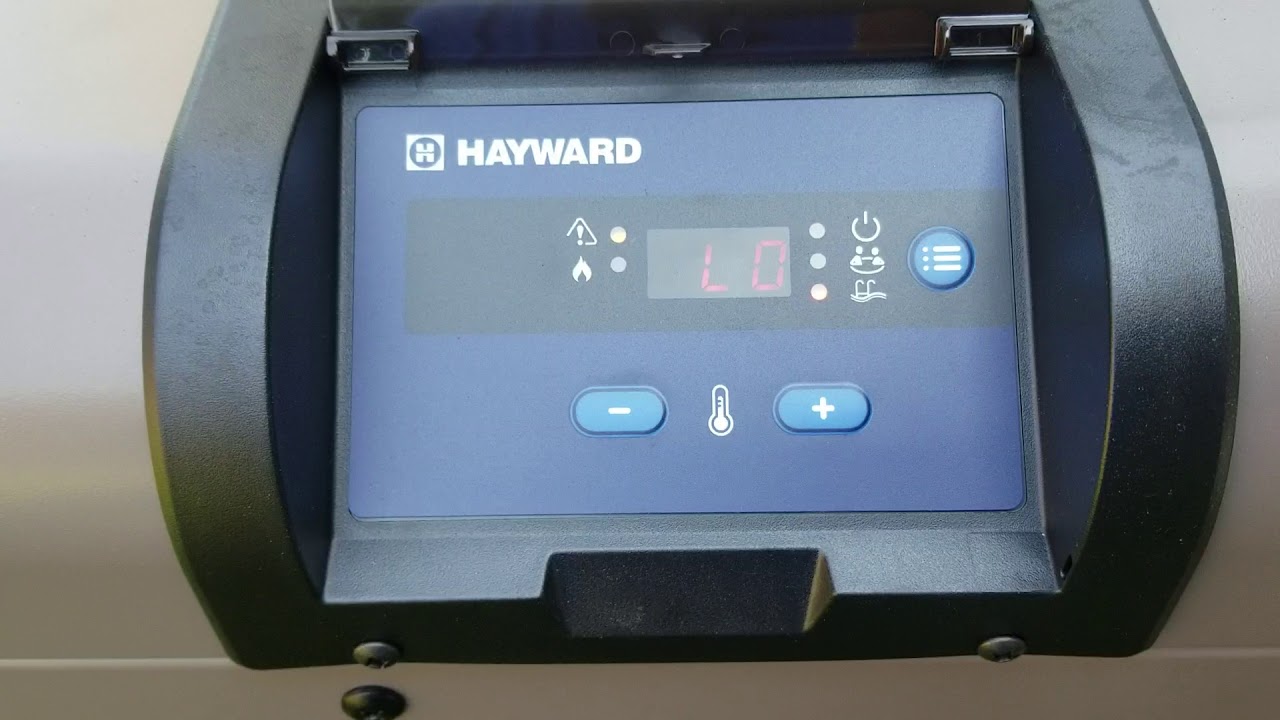
If you own a Hayward pool heater and have come across the dreaded “Lo” code, you’re probably wondering what it means and how to fix it fast. This little code can stop your heater from warming your pool, leaving you frustrated and cold.
But don’t worry—understanding the “Lo” code is simpler than you think. You’ll discover exactly what triggers this error and the easy steps you can take to get your heater back up and running. Keep reading, and you’ll be back to enjoying your perfect pool temperature in no time.

Credit: centraljerseypools.info
Common Causes Of Lo Code
The Hayward heater displays a Lo code to signal a problem with water flow. This code means the heater is not getting enough water to operate safely. Several issues can cause this low water flow error. Understanding these causes helps you fix the problem quickly and avoid damage.
Low Water Flow
Low water flow is the main reason for the Lo code. Water moves too slowly through the heater. This can happen if the pump is weak or broken. Pipes that are clogged or too narrow also reduce flow. Without enough water, the heater cannot heat properly.
Dirty Filter Or Skimmer
Filters and skimmers catch leaves and dirt from the pool. When they get dirty, water cannot pass through easily. A clogged filter or skimmer blocks water flow. Cleaning or replacing these parts can restore proper flow and clear the Lo code.
Faulty Pressure Switch
The pressure switch senses water pressure inside the heater. If this switch breaks or works wrong, it may send a false Lo code. The heater thinks water flow is low even if it is not. Testing and replacing the switch often fixes this issue.
Air In The System
Air trapped in the pipes causes poor water flow. Air bubbles stop water from reaching the heater. This can happen after maintenance or if the pump basket is loose. Bleeding the air out removes blockages and helps the heater work again.
Checking Water Flow
Checking water flow is important when your Hayward heater shows the Lo code. The heater needs steady water flow to work properly. Low flow can cause the heater to stop heating or display errors. Simple checks can help find the problem fast and save time.
Inspecting Pump And Valves
Start by looking at the pump. Make sure it is running smoothly and quietly. Check that the valves are open and not stuck. Closed valves block water and lower flow. Fix any valves that are partly closed or broken. A working pump and open valves keep water moving well.
Cleaning Or Replacing Filter
The filter collects dirt and debris to protect the heater. Over time, filters get clogged and reduce water flow. Remove the filter and clean it with water. If the filter is very dirty or damaged, replace it. A clean filter helps water flow easily and keeps the heater safe.
Clearing Obstructions
Look for blockages in pipes and skimmers. Leaves, hair, and dirt can stop water from flowing. Clear any visible debris by hand or with a tool. Check the pool’s water level too. Low water levels can cause air to enter pipes and block flow. Clear pipes and keep water level steady for good flow.
Pressure Switch Troubleshooting
Troubleshooting the pressure switch is key for fixing the Hayward Heater Lo code. This switch controls water flow and safety. It must work correctly to avoid heater errors and keep your pool warm. Check the pressure switch to find and fix issues fast.
Locating The Pressure Switch
The pressure switch sits near the heater’s water intake or filter. Look for a small box with wires and a tube attached. It connects to the heater’s control panel. Knowing its location helps you inspect and test it easily.
Testing For Proper Function
Turn off the heater first. Use a multimeter to check the switch’s electrical contacts. The switch should close when water pressure rises. If the switch stays open or shows no change, it may be faulty. Testing confirms if it works or needs replacement.
Replacing A Defective Switch
Disconnect power to the heater. Remove the wires and tube from the old switch. Install the new switch in the same place. Reconnect wires and tube securely. Turn power back on and test the heater. A new switch should fix the Lo code error.
Removing Air From The System
Air trapped in a Hayward heater system causes errors like the Lo code. It stops water from heating properly. Removing air from the system is essential to fix this issue quickly. This process improves heater performance and avoids damage. Follow these simple steps to clear the air and keep your heater working well.
Bleeding Air From The Heater
Start by turning off the heater. Locate the air bleed valve on the heater. Slowly open the valve to release trapped air. You will hear hissing sounds as air escapes. Close the valve once water starts flowing steadily. This step removes most air bubbles inside the heater.
Inspecting For Leaks
Check all pipes and fittings around the heater. Look for signs of water dripping or wet spots. Air can enter through small leaks. Tighten loose connections or replace damaged parts. Fixing leaks prevents air from returning to the system.
Ensuring Proper Water Level
Check the pool water level near the skimmer. Low water levels can cause air to enter the heater. Fill the pool to the correct level. This keeps the pump and heater full of water. Proper water levels reduce air buildup and errors.
Preventive Maintenance Tips
Preventive maintenance helps keep your Hayward heater working well. It stops errors and extends the heater’s life. Simple steps can avoid the common Lo code issues. Follow these tips to keep your heater safe and efficient.
Regular Filter Cleaning
Clean the filter often. A dirty filter blocks water flow. This can cause the Lo code to appear. Remove debris and rinse the filter with water. Let it dry before putting it back. Clean filters help the heater run smoothly.
Routine Equipment Inspection
Check all parts of the heater regularly. Look for cracks, leaks, and loose wires. Inspect the heater sensor and thermostat. Replace damaged parts quickly. Regular checks catch problems early and prevent bigger issues.
Seasonal Heater Shutdown Procedures
Turn off the heater properly before winter. Drain all water from the heater and pipes. This prevents freezing and damage. Cover the heater to protect it from dust and dirt. Proper shutdown keeps your heater ready for the next season.
Credit: www.youtube.com

Credit: www.reddit.com
Frequently Asked Questions
What Does The Lo Code Mean On A Hayward Heater?
The Lo code means the water temperature is too low. The heater waits for warmer water to start heating. It protects the system from damage.
How Can I Fix The Hayward Heater Lo Code?
Check the water temperature sensor and water flow. Clean filters and ensure the pump is working well. Replace faulty sensors if needed.
Why Does The Hayward Heater Show Lo Code Repeatedly?
Repeated Lo codes often mean poor water flow or a broken sensor. Make sure water circulates properly through the heater. Inspect and repair any damaged parts.
Can Low Water Flow Cause The Hayward Heater Lo Code?
Yes, low water flow is a common cause of the Lo code. It stops the heater from heating to avoid overheating. Fix pump or filter issues to restore flow.
Does The Hayward Heater Lo Code Affect Heating Performance?
Yes, the Lo code stops the heater from heating. It protects the heater from damage when water is too cold. Fix the cause to restore heating.
Conclusion
The Hayward Heater Lo Code shows low water flow or pressure. Check the water filter and pump for blockages or issues. Clean or replace parts as needed to fix the problem. Regular maintenance helps keep your heater working well. Understanding this code saves you time and money.
Stay aware of your heater’s signals for smooth pool heating. Keep your pool warm and enjoyable all season long.