
Ingress protection ratings are codes that define how well a device resists solids like dust and liquids like water. The code consists of two numbers following the letters “IP,” where the first digit shows protection against solid objects and the second shows protection against moisture. You can find the exact definitions for these levels in the International Electrotechnical Commission standard 60529.
These ratings help you choose the right gear for your environment. If you buy a device for a dusty workshop, look for a high first digit. If you use equipment near a pool, focus on the second digit. The main mistake people make is assuming a higher number always means the device is “waterproof.” It only means it passed specific tests for that level.
Understanding the rating system
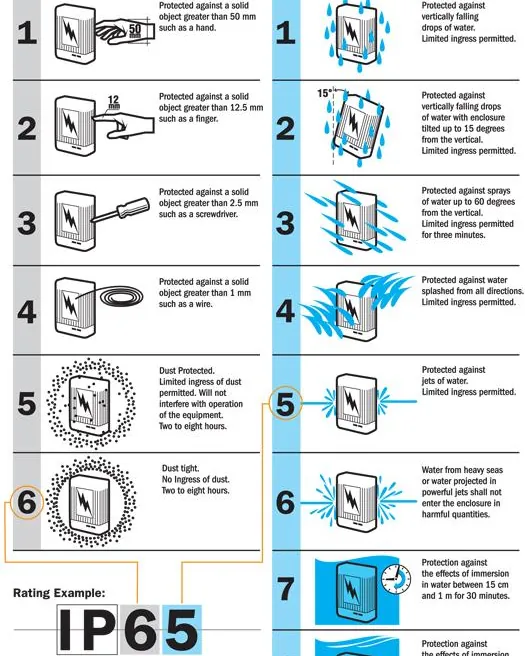
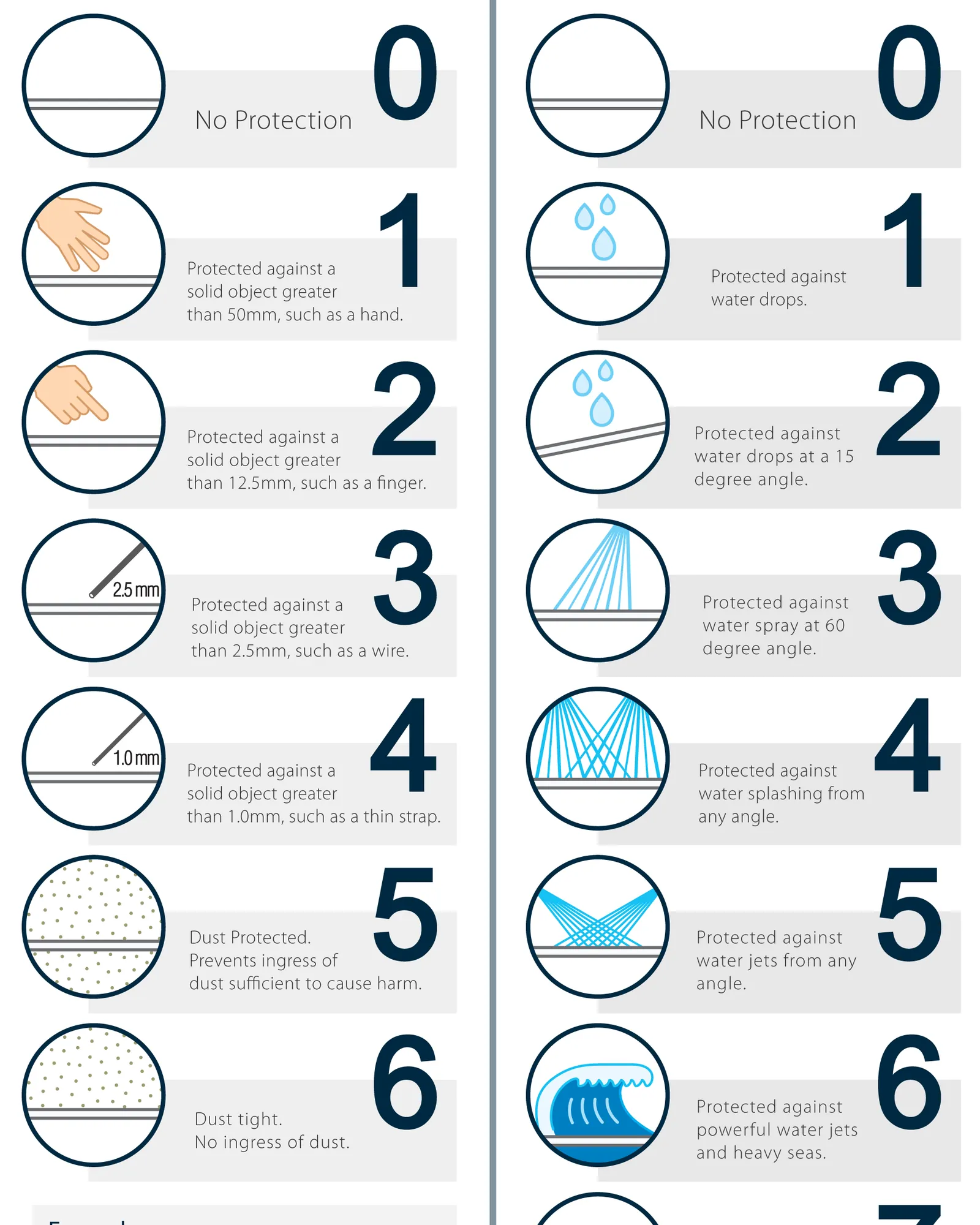
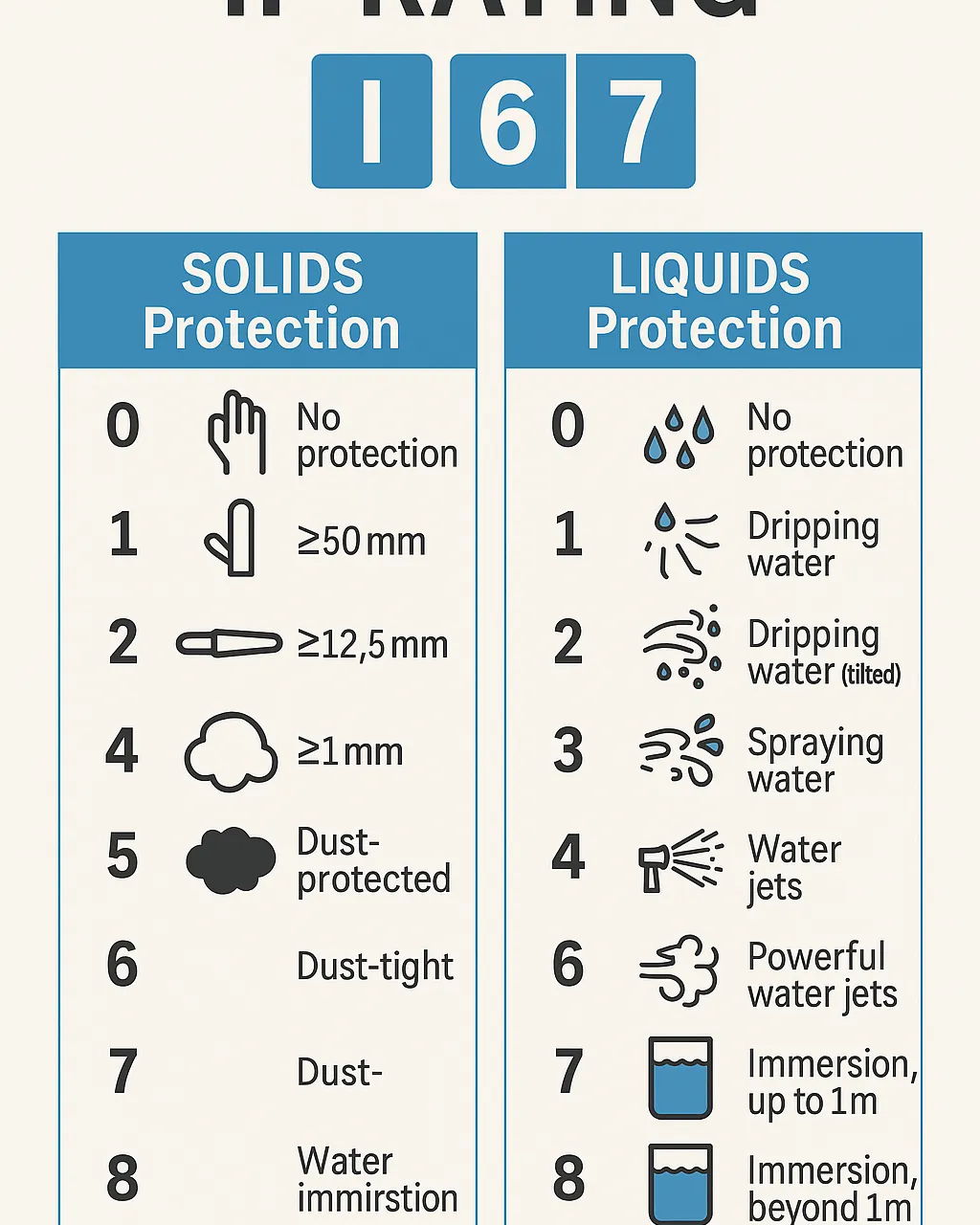
The system uses two digits to tell you exactly how much protection a device offers. The first digit ranges from 0 to 6, while the second ranges from 0 to 9.
- Check the first digit to see the level of protection against solid objects. A “6” means the device is dust-tight, while a “0” means it has no protection at all.
- Check the second digit to see the level of protection against water. A “9” means the device can withstand high-pressure, high-temperature water jets, while a “1” only protects against dripping water.
- Ignore any “X” you see in a rating. If a company writes “IPX7,” it means they didn’t test the device for dust protection, but it’s waterproof at level 7.
- Verify the testing conditions for your specific model. Manufacturers usually list these on the product manual or the technical specifications page of their website.
Tip: If you need a device that stays submerged, ensure it has a rating of at least IP67 or IP68.
Tip: Never assume a device is salt-water resistant just because it has a high IP rating. Most tests use fresh water, and salt can corrode internal parts over time.
Time required for protection testing
The duration of testing depends on the specific level a device is trying to reach. A device doesn’t simply stay in a tank; it must survive a standard amount of time and pressure to earn the label.
| Rating | Situation | How long | What changes it |
|---|---|---|---|
| IPX4 | Splash proof | 10 minutes | Water pressure |
| IPX7 | Temporary submersion | 30 minutes | Depth of water |
| IPX9 | High-pressure wash | 3 minutes | Water temperature |
Testing only measures performance at the exact moment of exposure. If you submerge a device deeper than one meter for an IPX7 rating, the seal integrity fails regardless of the thirty-minute window.
Most users mistake water resistance for waterproofing. If you notice condensation under the camera lens or screen, the seal has already failed. Power the device down immediately.
If your device is taking longer to dry out than the manufacturer suggests, don’t keep using it. Moisture trapped inside can cause short circuits that permanently damage the internal electronics. If the device feels warm while drying, the battery may be venting due to internal corrosion. Seek professional repair before attempting to charge it again.
How to verify the rating
You can tell if a device meets its rating by looking for signs of water or dust inside the casing. Most manufacturers design these products with tight rubber seals or gaskets to keep elements out. If you notice a loose seal, the IP rating is no longer valid for that unit.
If you’re unsure about a device, place it in a room with controlled light and check the seams. If you see light passing through gaps or feel the buttons are “mushy,” the seal is likely compromised. When these signs appear, you should treat the device as unprotected.
The most reliable test is the manufacturer’s own certification documentation. You can often request this if the product is used for professional or industrial work. Look specifically for an independent lab report rather than a self-declaration from the brand.
Self-declarations carry no legal weight if a failure causes damage on a job site. A proper test report will list the exact standard applied, such as IEC 60529.
It will also name the facility that performed the submersion or dust chamber testing. Always verify that the document matches your specific model number and production batch.
Errors that compromise device protection
- Opening the casing: Many people remove screws or covers to see the battery, which breaks the factory-sealed environment. Once you break this seal, you can’t restore the original level of protection at home.
Swapping a battery yourself voids the water resistance permanently. The adhesive holding the back glass requires precise heat and pressure to reseal correctly. Even a millimeter gap lets humidity reach the logic board over several weeks.
- Using chemical cleaners: Harsh soaps or solvents can dissolve the rubber gaskets that keep water out. Always use a damp cloth with plain water to clean the surface of your device.
Alcohol-based screen wipes degrade oleophobic coatings and seep into speaker meshes. Isopropyl alcohol dries out silicone seals much faster than expected. Stick to plain water on microfiber for daily cleaning tasks.
- Ignoring pressure limits: A device rated for light rain will fail immediately under a garden hose. Always check the specific pressure ratings in the manual before exposing your gear to any water source.
Static depth ratings don’t account for dynamic movement through water. Swimming strokes force liquid against seals far harder than simply standing still.
- Charging while wet: Plugging a charging cable into a wet port creates a path for electricity to jump, which ruins the pins. Always dry the port completely with a lint-free cloth before you connect any power cables.
Blowing into the port pushes moisture deeper past the primary gasket. Tap the phone gently against your palm instead. Wait at least thirty minutes after exposure before inserting any cable.
Related guides
- Salt vs Salt Free Water Softener: Which System Do You Need in 2026
- Best Water Softener Salt: How to Choose the Right Type in 2026
Frequently asked questions
Can I swim with an IP67 device?
No, you shouldn’t swim with an IP67 device because it’s only rated for temporary, shallow submersion in fresh water. The pressure of moving your arms while swimming can force water past the seals, even if the depth is low. This rating is meant for accidental drops in a sink or pool, not for active use in the water.
What happens if I drop my IP68 device in the ocean?
Salt water is much more aggressive than fresh water and can cause permanent damage to your device very quickly. You should rinse the device thoroughly with clean, fresh water immediately after exposure to remove the salt. Even with a rinse, salt can leave residue inside the ports that leads to future corrosion and hardware failure.
Is an IP69 rating better than IP68?
Yes, an IP69 rating is technically higher because it includes protection against high-pressure, high-temperature water jets. While IP68 is better for deep submersion, IP69 is designed for industrial cleaning environments where equipment must be sprayed down. You should choose the rating that matches your specific environment rather than just picking the highest number available.
How long does an IP rating last?
An IP rating lasts for the life of the product as long as the casing and seals remain in perfect condition. Over time, rubber seals become brittle, and accidental drops can cause tiny cracks in the housing. You should assume that older devices have a lower level of protection than they did when they were brand new.
Why do some devices have two different ratings?
Some devices have two ratings because they’re tested for different conditions, such as one for dust and one for water. Manufacturers sometimes list them separately to show the device was tested under different standards. Always look for the full code, like IP68, to understand the complete protection level for both dust and water.
Is it safe to use a device with a broken screen?
No, a broken screen creates a direct path for water and dust to enter the interior of your device. Any crack in the glass or frame voids protection immediately. You should treat the device as if it has no protection at all once the outer casing is damaged.
Conclusion
Choosing the right equipment depends on the environment you face every day. Always prioritize the second digit if you live in a rainy climate, or the first digit if you work in a dusty area. By checking the seals and avoiding common mistakes like opening the casing, you ensure your devices stay protected for their full lifespan.
