
Photodetectors turn light into an electrical signal by capturing photons and converting them into free-moving electrons within a semiconductor material. When light hits the device, the energy knocks electrons loose, creating a tiny current that flows through a circuit. Scientists and engineers explain that the principles and applications of photodetectors rely on the internal photoelectric effect, which serves as the foundation for modern sensors in cameras, fiber optics, and medical imaging tools.
Core parts of how photodetectors work
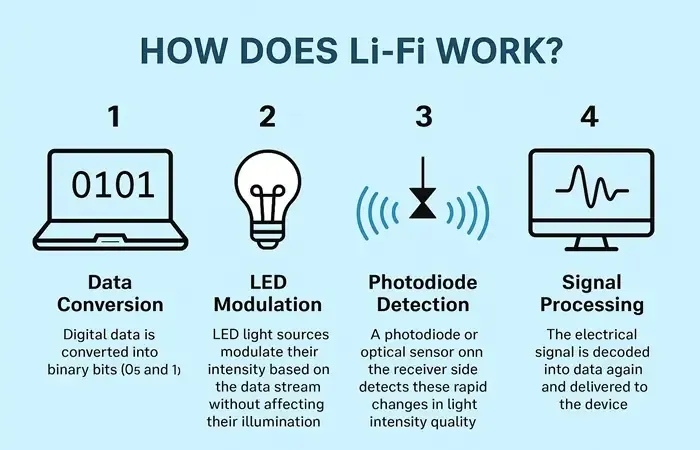
The performance of a sensor depends on its specific design and the materials used to build it. Each part serves a purpose, and when one fails, the entire signal chain breaks down, leading to inaccurate readings or total signal loss.
| Part or input | What it does | What you notice when it goes wrong |
|---|---|---|
| Semiconductor layer | Absorbs light and releases electrons | Signal becomes weak or non-existent |
| PN Junction | Creates a built-in electric field | High background noise in the signal |
| Optical window | Lets specific wavelengths of light in | Light is blocked or distorted |
| Contact leads | Carry the current to the circuit | Intermittent signal or complete disconnection |
| Bias voltage | Helps move electrons faster | Slow response time to light changes |
If your sensor detects light but reports values that drift over time, check the optical window for microscopic scratches or dust buildup.
When choosing a sensor, prioritize the semiconductor material based on your target spectrum. Use silicon for visible light, but switch to indium gallium arsenide if you need to capture infrared data. Using the wrong material results in a “blind” sensor that registers zero output regardless of light intensity. Never exceed the rated bias voltage. Pushing too much current through the junction can cause immediate thermal damage and catastrophic failure of the device.
Steps for converting light to current
The process follows a predictable path from the moment light hits the device to the final digital output. This cycle happens almost instantly, but the speed depends on the material’s specific response time, which you can find in the manufacturer’s technical data sheet for your specific model.
-
Light travels through the optical window and strikes the active semiconductor surface of the device.
-
Photons with energy exceeding the material’s bandgap knock electrons out of their atomic bonds, creating electron-hole pairs. If the photon energy is too low, the light passes through the material without generating any charge.
-
The built-in electric field at the PN junction pushes these charges toward the opposite electrical contacts.
-
This movement of charge creates a small electrical current that flows through the connected external circuit.
-
The amplifier converts this tiny current into a usable voltage signal for your processing equipment.
-
The system reads the voltage level to determine the intensity of the light hitting the sensor.
Most users fail by ignoring the dark current, which is the baseline noise present even without light. If your signal-to-noise ratio is low, you must cool the sensor to reduce thermal excitation. When the ambient temperature rises by ten degrees Celsius, the dark current often doubles.
Why signal quality changes across devices
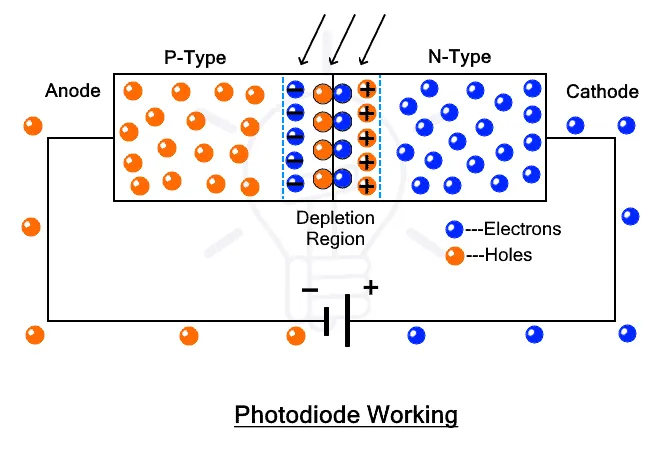
The connection between the physical mechanism and the signal you see is direct. If your sensor isn’t sensitive enough for your light source, you won’t get a clean measurement. Photodetectors are designed for specific wavelengths; if you use a silicon sensor for infrared light, it won’t work because the photons lack the energy to move electrons in that specific material. This is a common mistake that leads to expensive troubleshooting for a system that’s simply incompatible with the source.
If the signal is noisy, look at the bias voltage. A higher bias voltage increases speed but often introduces more thermal noise. If you need high sensitivity for low light, you must choose a device with a low dark current rating.
Conversely, if you need to track fast pulses of light, you must prioritize a device with a low junction capacitance. You can read the capacitance and dark current values on the product label or the included specification sheet. Always check these numbers before you buy, as they dictate the limits of what the sensor can actually see.
Controlling your sensor output
You can manage some parts of the system to get better data, but other parts are fixed by the physics of the material. A professional technician should handle any work involving high-voltage power supplies or microscopic wiring, as improper handling can permanently damage the sensor or cause injury.
What you can control
- The intensity of the light source hitting the sensor.
- The bias voltage level within the manufacturer’s recommended range.
- The ambient temperature of the environment near the device.
- The gain settings on the connected signal amplifier.
What is fixed by design
- The spectral response range of the semiconductor material.
- The physical size and shape of the active area.
- The internal capacitance of the junction.
Habits for better sensor performance
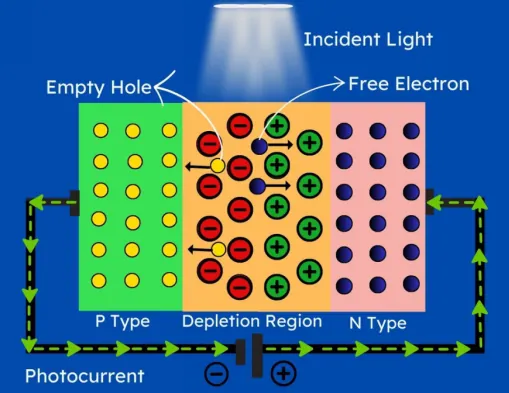
Good maintenance habits ensure your data stays consistent over time. Always keep the optical window clean because dust and oils absorb light before it reaches the semiconductor, which lowers your signal strength.
If you’re using a precision sensor, check the calibration date. Most sensors drift over time and require recalibration every 12 to 24 months to maintain accuracy. If your data trends consistently high or low despite a clean lens, your internal reference voltage has likely shifted, and you must send the unit to the manufacturer for a certified baseline reset.
Handle the device by its edges to prevent skin oils from reaching the window, as these oils can permanently stain the glass and block specific wavelengths. If you notice a gradual drop in signal, it’s usually due to surface contamination rather than a failing component. Use only high-purity isopropyl alcohol and a lint-free lens cloth for cleaning.
Keep the device in a dry, dark place when not in use to prevent degradation of the semiconductor material. If the sensor is exposed to light levels beyond the maximum rating in the manual, it can suffer permanent damage to its internal structure. If you see a “saturated” error code, move the sensor to a lower-light environment to ensure the signal remains within the linear operating range of the device.
Frequently asked questions
How long does a photodetector last?
Most photodetectors have a finite operational lifespan under normal conditions, though this depends on the intensity of light exposure and the operating temperature. You can find the expected lifespan or “mean time between failures” in the reliability report provided by the manufacturer in the device documentation.
Is it safe to touch the sensor window?
It isn’t safe to touch the sensor window because oils from your skin change how light enters the device and can permanently etch the coating. Always use a clean, dry microfiber cloth or specialized lens cleaning tissue if you must remove dust from the surface of the window.
Why is my signal output zero?
A zero signal usually means the light source is outside the sensor’s spectral range or the power supply is disconnected. Check the input light wavelength against the sensor’s datasheet, and use a multimeter to verify that the bias voltage is reaching the device contacts according to the manufacturer’s power specifications.
Can I use a photodetector for high-speed signals?
You can use a photodetector for high-speed signals if the device has a low junction capacitance rating, which you can find in the technical specifications. Higher capacitance creates a slower response time, so choose a model with a rating below 5 picofarads if your application requires nanosecond response speeds.
Does temperature affect the reading?
Temperature affects the reading by increasing the dark current, which adds background noise to your signal. Most sensors provide a temperature coefficient in their datasheet, which tells you how much the signal will shift for every 1 degree Celsius change in the operating environment.
What happens if I exceed the light limit?
Exceeding the light limit causes physical damage to the semiconductor lattice, leading to permanent loss of sensitivity or a total device failure. Check the “maximum irradiance” or “damage threshold” figure in your product manual to ensure your light source intensity stays safely below that specific limit.
Conclusion
As these devices continue to evolve, they’ll become even more sensitive and compact, opening doors for smarter wearable health monitors and autonomous vehicles. You shouldn’t hesitate to explore how these sensors integrate into your own projects. It’s an exciting time to see how light-based technology will shape our digital future.
