
A proctored test is an exam taken under the supervision of an authorized person, known as a proctor, who ensures the integrity of the testing process. This method prevents cheating by monitoring the student’s environment, identity, and behavior during the session. Whether you’re in a physical classroom or using remote software, the proctor acts as a witness to confirm that the results reflect your own work alone.
The success of these exams depends entirely on the clarity of the rules provided before you start. If you’re taking an in-person exam, arrive at least 15 minutes early to complete check-in procedures. If you’re taking a remote test, the most common mistake is failing to clear your workspace of unauthorized materials, such as notes, phones, or extra monitors. This oversight can lead to an immediate disqualification of your exam results.
How a proctored test works
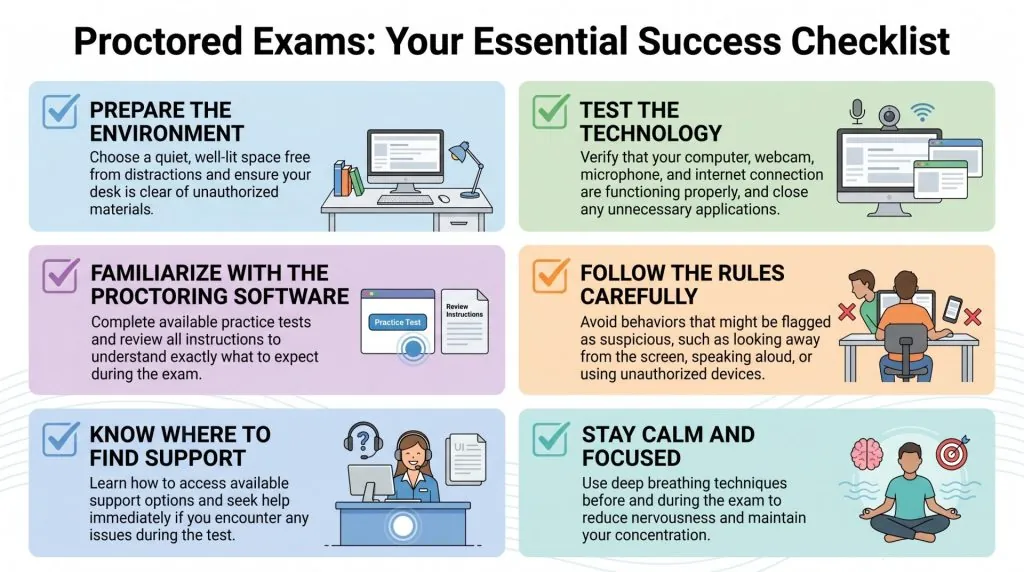
- Confirm your identity by presenting a valid government-issued photo ID to the proctor or the digital verification system. This step ensures that the person taking the test is the one officially enrolled in the course.
- Clear your desk of all non-essential items, keeping only the materials explicitly permitted by your instructor or the testing body. This often includes items like a specific calculator, blank scratch paper, or a pen.
-
Perform a system check if you’re testing from home to ensure your webcam, microphone, and internet connection meet the technical requirements. According to the University of Illinois guidelines on academic integrity, students must ensure their environment is free from outside interference to maintain the validity of their assessment. Tip: Test your internet speed at least one hour before the start time to avoid connection drops.
-
Follow the proctor’s instructions regarding the use of software, such as closing all background browser tabs or disabling screen-sharing applications. If you’re in a physical room, wait for the proctor to signal that you may begin writing.
- Monitor your time throughout the exam and alert the proctor immediately if you encounter a technical glitch or a fire alarm. Don’t attempt to fix software issues yourself, as this may look like an attempt to access restricted files. Tip: If you feel the need to use the restroom, ask for permission first; many testing centers strictly forbid leaving the room once the clock has started.
Timing and Logistics for Exams
The time required for a proctored exam varies based on the subject and the complexity of the questions involved. While some certification exams allow for several hours, shorter classroom assessments may last less than an hour. The following table outlines how your situation affects the total time you should set aside.
| Situation | How long | What changes it | What to watch for |
|---|---|---|---|
| University course | 60–120 mins | Number of questions | Clock visibility |
| Professional cert | 2–4 hours | Testing complexity | Fatigue levels |
| Remote assessment | 30–90 mins | Software setup | Internet latency |
If your exam is taking significantly longer than the time allotted by your instructor, don’t panic or rush your final answers. Instead, calmly signal the proctor to ask if extra time is available or if there has been a mistake in the timer display.
Verification of Completion
You know the process is done once you have officially submitted your responses through the designated portal or handed your paper directly to the proctor. Most systems will provide a confirmation screen or a receipt that serves as proof of your submission. If you’re in a physical room, the proctor will often verify that all materials, including scratch paper, have been returned before allowing you to leave your seat.
In cases where you’re testing remotely, ensure you receive a “submission successful” message before closing your browser. If you don’t see this notice, contact your testing administrator immediately to prevent your work from being lost. The final sign that the test is complete is the proctor’s formal dismissal, confirming that no further actions are required from you.
Mistakes That Can Invalidate Results

- Ignoring the environmental rules: If you have unauthorized books or devices within reach, the proctor may mark your exam as compromised even if you didn’t use them. Always remove every item from your desk that isn’t on the allowed list.
- Using unapproved browser extensions: Many remote proctoring tools will flag or block your test if you have screen-recording or communication software running in the background. Always restart your computer in a “clean” state before you log into the exam platform.
- Failing to maintain a stable connection: A sudden loss of internet can interrupt the proctor’s feed, which often triggers an automatic security alert. If your connection is unstable, try to move closer to your router or use a wired ethernet cable instead of Wi-Fi.
- Communicating with others: Talking to someone else in the room or receiving messages on a phone will result in an immediate violation of testing protocols. Keep your phone in a separate room or powered off to ensure there’s no chance of accidental interaction.
Related guides
Frequently asked questions
Can I use a second monitor during a proctored test?
No, most proctored tests strictly forbid the use of a second monitor because it makes it easy to hide unauthorized notes or search engines. If you usually work with two screens, you must disconnect the second one and physically remove it from your desk before starting. Most proctoring software will detect the presence of a second display and prevent you from launching the exam until it’s removed.
What happens if I have a technical problem?
You should immediately contact the proctor or the technical support team provided by your testing agency. Don’t try to restart your computer or close the browser on your own, as this can look like an attempt to bypass security. Most platforms have a chat feature or a phone number listed on the login page specifically for handling these urgent technical disruptions during the test.
Is it safe to use proctoring software on my computer?
Yes, reputable proctoring software is designed to monitor only the exam environment and doesn’t store your personal files. These programs typically operate within a secure browser or a temporary application that shuts down once the exam is submitted. If you’re concerned about your privacy, review the specific privacy policy of the software provider to see exactly what data they collect and how they handle it.
How long does it take to get my results?
The time varies from a few minutes to several weeks, depending on whether the test is automated or requires manual review. Multiple-choice tests graded by software often provide instant results, while exams with essays or complex problems require a human to review the footage and the content. Check your course syllabus or the testing body’s website to see the standard grading window for your specific exam type.
What if I can’t afford a webcam for my exam?
You should reach out to your instructor or the testing center to ask if they provide loaner equipment or alternative testing sites. Many universities and certification bodies have resources for students who lack the necessary hardware to perform a remote test. Don’t wait until the day of the exam to ask for help, as these requests often require several days to process and approve.
How do I know if my environment is acceptable?
You can check your environment by ensuring you’re in a quiet, private room with good lighting and no other people present. The proctor needs to see your face, your hands, and your workspace clearly throughout the entire session. If you can’t find a space that meets these requirements, contact your school or testing center to arrange a slot at a physical testing facility.
Conclusion
The most important thing to remember is that preparation prevents almost every common issue that occurs during these exams. By testing your equipment, clearing your room, and having your ID ready, you ensure that the focus remains entirely on your performance. If you follow these guidelines, you’ll have a much smoother experience when it’s time to take your test.
