
Is your Navien tankless water heater acting up or not heating water like it used to? Knowing how to reset your Navien unit can save you time, money, and frustration.
In this guide, you’ll discover simple, clear steps to get your water heater back on track quickly. Whether you’re facing error codes or just want a fresh start for your system, this article will help you fix the problem without calling a technician.
Keep reading and take control of your hot water today!
Credit: www.youtube.com
Navien Tankless Water Heater Basics
The Navien tankless water heater offers an efficient way to heat water on demand. It heats water only when needed, saving energy and space. Understanding its basics helps users manage and maintain it better.
These heaters are popular for their durability and advanced technology. They provide endless hot water without the bulk of traditional tanks. Learning about key features and common issues can simplify troubleshooting and care.
Key Features
Navien water heaters heat water instantly without storing it. They use advanced heat exchangers for better efficiency. These units have digital displays for easy control and monitoring. They also include safety features like overheat protection. Many models connect to Wi-Fi for remote control. The compact design fits in small spaces easily. They produce less noise than older models. These heaters help reduce energy bills by heating only what is needed.
Common Issues
Sometimes, the unit may stop producing hot water. This can happen due to error codes on the display. Scale buildup inside the heat exchanger can reduce efficiency. Low water pressure might cause the heater to shut down. Electrical problems can prevent the unit from starting. Sensors may fail, causing incorrect temperature readings. Regular cleaning and maintenance can prevent most problems. Knowing these issues helps users reset or fix the heater quickly.
When To Reset Your Navien Heater
Knowing when to reset your Navien tankless water heater helps keep it running smoothly. Resetting can fix small errors or clear faults that stop it from working well. It is important to recognize the signs that show a reset is needed. Doing this prevents bigger problems and ensures warm water is always ready.
Signs It Needs Resetting
The heater may stop producing hot water. It might show error codes on the display. Strange noises from the unit can also appear. Water temperature may change suddenly or feel colder. The unit could keep shutting off without reason. These signs show the heater needs a reset.
Safety Precautions
Turn off the power before resetting the heater. Make sure the water supply is off. Wait a few minutes after turning off the unit. Use dry hands and tools to avoid shocks. Follow the manufacturer’s instructions carefully. Never force buttons or parts. Safety keeps you and the heater protected.
Tools Needed For Reset
Resetting a Navien tankless water heater requires a few basic tools. Having the right tools makes the process simple and safe. This section lists all the tools needed to complete the reset.
Using proper tools helps avoid damage to the unit. It also saves time and effort during the reset process. Make sure to have these tools ready before starting.
Screwdriver
A screwdriver is essential for removing the heater’s access panel. Most Navien models use Phillips-head screws. A flathead screwdriver might also be helpful for prying the panel gently.
Multimeter
A multimeter checks electrical connections and power supply. It ensures the unit receives proper voltage before and after reset. This tool helps diagnose electrical issues safely.
Soft Cloth
A soft cloth cleans the control panel and surrounding areas. Dust or moisture can cause errors in the display. Keep the cloth dry to avoid any damage.
Owner’s Manual
The owner’s manual guides through the reset steps. It shows the exact location of reset buttons or switches. Always keep the manual handy for reference.

Credit: www.reddit.com
Step-by-step Reset Process
Resetting your Navien tankless water heater can solve many common issues. The process is simple and quick. Follow these clear steps to reset the unit safely and effectively. This guide will help you restore normal operation without hassle.
Power Off The Unit
First, turn off the power to the water heater. Locate the main switch or circuit breaker. Switch it off to cut the electricity supply. This step prevents electrical shocks and protects the unit during reset.
Locate The Reset Button
Next, find the reset button on the water heater. It is usually near the control panel. The button is small and may be red or black. Check the user manual if you have trouble finding it.
Performing The Reset
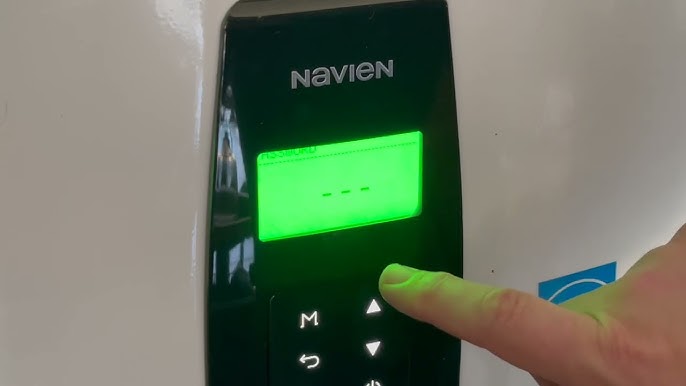
Press and hold the reset button. Keep it pressed for about 5 seconds. Release the button after this time. This action clears error codes and restarts the system.
Power On And Test
Turn the power back on by flipping the switch or breaker. Wait a few minutes for the unit to start. Test the water heater by running hot water. Check if the heater works normally without errors.
Troubleshooting After Reset
After resetting your Navien tankless water heater, some issues might still appear. Troubleshooting helps identify if the problem is minor or needs expert help. Understanding common errors and signs to call a technician keeps your heater working well.
Common Errors
Sometimes, error codes show up after reset. These codes point to specific problems. For example, error 11 means no ignition. Error 12 means flame failure. These issues can happen due to gas supply or vent problems.
Check if water pressure is low. Low pressure can stop the heater from working. Also, inspect if the unit is dirty or blocked. Dirt can cause overheating or shutdowns. Resetting might not fix these issues.
When To Call A Technician
If errors return after several resets, call a technician. Also, call help if the heater leaks water or gas. Strange noises or burning smells need expert attention.
Do not try to fix complex parts yourself. A trained technician has the right tools and knowledge. They ensure your heater is safe and efficient.

Credit: www.laborkreis.de
Preventive Maintenance Tips
Preventive maintenance keeps your Navien tankless water heater running smoothly. It helps avoid costly repairs and extends the heater’s life. Simple steps can improve performance and save energy. Regular care ensures consistent hot water and peace of mind.
Regular Cleaning
Clean the water heater’s exterior to remove dust and dirt. Wipe the unit gently with a damp cloth. Check the inlet filter regularly. Rinse it to remove debris that may block water flow. Clean the venting system to prevent buildup. This keeps air flowing properly and improves safety.
System Checks
Inspect the heater for leaks or corrosion often. Look at the water and gas connections. Tighten loose fittings carefully. Test the pressure relief valve by lifting its handle. It should release water and then close properly. Monitor the error codes on the display. These codes help identify small issues before they grow.
Frequently Asked Questions
How Do I Reset A Navien Tankless Water Heater?
Locate the reset button on the unit’s control panel. Press and hold it for 5 seconds until the display resets. This clears minor errors and restarts the system.
Why Does My Navien Heater Need Resetting?
Resetting fixes simple glitches like error codes or no hot water. It helps the heater return to normal operation quickly. Frequent resets may signal a deeper issue.
Where Is The Reset Button On A Navien Heater?
The reset button is usually near the front panel or under the control cover. Check your model’s manual for the exact location. It is often red or black.
Can Resetting Damage My Navien Water Heater?
No, a simple reset does not harm the unit. It only clears error codes and restarts the system. Avoid frequent resets without fixing the root problem.
How Often Should I Reset My Navien Tankless Water Heater?
Reset only when the heater shows error codes or stops working. Regular resets are not needed and may hide underlying problems. Call a technician if issues persist.
Conclusion
Resetting your Navien tankless water heater is simple and quick. Follow each step carefully for best results. This process helps fix common errors and keeps your heater running smoothly. Remember to turn off the power before starting. If problems continue, check the user manual or call a professional.
Regular maintenance can prevent future issues. Keep your hot water flowing without hassle. Taking action today saves time and money tomorrow. Easy to do, easy to maintain.