
Preventing carpal tunnel in office workspaces comes down to keeping your wrists straight instead of resting them on hard desks while you type. Most desk workers bend their wrists backward or lean their palms on gel pads all day, which pinches the median nerve inside the carpal tunnel and leads to numbness, burning fingers, and costly medical visits. Keep your wrists floating and completely level to stop this nerve compression immediately.
Prevent carpal tunnel by fixing your office habits
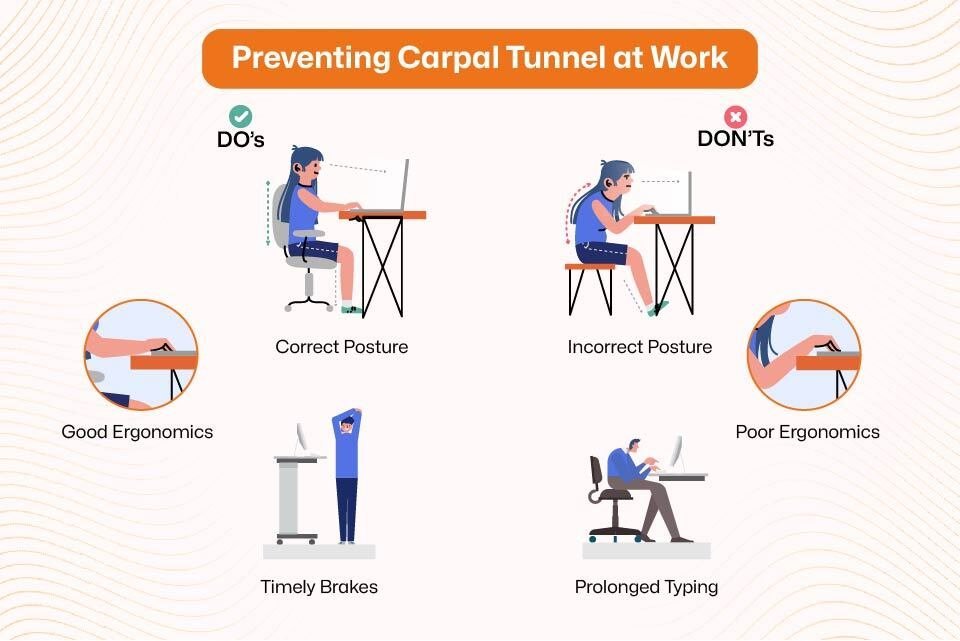 Photo: myyogateacher.com on Google
| What most people do | What to do instead | Why it matters |
|---|---|---|
| Rest wrists on desk edge | Float wrists straight while typing | Prevents pressure on the median nerve |
| Bend wrists back upward | Lower keyboard to elbow height | Keeps carpal tunnel open and relaxed |
| Tilt keyboard feet upward | Keep keyboard flat or negative | Reduces awkward angles on the wrist |
| Squeeze mouse with fingers | Move mouse using whole arm | Stops repetitive strain on forearm tendons |
| Rest palms on gel rests | Use pads only between typing | Avoids constant pressure on wrist base |
| Work 4 hours without moving | Take micro-breaks every 30 minutes | Restores healthy blood flow to hands |
Keep your wrists straight and flat
Wrists must stay in a neutral, straight line with your forearms rather than bent upward or downward. Many workers tilt their keyboards upward using the back plastic feet because seeing the keys feels easier, but this forces your wrists to bend back continuously. This angle dramatically raises internal tissue pressure inside the carpal canal. The National Institute of Neurological Disorders and Stroke carpal tunnel guide notes that chronic compression of this space irritates tendons and crowds the median nerve.
Drop your keyboard feet so the board lies flat on your desk, or angle the top edge slightly downward away from you. If your chair can’t go high enough to level your forearms, add an under-desk keyboard tray to drop your hands to your lap line. Keep your palms floating freely over the keys while your fingers strike them, and let your elbows hang at a loose 90-degree angle.
Move your mouse using your whole arm
 Photo: centennialorthopodiatry.com on Google
Don’t pivot your mouse using only your wrist while planting your heel on the desktop. Moving the mouse from the wrist bends the joint sideways toward your pinky, a movement called ulnar deviation that pinches nerves quickly. Grab the mouse lightly and push it from your shoulder and elbow instead.
If you work on detailed spreadsheets, this trade-off means trading quick, tiny wrist flicks for slower arm sweeps that feel awkward at first. If your desk space is tight, move papers aside to make a clear 10-inch square for arm movements; if you have a wide desk, pull the mouse pad right next to your keyboard edge. Keep your mouse sensitivity high enough that you don’t need wild swings, but low enough that your hand stays relaxed without squeezing the shell tightly.
Take regular micro-breaks from typing
Stop typing for 30 to 60 seconds every 30 minutes to relax your forearm flexor muscles. Constant key tapping keeps your hand tendons tight, reducing blood circulation and building fluid around the median nerve. Set a simple digital timer on your computer screen or phone to trigger these quick pauses.
During these breaks, let your hands hang straight down at your sides and shake them gently to release tension. This habit isn’t for workers doing heavy manual lifting outside the office, who need tendon rest rather than rapid muscle shaking. Check your work rhythm and adjust the break frequency to match your specific schedule.
Advice you can ignore
- Wearing wrist splints while typing: Splints keep your wrist stiff, which forces your fingers to fight the brace and increases strain.
- Squeezing stress balls to build wrist strength: This repetitive grip motion inflames already irritated tendons and crowds the carpal tunnel further.
- Relying on thick gel wrist rests: Leaning on gel pads during typing puts direct, dangerous contact pressure right over the median nerve.
- Relying entirely on a vertical mouse: A vertical mouse helps forearm rotation, but it won’t fix poor desk height or long typing hours without breaks.
The right way, start to finish
 Photo: www.jonathanshultsmd.com on Google
- Adjust your office chair height so your feet sit flat on the floor, checking that your thighs stay parallel to the ground.
- Lower your desk or keyboard tray until your forearms rest level with the floor, keeping your elbows bent at roughly 90 degrees.
- Fold down the tilt legs on your keyboard so the keys sit completely flat, checking that your wrists stay straight as you reach.
- Position your mouse right beside your keyboard edge, making sure your shoulder stays relaxed without reaching forward or outward to hold it.
- Float your palms in the air while typing, checking that your wrists don’t touch the desk edge or any wrist pad during keystrokes.
- Grip your mouse gently without squeezing the plastic shell, moving the device with your elbow rather than pivoting your wrist joint sideways.
- Rest your palms on soft pads only during pauses between sentences, never pressing your wrists into the pad while fingers are striking keys.
- Stop work for 30 seconds every 30 minutes to drop your arms loosely at your sides and shake your fingers completely relaxed.
Frequently asked questions
Can wrist braces prevent carpal tunnel during typing?
No, you shouldn’t wear stiff braces while typing on a keyboard. A brace limits normal joint movement, forcing your finger tendons to pull harder against the restraint. Wear supportive braces at night instead to keep your wrists from curling inward while you sleep.
How long does it take for carpal tunnel to develop?
About several months of daily repetitive strain usually pass before symptoms begin. The pressure on the nerve builds gradually through sustained awkward angles and direct desk contact. If you ignore mild finger tingling, permanent nerve damage can develop over one or two years.
What happens if I keep typing through wrist pain?
Your median nerve can suffer permanent loss of sensation and strength. Continuing to type with symptoms causes severe muscle wasting at the base of your thumb. You’ll drop everyday objects like cups, and you may eventually require surgical intervention to cut the carpal ligament.
Does a vertical mouse stop carpal tunnel?
No, it reduces forearm twisting rather than curing nerve compression directly. A vertical mouse keeps your hand in a neutral handshake posture, which eases strain across the forearm. However, you’ll still face nerve issues if your desk height forces your wrist to bend backward.
Is it safe to stretch my wrists during work?
Yes, gentle backward and forward finger extensions are safe if done slowly. Extend your arm and pull your fingers back until you feel a mild pull, holding for five seconds. Stop immediately if you feel sharp pain, burning, or tingling along your palm.
Why do my fingers tingle only at night?
Most people curl their wrists tightly toward their chest while sleeping. This curled posture spikes fluid pressure inside your carpal tunnel, waking you with numb or prickly thumbs and index fingers. Wearing a rigid, straight splint to bed stops this nocturnal bending.
Related guides
