
Optical signals transmit information by sending rapid pulses of light through a glass fiber. A laser switches on and off millions of times per second to encode data as binary ones and zeros. These pulses travel through the cable core, remaining trapped inside by total internal reflection until they reach the receiver.
How optical signals transmit information
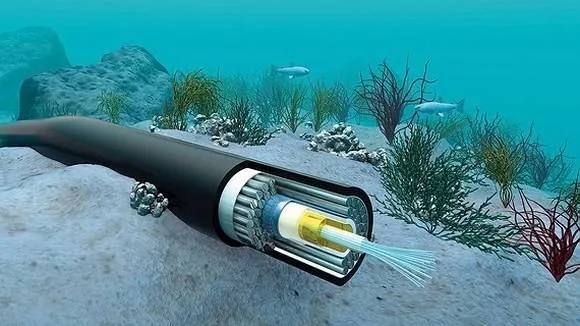
Systems rely on specific hardware to turn electrical data into light and back again. The table below outlines the primary parts that make this process possible.
| Part or input | What it does | What you notice when it goes wrong |
|---|---|---|
| Transmitter | Converts electricity into light pulses | Signal is completely lost |
| Fiber core | Carries light over long distances | Data errors or slow speeds |
| Cladding | Keeps light inside the core | High signal loss or attenuation |
| Photodetector | Changes light back into electricity | Intermittent connection or total failure |
| Receiver | Decodes electrical pulses into data | Corrupted files or missing packets |
Most technicians make the mistake of assuming a cable is broken when the issue is actually a dirty ferrule. Even a microscopic speck of dust can block enough light to trigger a system alarm. If your light levels drop by more than 3 dB, clean the connector face with a lint-free wipe before replacing the hardware.
If you’re running multi-mode fiber, keep your cable length under 500 meters to avoid signal dispersion. Single-mode fiber is the better choice for any run exceeding two kilometers. You can distinguish between the two by checking the jacket color; multi-mode is typically aqua or orange, while single-mode is almost always yellow.
If you suspect a hardware issue, check the physical connectors for dust or debris; you can often find the expected light levels for your specific equipment in the Federal Communications Commission broadband guide.
Steps for transmitting light data
The process of sending information relies on precise timing and light management. Follow these steps to understand the way a single cycle of data transmission occurs.
- The transmitter receives electrical data from your device, such as a computer or router, and prepares it for conversion into binary code.
- A laser or LED turns on and off rapidly to represent ones and zeros, creating a sequence of light pulses inside the fiber cable.
- These light pulses enter the glass core, which is thinner than a human hair, and bounce off the internal walls to travel forward.
- The signal travels through the fiber for up to 60 miles before it needs an amplifier to boost the light strength for longer distances.
- At the destination, the photodetector senses the incoming light pulses and converts them back into electrical current that mimics the original data.
- The receiver decodes these electrical signals into the original digital format, completing the transfer in a fraction of a millisecond for the user.
Why signal quality matters
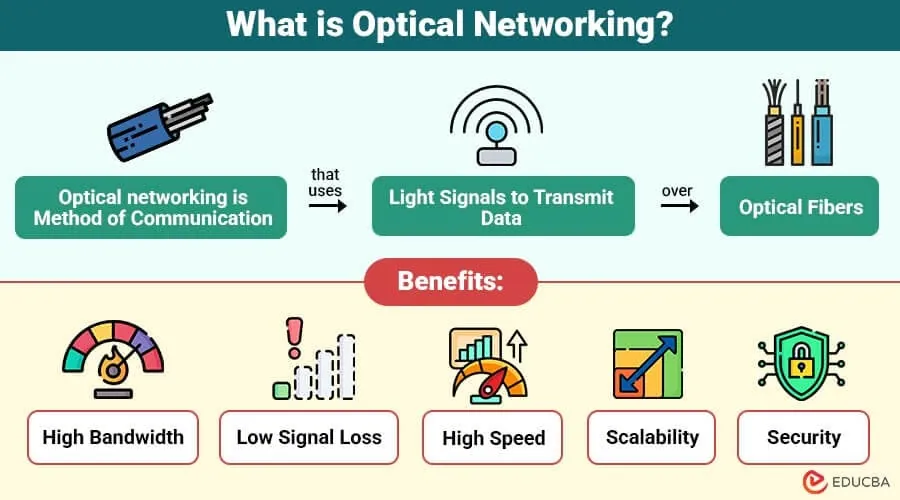
The reliability of your connection depends on how well these light pulses maintain their shape as they move. If the glass core is bent too sharply or the connection point is dirty, the light may leak out of the core into the cladding. This loss is known as attenuation, and it causes the pulses to become blurry or weak. When the receiver can’t clearly tell the difference between an “on” pulse and an “off” pulse, it starts to make errors.
You might notice this as a slow internet speed or a connection that drops out during heavy usage. Because the transmitter sends data at such high frequencies, even a tiny amount of interference can cause the system to re-send the same information multiple times. This extra work slows down your effective throughput significantly.
If you have a long cable run, the signal naturally fades over distance, which is why technicians use specialized equipment to measure the light levels at both ends. If the signal is too low, the system simply can’t translate the light into usable data, and your device will report that no network is available.
Controlling your connection quality
You can manage some aspects of your setup, but other parts are fixed by the physics of the fiber itself.
Things you can control
- Keep your fiber optic cables away from sharp corners or tight loops.
- Ensure all connectors are pushed in firmly until they click.
- Use compressed air to clean any visible dust from the cable tips.
- Use the shortest cable length possible to reduce signal degradation.
Things fixed by design
- The glass purity inside the cable determines the maximum distance.
- The laser strength is set by the manufacturer for the hardware.
- The speed of light in glass is a physical constant.
Working with the internal laser or splicing fiber glass requires specialized tools and training to prevent eye damage or permanent damage to the equipment. If the cable itself is broken, contact your service provider, as they have the calibrated testing tools required to fix or replace the line safely.
Getting more out of your signal

Maximizing your performance comes down to minimizing the physical stress on your cables. Since fiber optics work by total internal reflection, anything that changes the angle of the glass core can cause the light to escape.
Avoid placing heavy furniture on top of your fiber cables, as this pressure can deform the glass and create micro-cracks over time. If you notice your speeds are inconsistent, check the cable for any visible kinks that might have developed after you first installed it.
Most home systems are designed for a specific light budget, meaning they expect a certain amount of signal to arrive at the other end. If you add extra connectors or adapters, each one introduces a small amount of loss. To keep your data flowing at the maximum rate, use a single, continuous cable whenever you can. This avoids the signal loss that happens at every connection point, ensuring your data arrives as cleanly as it left the transmitter.
Frequently asked questions
How far can an optical signal travel without a boost?
An optical signal can travel up to 60 miles before it requires an amplifier to boost the light strength. This distance depends heavily on the purity of the glass in the fiber core and the quality of the light source used by your specific service provider.
Is it safe to look at the end of a fiber optic cable?
It isn’t safe to look directly into the end of a fiber optic cable because the laser light is often invisible to the human eye. Even if you can’t see the light, it can still cause permanent damage to your retina if it enters your eye during a transmission.
What happens if the fiber cable gets a sharp bend?
A sharp bend causes the light to escape the core and leak into the outer cladding, which weakens the signal. This is known as macro-bending, and it results in data errors or a total loss of connection if the bend is tight enough to stop light reflection.
How fast does information travel through fiber?
Information travels at about two-thirds the speed of light in a vacuum, or roughly 124,000 miles per second. The exact speed depends on the refractive index of the glass material used in the fiber core, which varies slightly between different cable manufacturers and industry standards.
Does the cable length matter for performance?
The cable length matters because every foot of fiber introduces a small amount of signal loss through absorption and scattering. While this is negligible for short home runs, it becomes a critical factor in long-distance networks where every fraction of a decibel determines if the signal remains readable.
How do I know if my fiber signal is weak?
You know your signal is weak if your router displays a red light or if you experience frequent packet loss and slow data speeds. You can often see the specific signal strength values by logging into your router’s administrative page and looking for the optical power or light level section.
Conclusion
The efficiency of optical transmission relies on keeping the light pulses sharp and contained within the glass core. By protecting your cables from physical damage and keeping connections clean, you ensure the signal arrives with the highest possible clarity for your devices.

2 thoughts on “How an Optical Signal Transmits Information: A Simple Guide”