
Finding the best light bulbs with google home that fits your home can be tricky when you have so many options. You might just want to dim the lights for a movie or set a schedule for when you’re away. Some bulbs need a hub, while others connect directly to your router, making the initial choice feel a bit overwhelming.
The main struggle is balancing a simple setup against the features you actually need for your daily routine. These comparisons help you weigh those differences so you can pick the right lighting without the headache.
1. Hue Premium Smart Bulbs

Right for: Users who want a reliable, ecosystem-based lighting experience.
These bulbs offer 16 million colors to suit any room in your house. Because they’re part of a larger system, they work well with various smart home setups, including Google Assistant.
Since this system requires a hub, you’ll need to set that up before the lights work.
What works:
- Integrates with multiple smart home platforms
- Offers a wide range of colors
- Reliable performance across many rooms
Where it gives ground:
- Requires a hub for operation
Skip it if: You want a simple setup that connects directly to Wi-Fi.
2. Kasa Multicolor Dimmable Wi-Fi Smart Bulb

Right for: Users who want energy monitoring and reliable Wi-Fi control.
This bulb lets you adjust colors and white temperatures to match your natural light patterns. It connects directly to your 2.4GHz Wi-Fi, which simplifies the installation process for most users.
You can track your real-time energy usage through the Kasa app. It’s a solid choice for someone who wants to control their lights from anywhere using a smartphone.
What works:
- Tracks real-time energy usage
- Adjusts color temperature automatically
- No hub required for setup
- UL certification for safety
Where it gives ground:
- Only works on 2.4GHz networks
Skip it if: You have a 5GHz-only Wi-Fi network at home.
3. GE CYNC A19 Smart LED Light Bulbs
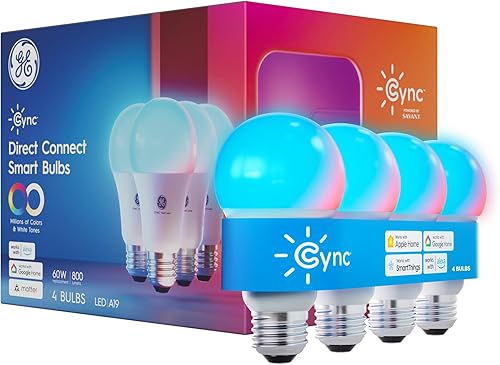
Right for: Users needing color-changing lights without a hub.
These bulbs are designed to add color and mood lighting to any decorative fixture. They connect directly to your home network, allowing you to control them through voice commands or the app.
The scheduling feature is helpful for security, as you can make it look like someone is home even when you’re out. It’s a straightforward way to add smart features to existing lamps.
What works:
- Simple setup with no hub
- Millions of color options available
- Built-in scheduling for routines
Where it gives ground:
- Requires 2.4GHz Wi-Fi connection
Skip it if: You prefer a system that uses a physical bridge.
4. Matter Smart Light Bulb

Right for: Users looking for future-proof, multi-platform compatibility.
This bulb uses the Matter protocol, which helps it work across different smart home systems simultaneously. It also keeps your local controls running smoothly even if your internet connection drops.
If you enjoy syncing your lights to music, this bulb provides several dynamic rhythm modes. It’s built for those who want their devices to stay relevant as smart home technology changes.
What works:
- Works offline via local network
- Syncs with music rhythm
- High color rendering index
- Standardized Matter setup process
Where it gives ground:
- Not compatible with dimmer switches
Skip it if: You don’t plan to use a Matter-certified app.
5. Tapo Multicolor Smart Bulb

Right for: Users who need extra brightness for larger rooms.
This bulb stands out with 1100 lumens of light, which is higher than many other smart bulbs. It provides vibrant colors and tunable whites, perfect for both work and relaxation.
What works:
- High brightness output
- Matter-certified for broad compatibility
- Easy dimming from 1% to 100%
Where it gives ground:
- Higher brightness may be overkill for small lamps
Skip it if: You only need dim, ambient light for reading.
6. GE Dynamic Effects A19 LED Smart Light Bulbs

Right for: Users who want to sync lights with their music.
These bulbs are built to change colors and effects based on the music playing in the room. They connect via Bluetooth and Wi-Fi to give you flexible control options.
They’re a fun addition to a home theater or a party space. The setup is designed to be compatible with standard voice assistants like Google Home.
What works:
- Music sync capabilities
- Dual connectivity via Bluetooth and Wi-Fi
- Simple voice assistant integration
Where it gives ground:
- Limited information on advanced automation
Skip it if: You only want basic white light for tasks.
7. Matter Smart Edison Bulb

Right for: Users who want smart tech with a vintage look.
These bulbs feature the classic Edison style while offering modern smart home control. They’re ideal for decorative fixtures where the bulb itself is visible.
Since they use the Matter protocol, they’re easy to integrate into your existing smart home network. They provide a unique aesthetic without sacrificing convenience.
What works:
- Vintage design for exposed fixtures
- Matter-certified for easy pairing
Where it gives ground:
- Style may not suit every modern room
Skip it if: You need high-intensity light for a workspace.
8. Matter BR30 Smart Light Bulbs

Right for: Users with recessed ceiling lighting fixtures.
These bulbs are specifically shaped for recessed cans, making them a perfect fit for kitchen or hallway ceilings. They offer the same smart features as other Matter-compatible bulbs.
You can group them together to control all your ceiling lights at once with a single command. They’re a clean, hidden way to upgrade your home lighting.
What works:
- Designed for recessed lighting
- Broad platform compatibility
Where it gives ground:
- Not for use in standard lamps
Skip it if: You don’t have recessed ceiling lights.
9. Smart LED A21 Bulb 1-Pack

Right for: Users who need high-intensity, bright white light.
This bulb provides 1600 lumens, making it one of the brightest options available. It’s a great choice for garages, basements, or any area needing strong, clear illumination.
It’s dimmable, so you can still lower the light levels when you don’t need the full brightness. It works well with major voice assistants for hands-free operation.
What works:
- Very high lumen output
- Dimmable for flexible use
Where it gives ground:
- Large size may not fit every lamp
Skip it if: You want a small bulb for a bedside lamp.
10. TP-Link Tapo Smart Light Bulbs

Right for: Users who want a simple, daylight-focused bulb.
This bulb provides 800 lumens of 4000K daylight, which is great for staying productive. It connects directly to your Wi-Fi, so you don’t need any extra hardware.
You can set schedules to turn the lights on or off automatically.
What works:
- Simple, direct Wi-Fi connection
- Daylight temperature improves focus
- Easy energy monitoring in app
Where it gives ground:
- Fixed color temperature
Skip it if: You want colors rather than daylight white.
As an Amazon Associate, we earn from qualifying purchases. This post contains affiliate links – if you buy through them, we may earn a commission at no extra cost to you.
How to Think Before You Choose
Hub vs. Direct Wi-Fi
Some bulbs require a bridge or hub to talk to your router, while others connect directly to your Wi-Fi. A hub can be more stable if you have many devices, but direct Wi-Fi is easier to set up. Most modern homes with a strong router handle direct bulbs well. Check how many devices are already on your network before adding more.
Color vs. Daylight White
Full-color bulbs let you change the mood for parties or holidays, but they can be more complex to manage. Daylight or white-only bulbs focus on productivity and simplicity. If you just need a bright light for your desk, a white-only bulb is usually enough. Measure your room size to see if you need the extra brightness of an A21 bulb.
Brightness and Compatibility
Smart bulbs come in different shapes and brightness levels, measured in lumens. A bulb that’s too large for your lamp or too dim for your room will be frustrating. Always check the base size and the physical dimensions of the bulb against your fixture. Before you buy, check your existing light switches to ensure they aren’t physical dimmers, which can cause flickering.
Who Should Skip These Altogether
- Someone who only needs a simple light switch and no remote control.
- Someone who already has a smart home system that doesn’t support these brands.
- Someone who lives in a place with poor Wi-Fi coverage where bulbs will constantly disconnect.
- Someone who would use the smart features once and then leave them alone forever.
The Kasa Multicolor Smart Bulb offers energy monitoring and reliable Wi-Fi control. The Smart LED A21 Bulb provides 1600 lumens of brightness. Check your Wi-Fi frequency and fixture size before you click order.
Related guides
- 7 Best Light Bulbs for Nelson Bubble Lamps: Our Top Picks in 2026
- 10 Best Wattage for Bathroom Lighting Options for Your Home in 2026
- 5 Best Light Bulbs for Pump House Lighting Solutions in 2026
Frequently Asked Questions
Can I use these bulbs with a traditional dimmer switch?
Most smart bulbs aren’t designed for use with traditional wall-mounted dimmer switches. Using them together often causes buzzing, flickering, or damage to the bulb’s internal electronics. You should keep your wall switch in the “on” position and use the app or voice commands to dim the lights instead.
Do these bulbs work when the internet is down?
Some bulbs, particularly those that are Matter-certified, can operate over your local area network (LAN) even without an active internet connection. Other bulbs that rely on cloud-based servers may stop responding to voice commands if your internet goes out. Check the specific protocol of the bulb if offline reliability is a priority for you.
How much energy do these bulbs actually save?
Smart LED bulbs are generally more efficient than traditional incandescent bulbs, often using significantly less electricity for the same level of brightness. You can track this usage in the manufacturer’s app to see your actual energy consumption.
Is it hard to set up these bulbs with Google Home?
Most modern smart bulbs are designed for a quick setup process within the Google Home app. You usually just need to scan a QR code or follow the prompts in the manufacturer’s app to link the accounts. Once linked, you can control the lights using simple voice commands immediately.
What should I check before buying a bulk pack?
Verify that the bulb shape and base size match your existing fixtures, as some smart bulbs are larger than standard ones. Also, confirm that your home Wi-Fi network operates on the standard frequency band used by smart home devices, as most bulbs are incompatible with the faster 5GHz signals. Checking these two things prevents the need for returns or additional adapters.
Final Thoughts
Once you’ve picked the right bulbs, you’ll love how much easier your daily routine feels. Don’t be afraid to experiment with different brightness levels or custom voice commands to create the perfect mood. You’re going to enjoy having complete control over your home’s atmosphere right from your phone or smart speaker.
