
To rank your priorities or evaluate options, you must list your items in a grid and compare each pair one by one to see which is more important. You can use how to use the pairwise comparison method to turn subjective feelings into a clear, ranked list of preferences. This approach works best for individuals or small teams who need to make objective decisions when they have many options but no clear winner.
What you need for pairwise comparison
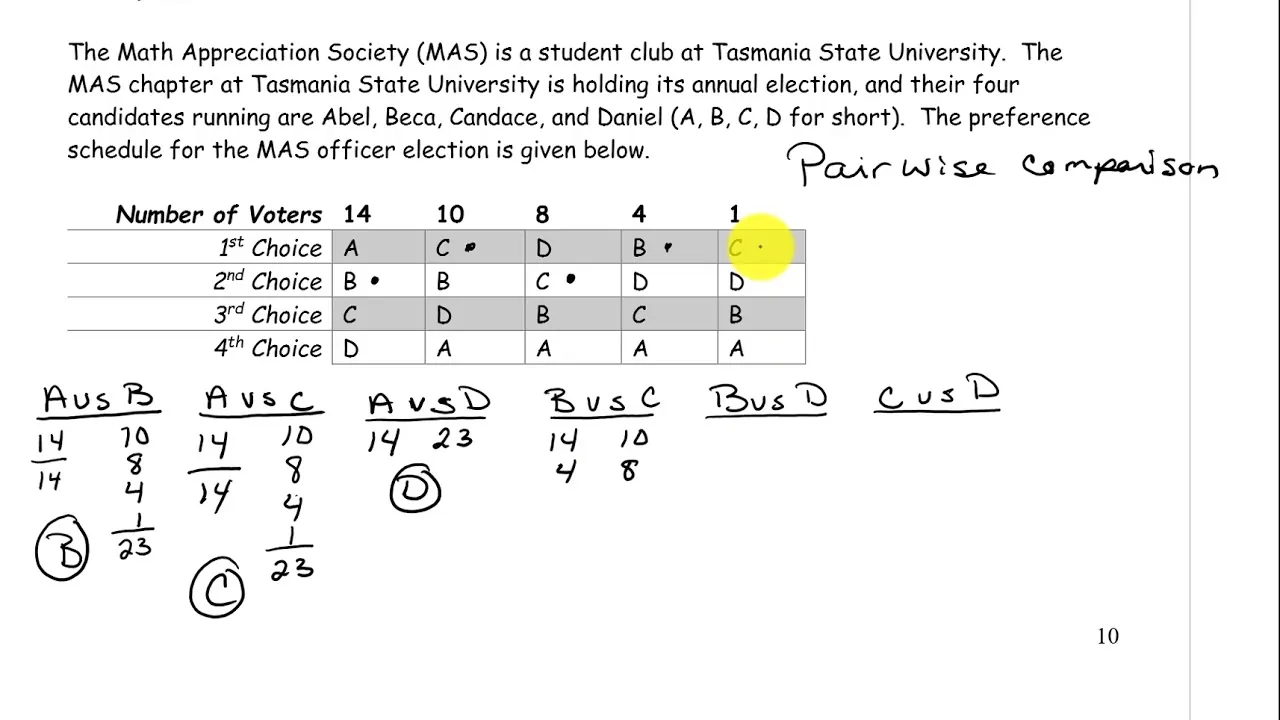
To begin this process, you need a few simple tools to keep your data organized and your logic consistent. Having these items ready prevents you from getting lost in the comparison process later on.
- A list of all items, features, or ideas you’re currently comparing.
- A blank grid or spreadsheet with the same number of rows and columns as your total items.
- A pen or a digital document to record the “winner” of every individual matchup.
- A clear definition of the criteria you’re using to judge each item.
- A calculator if you have a high number of items, to ensure your final score totals match the expected number of comparisons.
If you’re comparing more than 10 items, use a digital spreadsheet instead of paper to avoid math errors. If you have fewer than 4 items, this method is usually overkill and a simple list will suffice. For complex business or project management tasks, you can check the Mind Tools decision making guide to see how this fits into larger strategic frameworks.
Steps for using the pairwise comparison method
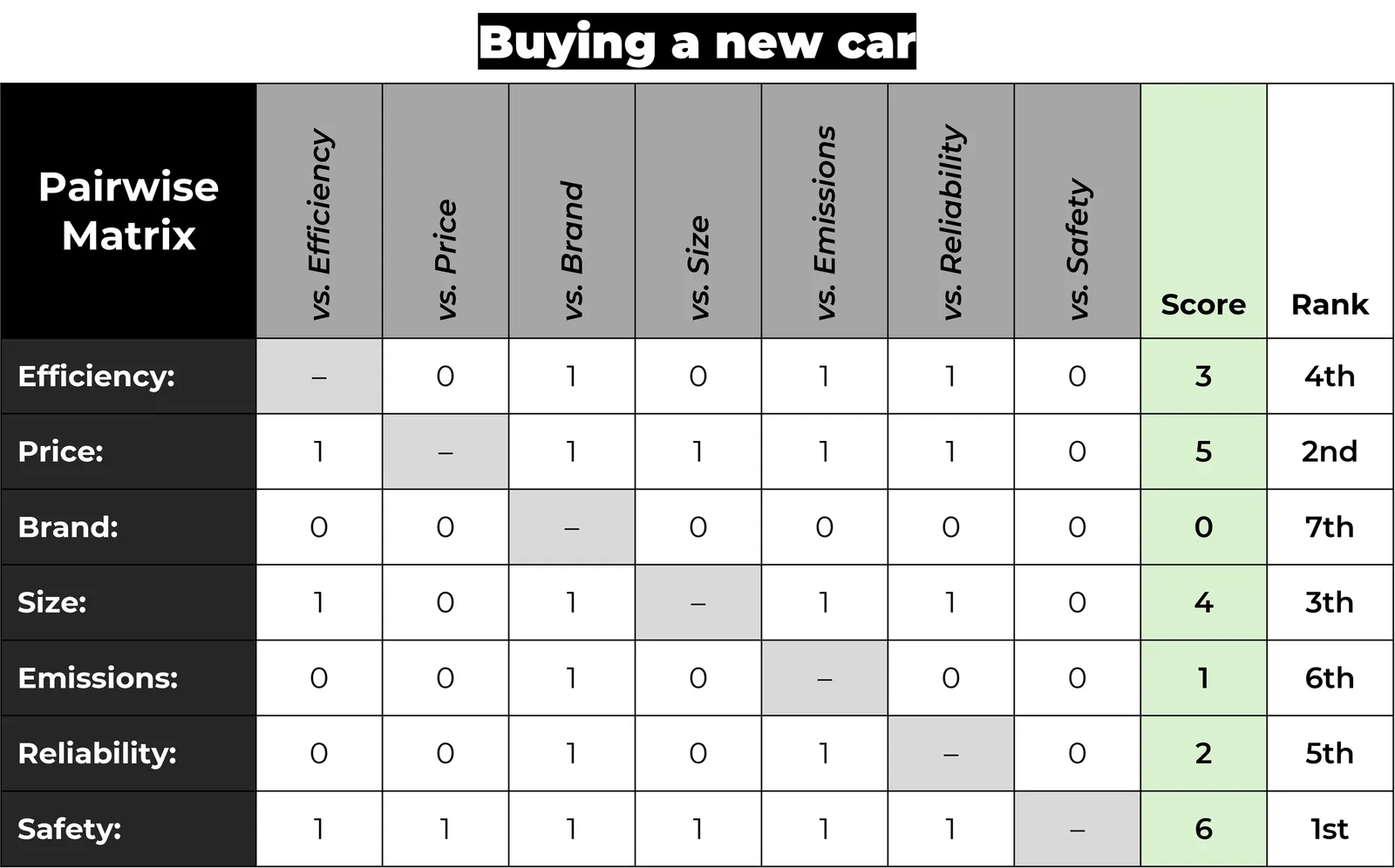
- Create a table with the same number of rows and columns as the items you want to compare.
- Label both the rows and the columns with your items in the same order.
- Block out the diagonal cells where an item intersects with itself, as you can’t compare an item to itself.
- Compare the first item in the row to each item in the column.
- Record the “winner” of each pair in the corresponding cell, noting which option is more important or valuable based on your criteria.
- Assign a score, such as 1 point, to each winner you record in the grid.
- Count the total wins for each item once you have filled in all the empty cells.
- Rank the items from highest total score to lowest to determine your final priority list.
Tip: If two items feel equal in importance, force yourself to choose one anyway. This forces you to be decisive rather than neutral.
Careful: Don’t change your criteria halfway through the process. If you start judging by “cost,” don’t switch to judging by “speed” for the remaining pairs.
Evaluating your comparison results
The time and effort required for this process change based on how many options you’re weighing against one another. If you have many items, the number of comparisons grows quickly, which can lead to fatigue and mistakes.
| Number of Items | Comparisons Required | Time Estimate | Focus Area |
|---|---|---|---|
| 3 Items | 3 | 2 minutes | Clarity |
| 5 Items | 10 | 5 minutes | Logic |
| 7 Items | 21 | 15 minutes | Consistency |
| 10 Items | 45 | 30 minutes | Accuracy |
It’s always safer to start with a small set of items and add more later than to start with a massive list that makes the process feel overwhelming.
How to tell you did it right
A good result is a ranked list where the top item clearly stands out as the highest priority based on your chosen criteria. If you find that several items are tied for first place, it often means your criteria weren’t specific enough during the comparison phase. This happens when the person doing the ranking hasn’t clearly defined what “value” means for that specific project.
To prevent this, define your goal in one sentence before you start the grid. If you’re comparing project ideas, your goal might be “highest potential revenue.” If you’re comparing tools, your goal might be “easiest to learn.” Sticking to one specific goal ensures that your ranking reflects what actually matters to you.
If you still see a tie, force a choice by asking which option would be harder to replace if it disappeared tomorrow. This simple test reveals hidden dependencies or unique benefits you ignored. If the top two choices remain equal, you’re likely comparing apples to oranges. In that case, split the list into two separate grids to avoid diluting your metrics.
The rules and what to do afterwards
The main rule for this method is that you must maintain consistency throughout the entire grid. According to the standard principles of decision science, you should record your results in a permanent document so you can justify your choice later. Once you have your final rank, clear your workspace and save your grid as a reference for why you chose that specific path.
If you find that your priorities shift after a few weeks, you should perform a new comparison rather than trying to adjust the old one. If you’re using this method for high-stakes financial or legal decisions, consult with a professional advisor to ensure your criteria align with regulatory requirements. These rankings usually remain valid for as long as your primary goal or market conditions stay the same.
Alternative ways to rank options
Simple weighted scoring
Assign a weight to each of your criteria, such as “cost” or “durability,” and score each item from 1 to 5. This is faster than pairwise comparison and works well when you have a set of clear, measurable goals. It’s less precise but much easier for large teams.
The Eisenhower matrix
Divide your tasks into four quadrants based on urgency and importance. This doesn’t rank items against each other but helps you decide what to do immediately versus what to delegate. It’s best for daily task management rather than selecting between many different options.
The MoSCoW method
Label your items as “Must have,” “Should have,” “Could have,” or “Won’t have.” This is a quick way to prioritize features in product development. It’s less about comparing pairs and more about sorting items into buckets based on project necessity and time constraints.
Frequently asked questions
Can I use this method for personal decisions?
Yes, you can use this for any decision where you have multiple options. It’s very effective for choosing a vacation spot or a new appliance, as it forces you to think about which features matter most to you, rather than just choosing the first thing you see.
How long does it take to compare 20 items?
It takes a significant amount of time, as you would need to perform 190 individual comparisons. Because of this, it isn’t recommended for lists longer than 10 or 12 items. If you have 20 items, group them into smaller categories first to make the work manageable.
Is it safe to use this for business budgets?
It’s safe for prioritizing where to spend money, but it doesn’t replace financial analysis or risk assessment. Use this to rank your priorities, then use standard accounting software or professional financial advice to ensure your final plan is viable and follows legal requirements.
What happens if I make a mistake in the grid?
If you make a mistake, your final ranking won’t accurately reflect your own preferences. You can avoid this by reviewing your grid after you finish to ensure you didn’t skip any cells. If the final list looks wrong, double-check your math and look for any inconsistent choices.
Why do I need to force a choice between equal items?
You should force a choice because “equal” often masks a reluctance to make hard decisions. By forcing a preference, you uncover what you truly value in a direct conflict. This process helps you identify your real priorities rather than hiding them behind a neutral stance.
Conclusion
Once you have your final results, don’t just file them away. Use your new list to guide your schedule for the coming week. It’s a simple way to ensure you’re focusing on what truly matters. You’ll find that when you’re clear about your goals, making tough choices becomes much easier.
