
The operating voltage is the specific range of electrical potential at which a piece of equipment is designed to function safely and efficiently. If a device receives power outside this designated limit, it may fail to start, perform poorly, or suffer permanent internal damage. Manufacturers specify this value on the product label or technical manual to ensure the internal components don’t overheat or experience electrical stress during normal use.
This value is the most important factor when you’re connecting electronics to a power source. You must match the device requirement to the supply output. A common mistake is assuming that any wall outlet or battery pack will work for a device just because the plug fits physically. This error often leads to blown fuses or fried circuit boards, which can be expensive to repair or replace.
Checking operating voltage for your equipment
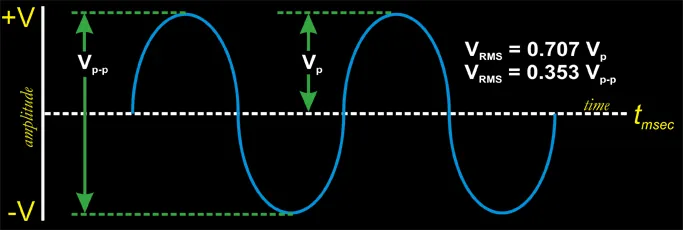
Connecting a new device requires checking the labels on both the power adapter and the unit itself. If the voltage of the source is too high, the device will likely overheat; if it’s too low, the motor or screen may not function at all. You can verify these values by looking for the “Input” or “Output” rating printed directly on the device chassis or its power brick.
- Locate the technical label on the back or bottom of your electronic device.
- Identify the number followed by a “V” (for volts) and check if it says “DC” or “AC”.
- Compare this number to the power source you intend to use to ensure they’re identical.
- Inspect the power cord for signs of fraying or damage before plugging it into the wall.
- Plug the device into the outlet only after confirming the voltage matches exactly.
- Monitor the device for the first 10 minutes for any unusual heat or smell.
Tip: If you’re using a universal power adapter, always set the dial to the exact voltage required by the appliance. Selecting the wrong setting can cause immediate failure of the internal power supply.
If the device requires a specialized connection or high-voltage wiring, stop immediately and hire a licensed electrician. Work involving high-voltage lines or building infrastructure can cause severe injury or fire if handled by someone without proper training or certification.
Estimating power compatibility timeframes
The time it takes to identify and verify the correct voltage depends on the device type and the accessibility of its label. Most small electronics are clearly marked, while industrial equipment might require checking the full technical manual.
| Situation | Time to Verify | What changes it | What to watch for |
|---|---|---|---|
| Simple household lamp | 10 seconds | Accessibility of base | Bulb wattage limits |
| Laptop or tablet | 30 seconds | Cord length | Heat of power brick |
| Industrial machine | 5 minutes | Manual availability | Phase requirements |
| International travel | 10 minutes | Outlet standards | Plug shape differences |
If a device is taking much longer than expected to power up or is showing erratic behavior, disconnect it immediately from the power source. Don’t attempt to force a connection if the voltage ratings don’t match, as this can lead to permanent hardware destruction.
Determining operational status

You can tell when a device is operating at its correct voltage by observing its standard performance indicators. Most units feature a power light that glows a steady color, such as green or blue, when the input is stable. If the light is flickering or the device makes a humming noise, it may be struggling with an unstable power supply.
The most reliable test is to use a digital multimeter to measure the output at the connection point. According to the American National Standards Institute, electrical systems must stay within specific tolerance ranges to prevent damage to connected equipment.
Many users mistakenly assume that a device failing to boot is a hardware defect, when it’s often just a voltage sag during the initial power draw. If your multimeter shows a stable reading while idle but drops significantly when you turn the device on, the power supply is failing under load. Replace the unit immediately to avoid permanent circuit damage. Always consult the manufacturer’s documentation to verify the exact tolerance range allowed for your specific hardware.
Errors that compromise device safety
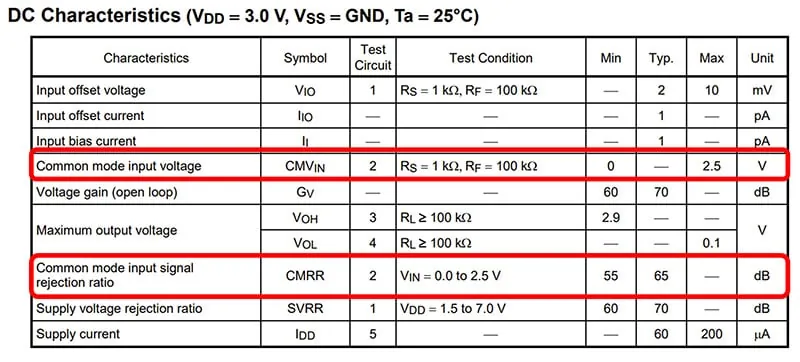
- Ignoring the AC vs DC label: Using an alternating current (AC) source for a device designed for direct current (DC) will cause immediate damage to the internal electronics. Always look for the symbol—a wavy line for AC and a straight or dashed line for DC—before plugging in your cord.
- Overloading a power strip: Plugging multiple high-draw devices into one strip can cause a voltage drop, leading to inconsistent performance for all connected units. Calculate the total amperage of all connected items and ensure it stays below the limit printed on the power strip.
- Using damaged power cables: A cable with exposed wires or loose connections creates resistance, which reduces the voltage reaching the device. Replace any cord that shows signs of wear to ensure the equipment receives the full, clean power it needs to function safely.
Related guides
- Operational Limits of Restricted Category Aircraft Explained
- 7 Best Bariatric Toilet Seats for Safety and Support in 2026
- Can You Microwave Styrofoam: Safety Facts and Risks Explained
Frequently asked questions
Can I use a 240V device on a 110V outlet?
No, a 240V device won’t operate correctly on a 110V outlet. The device will likely fail to turn on, or it may operate at extremely low power that causes internal components to overheat. You would need a voltage converter to step up the power from the outlet to match the device, but even then, many high-draw appliances aren’t compatible with standard travel converters.
How do I know if my power supply is failing?
You can identify a failing power supply by checking for inconsistent performance, such as flickering lights or devices that suddenly shut off. If you use a multimeter to test the output and find that the voltage is fluctuating significantly while the device is under a load, the power supply is likely unstable. Replace the supply unit before it causes damage to your hardware.
Is it safe to use a higher voltage adapter?
No, using an adapter with a higher voltage than the device requires will almost certainly damage the internal circuitry. Using an adapter with a higher voltage than the device requires will force excessive current through the components, causing immediate damage. This usually results in a blown capacitor or a burnt circuit board within seconds of connecting the power.
What happens if the voltage is slightly off?
If the voltage is slightly off, the device may work for a short time but will experience increased wear and tear. Over time, this stress leads to premature failure of the internal parts, as the components are forced to operate outside their intended design specifications. It’s always best to use a power source that matches the device’s rated voltage exactly to ensure a long lifespan.
How often should I check my voltage settings?
You should check your voltage settings every time you connect a device to a new power source, especially when traveling between different countries. If you’re using a fixed home setup, you generally don’t need to recheck the voltage unless you’re moving the equipment or changing the power strip. Always verify the label if you’re unsure about the compatibility of a specific outlet.
Why does my device hum when plugged in?
A device that hums when plugged in often indicates that the internal transformer is struggling with the incoming voltage or frequency. This noise can be a sign that the power supply isn’t providing clean, consistent electricity, or that the device is mismatched with the outlet. If the humming is accompanied by a burning smell or excessive heat, unplug the device immediately to prevent a fire hazard.
Conclusion
Maintaining the correct voltage is the most effective way to protect your electronics from premature failure. By verifying the requirements on your device labels and ensuring your power sources match those specifications, you prevent costly repairs and ensure your equipment runs smoothly for its intended lifespan. Always prioritize safety by checking for damage and using only compatible power adapters for your specific hardware.
