
The company currently offers two primary myq subscription plans for users who want to add video recording and storage features to their smart garage door openers. These options include a basic monthly plan for a single device and a premium version that covers multiple cameras or openers. If you only own one garage camera, choose the basic tier; if you manage three or more devices, the premium tier saves you money over individual subscriptions.
What your subscription plans include
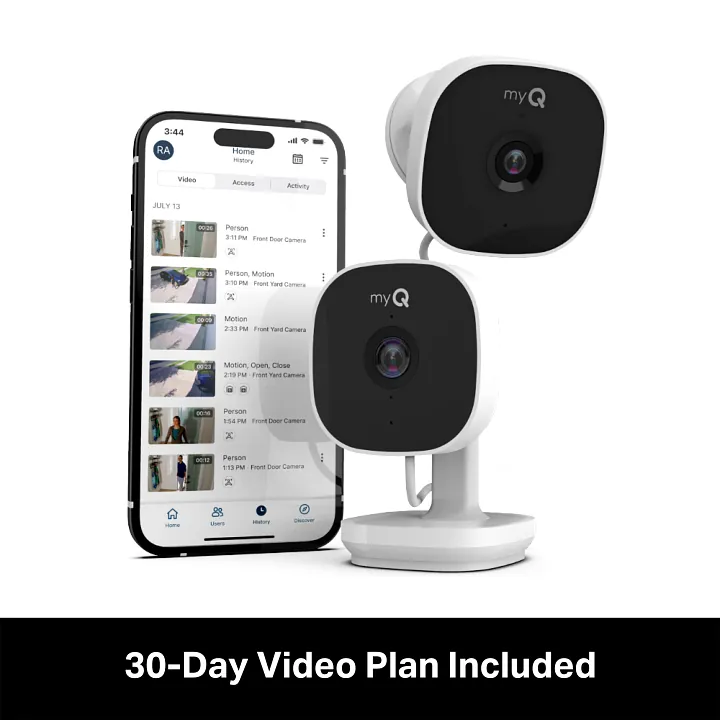
Basic Plan provides 7-day video history for a single device, billed monthly or annually. This tier is best for apartments or entryways where monitoring a single high-traffic point suffices. If you operate more than one camera, the system will only record the device designated as primary, leaving your other units as live-view only.
Premium Plan offers 30-day video history for up to 10 devices. This is the standard for full-property coverage, as it accounts for the inevitable overlap in motion triggers across multiple zones. Without this plan, you lose the ability to review footage of incidents that occurred while you were away from your phone.
Free features include basic connectivity, remote opening, and real-time alerts. These remain active without a subscription, but you lose the ability to go back in time. If you don’t pay, you must view the alert the second it arrives or the event is gone forever.
New users receive a 30-day trial to test cloud storage. Use this window to trigger motion events in different weather conditions to see if your internet upload speed supports high-definition playback.
You can switch between monthly and annual billing through your account portal. Annual billing typically saves you the cost of two months of service. If you anticipate seasonal use, stick to monthly billing to avoid paying for gaps when you’re home.
Why these plans exist
The core purpose of these subscription tiers is to manage the server costs associated with cloud-based video storage. When your garage camera detects motion, it records a clip and uploads it to secure servers. Because storing high-definition video files requires significant data bandwidth and server space, the company charges a fee to maintain this infrastructure. This is why live streaming remains free, but saving those clips for later viewing requires a paid agreement.
These plans also fund the security protocols needed to keep your home data private. Keeping video files encrypted and accessible only to your account requires regular security updates and server maintenance. If you choose not to subscribe, your hardware still functions perfectly for remote operation and status monitoring. You simply lose the ability to go back and watch what happened in your garage earlier in the week or month.
Many users mistakenly assume that local storage options are inherently more secure than these cloud tiers. In reality, local hardware is vulnerable to theft or physical damage during a break-in. If a burglar takes the camera, your evidence goes with them. Cloud storage ensures your footage survives even if the device is destroyed.
Your choice should depend on your specific hardware footprint. If you have a single gate or garage opener, the entry-level plan covers your needs. If you have expanded your setup to include cameras on side doors or detached buildings, the premium plan is the only way to aggregate that data.
Use this rule: if you manage more than three cameras, the premium tier is mandatory to avoid separate billing cycles. Managing multiple subscriptions for one home often leads to missed payments and sudden service interruptions. Consolidating your devices into one account ensures that a single payment failure doesn’t leave your entire property unmonitored.
Choosing the right plan

If you own one device, pick the basic plan; if you manage several, pick the premium plan.
Most users default to the premium tier without checking their actual camera count. If you have fewer than three devices, the premium features often sit idle, costing you more than the basic plan for capacity you never touch. Stick to the basic plan until you exceed three active feeds.
If you rely on your system for professional security, ignore the monthly billing cycle entirely. Monthly payments are designed for temporary users. By switching to annual billing, you typically capture a 20% discount, effectively gaining two months of coverage for free.
Distinguish between your needs by checking your playback habits. If you only check your cameras when you receive a push notification, the free account’s live view is sufficient. You only need to upgrade when you require a rolling history of footage to review incidents after the fact.
If you’re currently inside a trial period, don’t upgrade early. You’ll forfeit the remaining days of your free access the moment you commit to a paid plan. Wait until the final 24 hours of the trial to make your selection.
How to manage your account
Open the app on your smartphone and log in to your dashboard to see your current device list. If you see a device listed as “offline,” tap its icon to refresh the connection before attempting to modify any subscription settings.
Navigate to the settings menu by tapping the gear icon located in the top corner of the screen. Select the subscription management tab to view the available myQ subscription plans and their current pricing.
Choose the plan that matches your camera count to ensure all devices have active cloud storage. If you have more than three cameras, a premium plan is required; attempting to use a basic plan for four or more cameras will result in the newest devices failing to record video clips.
Enter your payment details securely if you’re starting a new subscription or upgrading from a free account. Avoid using public Wi-Fi networks for this step to ensure your financial data remains encrypted.
Verify that your camera status shows as “active” for cloud storage in the device settings menu. If the status remains “pending” for more than ten minutes, force-close the app and restart your phone to clear the cache.
Check your email for a confirmation receipt to ensure your billing cycle has started correctly. If you don’t receive this receipt within an hour, verify that your bank hasn’t flagged the transaction as a potential error. Keeping this receipt is essential if you ever need to request a prorated refund when downgrading your service tier.
The mistakes that ruin it
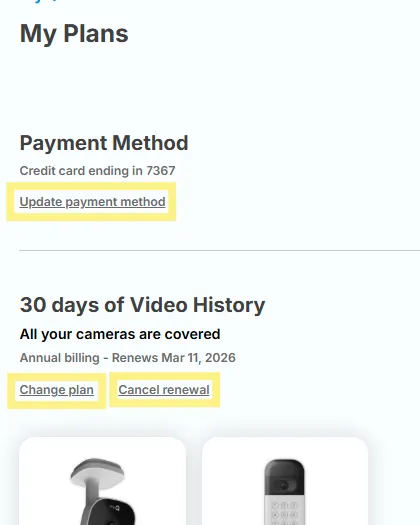
Signing up for multiple basic plans instead of one premium plan leads to higher monthly costs. Most users lose roughly 30% in potential savings by failing to consolidate accounts under a single family or enterprise license.
Ignoring the expiration date of your free trial results in an automatic transition to a full-price monthly subscription. Set a calendar reminder for 48 hours before the trial ends. If you miss this window, contact support immediately; many providers will issue a refund if you haven’t accessed the premium features since the charge posted.
Using an outdated app version often causes billing errors or prevents the activation of new storage features. Always check for updates before troubleshooting payment failures.
Registering devices under two different email addresses makes it impossible to link them to one premium plan. If you find yourself in this situation, you must cancel the secondary subscription and manually migrate data to the primary account. Avoid this by designating a single “master” email for all hardware registrations, even if you share the equipment with other users.
Related guides
- Best Camping Cot for Two Persons in 2026
- How to Arrange Two Desks in a Small Office: Layout Solutions
- Best Two Room Tent for Camping with Family: Top 10 Picks in 2026
Frequently asked questions
Can I use my camera without a subscription?
You can use your camera without a subscription for live viewing and basic remote control functions. The hardware remains fully functional for operating your garage door from anywhere. You only need a paid plan if you want to store recorded video clips in the cloud.
How long are the videos saved?
Videos are saved for 7 days on the basic plan and 30 days on the premium plan. Once this period passes, the oldest clips are automatically deleted to make room for new footage. You must download important files to your device before the retention period ends to keep them.
Does it matter if I pay monthly or annually?
Annual plans offer a lower total price compared to paying month-to-month. Choosing the annual option reduces your total costs by providing a discount on the monthly rate. Check the pricing page in your app to see the specific savings available for your region.
What happens if my payment fails?
If your payment fails, your account will revert to the free tier and cloud storage will stop recording new events. The app will notify you to update your payment method. You’ll retain hardware access, but you’ll lose access to history logs until the subscription is renewed.
Is it safe to store my videos in the cloud?
Cloud storage for these devices uses encryption to protect your video data from unauthorized access. The company maintains security standards to ensure that only you can view your recorded clips through your verified login. You should always use a strong, unique password for your account to prevent others from gaining access to your camera feeds. This is the best way to maintain privacy while using internet-connected home security hardware.
How many cameras can I add to the premium plan?
The premium plan allows you to add up to 10 cameras or garage door openers to a single account. This limit is set per account, allowing you to manage a large home system without multiple subscriptions. Most residential users find this limit sufficient to cover all their doors.
Conclusion
Managing your garage camera storage is a simple way to keep your home secure. By picking the plan that matches your device count, you ensure that every camera is recording when you need it most. Check your app settings today to confirm your current status and ensure your billing information is accurate for the coming year.
