
The most reliable options are usually wall-mounted units from brands like Lutron or Leviton, as these best bathroom exhaust fan humidity sensor switches allow you to set precise moisture triggers to keep your air clear. Choosing a model with manual override buttons is vital for those times when you need extra ventilation for odors or quick steam removal regardless of the current humidity level. This guide explains how to select, install, and adjust these sensors for peak efficiency in your home.
Understanding Moisture Control Technology
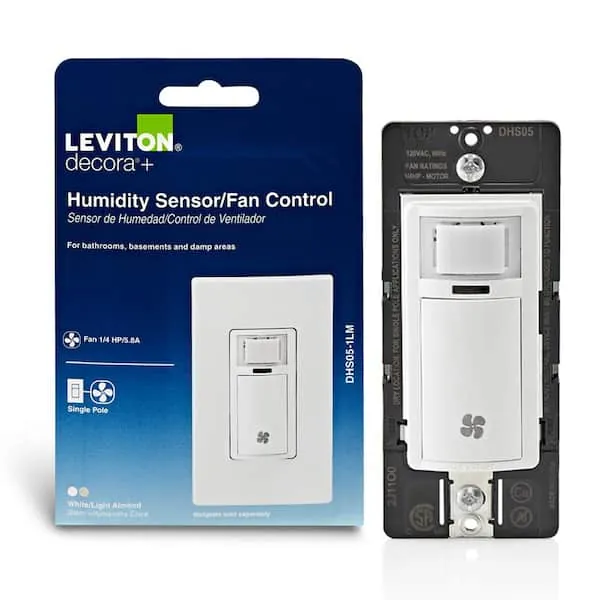
Humidity sensors for bathroom fans are designed to detect rising moisture levels and turn the fan on automatically. They use a small sensor behind the faceplate to monitor the room’s air. When the moisture reaches a level you set, the switch triggers the fan. Once the air dries out, the sensor turns the fan off after a set delay. This prevents mold growth and protects your walls from peeling paint caused by trapped steam.
These devices are for anyone who wants a hands-free way to manage bathroom air. They’re especially useful in households where people often forget to turn the fan on or leave it running for hours, wasting energy. A common mistake is thinking these sensors work instantly like a light switch. They actually need a few moments to detect the change in the air before the motor kicks in.
The core mechanism is a solid-state sensor that measures relative humidity. According to the Environmental Protection Agency, keeping indoor humidity levels between 30% and 50% is a key way to prevent mold, which is exactly what these switches aim to support. If your bathroom stays damp for long periods, these sensors provide a consistent way to manage that moisture without manual intervention.
Installing Your Humidity Switch
Installing a new control switch is a manageable project if you’re comfortable working with basic electrical wiring. Always turn off the power to the bathroom circuit at your main breaker panel before starting. If you don’t have experience with electrical work, contact a licensed electrician to avoid injury or damage.
- Turn off the power at the breaker and test the switch with a voltage detector to ensure it’s dead.
- Remove the old wall plate and unscrew the existing switch from the electrical box.
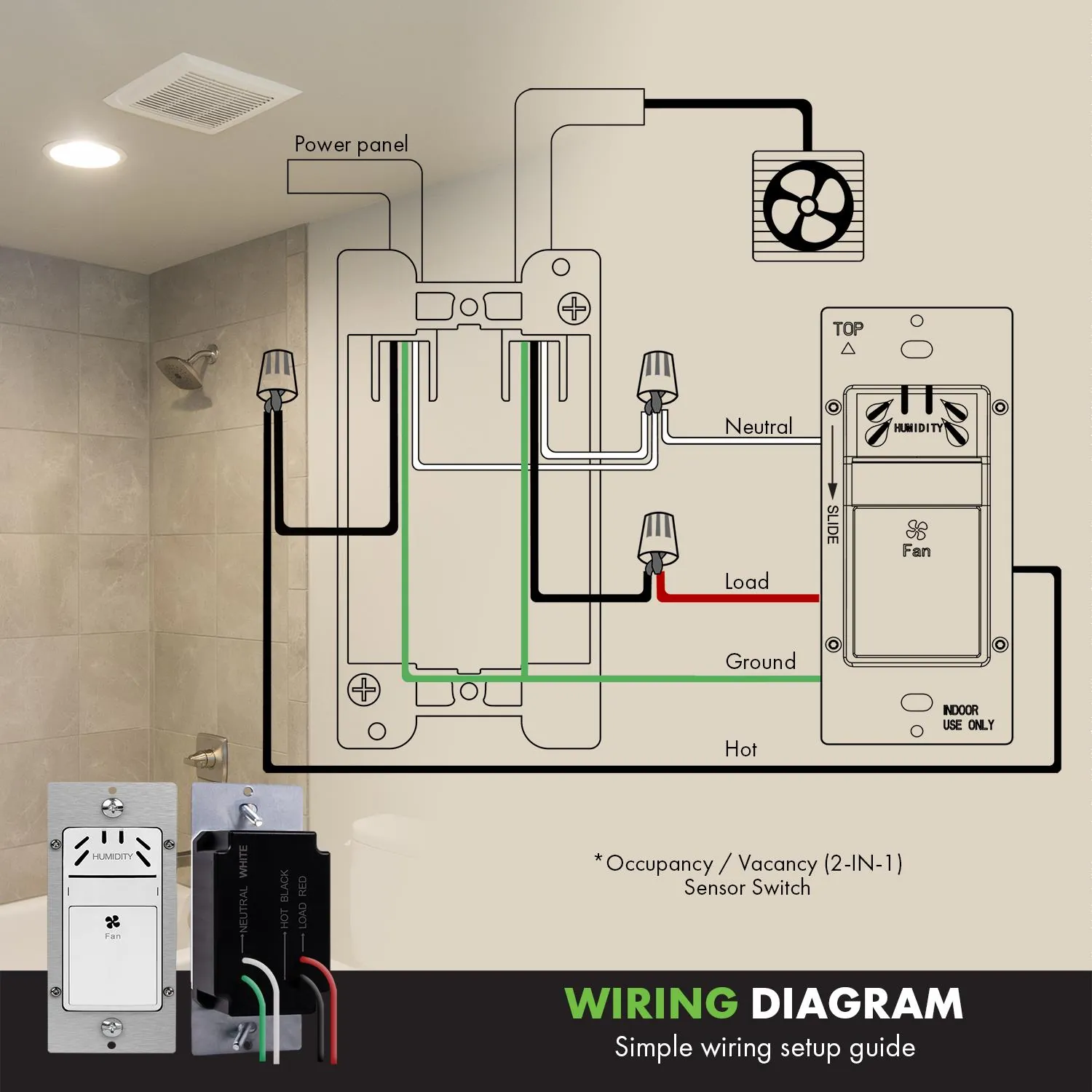
- Identify the wires: you’ll typically need a hot wire, a load wire (to the fan), and a neutral wire.
- Use wire nuts to connect the new sensor switch according to the manufacturer’s wiring diagram.
- Push the wires carefully back into the box and screw the new switch into place.
- Attach the wall plate and restore power at the breaker panel.
- Test the sensor by creating steam in the shower or using a spray bottle near the wall plate.
The most important judgement call is setting the sensitivity dial correctly. If you set it too low, the fan will run constantly even on dry days. If you set it too high, the fan may not start when the room is clearly damp. Always start at the middle setting and adjust it over a few days based on your local climate.
Choosing the Best Bathroom Humidity Sensor Switches
| Situation | What to use | How long | What to watch for |
|---|---|---|---|
| Small bathroom | Standard sensor | 10-20 minutes | False triggers |
| Large master bath | High-CFM fan switch | 30+ minutes | Cold air drafts |
| Humid climate | Low-sensitivity mode | Continuous | Excessive runtime |
| Dry climate | High-sensitivity mode | 5-10 minutes | Rapid cycling |
| Basement bath | Moisture-only model | 20 minutes | Sensor blockage |
These figures assume standard residential room sizes. If your bathroom exceeds 100 square feet, standard switches often fail to clear the air before the timer expires. In these cases, consult a professional technician to ensure the switch is properly rated to prevent internal relay failure.
Most users mistakenly set their sensors to maximum sensitivity regardless of room size. This leads to the fan running long after the room is dry, which wastes energy and pulls conditioned air out of your home. If your mirror clears within five minutes of leaving the room, dial the sensitivity down by one notch.
If you notice the fan cycling on and off, the humidity level may be hovering exactly at the trigger threshold. Move the sensor to a wall that doesn’t face the direct airflow of your heating system.
For bathrooms with high ceilings, the moisture level at the floor is often lower than at the ceiling. Mount your sensor at least five feet high to ensure it detects the steam before it condenses on your walls.
If you live in a climate with seasonal humidity swings, choose a model with a manual override button. This allows you to force the fan on for a set duration when the ambient humidity is too high for the sensor to trigger reliably.
Achieving Consistent Results
The difference between a bathroom that smells fresh and one that feels damp usually comes down to the placement of the sensor and the fan’s power. Experienced installers ensure the switch isn’t located directly in the path of the shower’s spray or too close to a heat vent. If the sensor is located near a vent, the airflow can cause inaccurate humidity readings.
Proper Calibration Steps
Most switches have a small dial on the front or under the cover plate to adjust the humidity threshold. You should adjust this during the morning when you normally shower. If the fan runs for more than 15 minutes after you leave the room, the timer is set too long. If the mirror remains foggy, turn the sensitivity dial toward the “high” setting to trigger the fan earlier.
Avoiding Common Errors
Don’t paint over the sensor openings on the faceplate. This blocks the air from reaching the internal monitor and renders the device useless. Also, avoid using these switches with fans that have built-in thermostats, as they can conflict with each other. If you have a dual-purpose fan and light, ensure your switch is rated to handle both loads separately, as some models only support the fan motor.
Troubleshooting Common Issues
| What you notice | What it usually means | What to do first |
|---|---|---|
| Fan won’t turn on | Low sensitivity setting | Turn dial to high |
| Fan runs forever | Timer set too long | Shorten delay time |
| Fan cycles randomly | Airflow interference | Check for vent drafts |
| Light flickers | Loose neutral wire | Tighten wire connections |
If the fan fails to trigger despite a high sensitivity setting, check the sensor vents for dust buildup. A thin layer of grime can block airflow to the sensor, preventing it from detecting moisture levels. Wipe the sensor gently with a dry microfiber cloth before adjusting internal wiring.
When a fan runs indefinitely, confirm the “occupancy” versus “vacancy” mode. If it stays on, ensure no heat sources like space heaters or incandescent bulbs are within six feet of the sensor.
Random cycling often points to a draft from a supply vent. If the sensor is positioned directly across from an HVAC register, the temperature shift can interfere with the sensor’s ability to accurately measure relative humidity. Relocate the sensor or adjust the air deflector on the vent to redirect the flow away from the unit.
Flickering lights usually indicate a loose neutral connection at the switch box. Before tightening, turn off the main circuit breaker to prevent electrical shock. If the wire is secure but the flickering persists, the LED bulb may be incompatible with the dimmer switch. Swap the bulb for one explicitly rated for use with electronic low-voltage controls.
Legal and Safety Requirements
Electrical work must always follow the National Electrical Code (NEC) standards in the United States. These codes ensure that your wiring is safe and that your home remains protected against electrical fires. Humidity switches require a neutral wire in the electrical box to operate the internal sensor circuitry. If your older home lacks a neutral wire at the switch, you can’t use these standard models without significant electrical upgrades.
Check your wall box for a bundle of white wires tucked into the back. If you only see two black wires connected to your current switch, you lack the necessary neutral connection. Installing a switch without this wire will cause the device to fail or create a dangerous ground fault. In this case, you must either pull a new wire from the nearest junction box or select a specialized battery-operated sensor.
Always check your local building codes before starting, as some areas require a permit for electrical replacements. Municipalities often mandate an inspection if you’re modifying existing circuits. Skipping this step can void your homeowner’s insurance policy if a fire occurs later.
If you find your wall box is full of wires or you notice signs of charred insulation, don’t proceed with the installation. These are signs of underlying electrical issues that require a professional electrician to diagnose and fix safely. If the insulation on your existing wires crumbles when touched, stop immediately. This indicates brittle, aging wiring that poses a high risk of short-circuiting.
Don’t attempt to tape over these areas; the entire circuit segment must be replaced to prevent an arc flash. If you encounter aluminum wiring, which is common in homes built during the 1960s, hire a licensed expert to install compatible hardware to prevent oxidation fires.
Maintaining Your Humidity Sensor
Once your sensor is installed, maintenance is minimal but necessary to keep it working. Dust can build up inside the sensor vents over time, which slows down the device’s ability to “smell” the air.
Use a soft, dry brush to clear the vents as needed based on your specific environment; consult your owner’s manual for the recommended frequency. Never use liquids or household cleaners directly on the switch face, as moisture can seep into the electronics and cause a short circuit.
If you find the fan is no longer turning on automatically, first check if the manual override button works. If the manual mode works but the automatic mode does not, the sensor may have reached the end of its lifespan or have a faulty internal circuit. Most quality switches have a finite lifespan, depending on the frequency of use and the amount of dust in the home.
Many homeowners mistakenly assume that a sensor failing to trigger is a wiring issue. Before calling an electrician, verify the air intake. If you have recently painted or performed construction nearby, fine particulate matter may have clogged the internal membrane. A quick blast of compressed air from a distance of six inches can often clear this blockage.
You can test the sensor’s sensitivity by holding a damp towel near the intake. If the fan triggers within sixty seconds, the sensor is likely functional but calibrated too conservatively for your environment. If the fan remains idle, the internal hygrometer has likely drifted beyond its usable range.
If your bathroom fan runs constantly regardless of the humidity level, check the sensitivity dial hidden behind the faceplate. Turning this dial counter-clockwise increases the trigger threshold. If the fan still refuses to shut off, the relay has likely fused in the closed position. In this case, the entire unit must be replaced to prevent motor burnout.
When to Choose Manual Control
Sometimes a humidity sensor isn’t the right tool for the job. If your bathroom has very poor natural airflow or if the fan is undersized for the room, a sensor will just keep the fan running indefinitely. In these cases, a simple mechanical timer switch is a better choice. You can set it for 30 or 60 minutes when you enter, ensuring the room dries out regardless of the humidity level.
If your fan runs for more than 45 minutes after you leave the room, the sensor is likely fighting a losing battle against physics. Replace the sensor with a countdown timer to prevent excessive wear on the motor and unnecessary energy waste. A motor running for six hours a day will fail three times faster than one used for 30-minute intervals.
Additionally, if you live in a very humid coastal area, the sensor may stay triggered for long periods because the baseline humidity is already high. In these regions, a manual switch or a high-end smart switch that accounts for local outdoor weather data is often more effective. This prevents the fan from running all day when the indoor air is simply mirroring the outdoor weather.
Check your local weather station data before installing a sensor. If your average outdoor humidity regularly exceeds 70 percent, a standard sensor will struggle to find a “dry” state to trigger the shut-off command. In this climate, use a switch with a manual override or a delay-off function.
If you notice condensation forming on the mirror even when the fan is running, the issue is CFM capacity, not automation. No sensor can fix a fan that lacks the power to exchange the room’s air volume every five minutes. Install a higher-rated fan first, then decide if you still need the sensor.
Related guides
- 10 Best Dimmer Switches for Precise Light Control in 2026
- 10 Best Rated Toilet Seats for Your Bathroom Upgrade in 2026
- 5 Best Air Purifiers for Exhaust Fumes: Our Top Picks in 2026
Frequently asked questions
Can I install a humidity switch in a bathroom without a window?
Yes, these switches are excellent for windowless bathrooms because they ensure the fan runs long enough to clear all moisture. Without a window, steam has nowhere to go but into your walls, so the sensor helps prevent hidden damage. Just ensure the fan itself is powerful enough to move the air through the ducting, as the switch only controls when the fan turns on and off.
How do I know if my switch needs a neutral wire?
You can verify this by removing the faceplate and looking for a bundle of white wires tucked into the back of the electrical box. Most smart or humidity-sensing switches require this white wire to power the sensor when the fan is off. If you don’t see a neutral wire, you must choose a model specifically designed for “no-neutral” installations, though these are much harder to find for humidity sensing.
Is it safe to use a humidity sensor in a very small half-bath?
Yes, it’s safe, but it might be overkill for a room without a shower or tub. In a half-bath, you only need to clear odors, so a motion-sensing switch or a standard manual switch is usually more practical. If you do install one in a half-bath, keep the sensitivity setting very high so that it only triggers during actual cleaning or heavy use.
Will the fan turn on if I am just washing my hands?
It shouldn’t if the sensitivity is set correctly, but it depends on the amount of steam created. If you only use cold water, the sensor will rarely trigger, which is how it should work. If you notice it turning on too easily, simply turn the sensitivity dial toward the “low” setting to require a higher concentration of moisture before it activates.
How long does it take for the fan to turn off after the air dries?
Most switches have a fixed or adjustable delay of 5 to 20 minutes to ensure the room is completely dry. This delay is important because it allows the fan to finish clearing the residual steam from the ceiling and corners of the room. If you find the fan turns off too soon and the mirror is still foggy, increase the delay time by one notch on the switch.
What happens if the power goes out?
Most electronic humidity switches will reset to their default factory settings once the power returns. You may need to re-adjust your sensitivity and delay settings to match your previous preferences. High-quality models usually have a small internal memory, but you should always check the status of your fan after a power outage to ensure the sensor is still active and working as expected.
Conclusion
Once your sensor is dialed in, you won’t have to worry about damp walls or lingering smells after a shower ever again. It’s a simple upgrade that’ll keep your home feeling fresh and dry. Take a look at your current switch today and see if it’s time for a smarter change.