
Choosing the best asus router for your home or office comes down to matching your connection speed and device density to the right hardware. A wrong choice often leads to bottlenecks in your network, especially if you rely on high-bandwidth tasks like gaming or 4K streaming. While many options look similar, they differ significantly in their port configurations, radio bands, and specialized software features. Every pick below is judged on the same three things — what it’s strong at, what it gives up, and what living with it would ask of them.
As an Amazon Associate, we earn from qualifying purchases. This post contains affiliate links – if you buy through them, we may earn a commission at no extra cost to you.
1. RT-BE88U WiFi 7 Router

Best for: Users needing heavy-duty wired and wireless network capacity.
The ASUS RT-BE88U is built to handle high-demand environments using WiFi 7 technology. Its listing emphasizes the inclusion of two 10G ports, which allows for extremely fast wired connections across your local network. The device also features a powerful quad-core 2.6GHz CPU to manage intensive traffic flows without slowing down.
Strengths:
- High throughput up to 7200Mbps via WiFi 7
- Dual 10G ports for massive wired capacity
- AI WAN detection provides reliable internet
- Extensive Guest Network Pro configuration options
- Commercial-grade AiProtection Pro security included
Trade-offs:
- Requires compatible hardware for 10G speeds
- Complex setup for advanced WAN configurations
Living with this router means you can stop worrying about network congestion, even with many smart home devices connected. You’ll spend time initially configuring the five separate SSIDs to keep your IoT devices organized. Maintenance is minimal, as the AiProtection Pro handles security scanning in the background.
| Best for | Why |
|---|---|
| Power users | High-speed 10G wired connectivity |
| Smart home fans | Easy IoT device management |
| Large families | Reliable AiMesh whole-home coverage |
2. ROG Rapture GT-BE98 Pro WiFi 7 Gaming Router
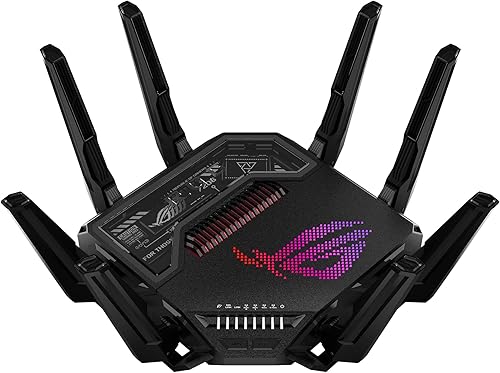
Best for: Competitive gamers wanting the absolute fastest wireless performance.
The ASUS ROG Rapture GT-BE98 Pro is designed for maximum throughput, utilizing quad-band WiFi 7 to reach speeds up to 30 Gbps. It features specialized external antennas to improve signal strength throughout your space. The listing highlights its focus on minimizing latency, making it a dedicated tool for high-end gaming setups.
Strengths:
- Extreme speed up to 30 Gbps
- Multi-link Operation for stable connections
- Dual 10G ports plus quad 2.5G ports
- Triple-Level Game Acceleration for low latency
- High-efficiency external dual-feeding antennas
Trade-offs:
- Large physical footprint for antennas
- Potentially overkill for basic web browsing
Living with this router involves managing a high-performance machine that prioritizes your gaming traffic above all else. You’ll enjoy stable connections during intense online matches without needing to adjust settings often. It isn’t for the casual user who only needs basic internet access, as the advanced gaming features would remain unused.
| Best for | Why |
|---|---|
| Online gamers | Triple-Level Game Acceleration |
| Enthusiasts | Quad-band WiFi 7 capacity |
| Power users | Extensive wired port options |
3. ROG Strix GS-BE12000 WiFi 7 Gaming Router
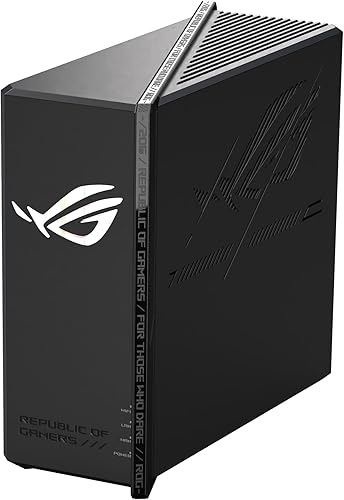
Best for: Gamers who need high-speed wired ports for multiple consoles.
The ASUS ROG Strix GS-BE12000 is a tri-band WiFi 7 router that focuses on providing a massive amount of wired connectivity. Its listing highlights seven 2.5G LAN ports, which is ideal for connecting several gaming PCs or consoles directly.
Strengths:
- Tri-band throughput up to 12000 Mbps
- Eight internal antennas for wide coverage
- Seven 2.5G LAN ports for wired devices
- Smart Home Master for subnetwork management
- Triple-level network security included
Trade-offs:
- No 10G ports for ultra-high-speed backhaul
- Internal antennas can’t be adjusted
You’ll spend your time using the Gaming Network features to prioritize your traffic. It isn’t for users who don’t have wired devices, as the high number of 2.5G ports would be unnecessary. You can expect a set-and-forget experience for your home security and network management.
| Best for | Why |
|---|---|
| Wired gamers | Seven 2.5G LAN ports |
| Large homes | 3000 sq. ft. coverage |
| Security-minded | AiProtection Pro included |
4. RT-BE9700 WiFi 7 Router
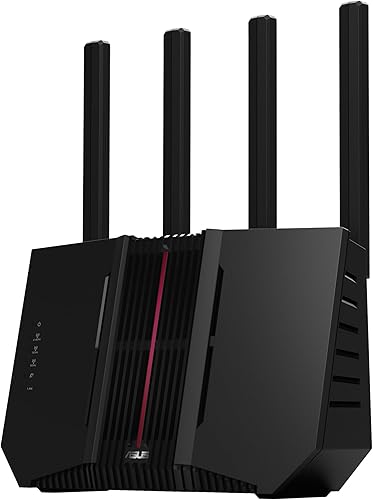
Best for: Users seeking a balanced, high-performance tri-band router.
The ASUS RT-BE9700 offers a strong balance of WiFi 7 speed and versatile connection options. It supports 9.7 Gbps throughput and includes multiple WAN configuration choices to keep your internet active. The listing points to its subscription-free security as a major benefit for long-term ownership.
Strengths:
- Fast 9.7 Gbps wireless speeds using the latest generation of networking standards.
- Versatile WAN with 4G/5G tethering support
- Subscription-free triple-level network security
- Advanced site-to-site VPN capabilities
- Seamless AiMesh roaming support
Trade-offs:
- Lacks the extreme port count of gaming models
- Performance depends on environmental factors
Living with this router is straightforward, as the AiMesh system handles the heavy lifting for your whole-home coverage. The router includes subscription-free triple-level network security. It isn’t for users who require specialized gaming ports, as this model focuses on general high-speed connectivity.
| Best for | Why |
|---|---|
| General households | Balanced tri-band performance |
| Remote workers | Advanced VPN features |
| Growing families | Easy AiMesh expansion |
5. RT-BE86U WiFi 7 Gaming Router
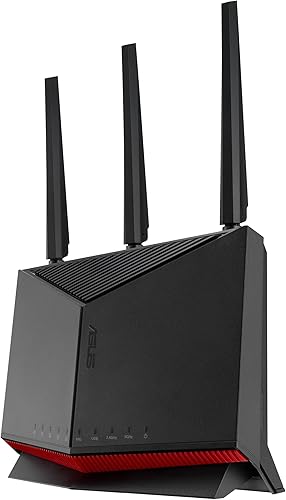
Best for: Mid-range users wanting 10G wired capabilities.
The ASUS RT-BE86U provides a powerful upgrade path with its 10G WAN/LAN port and WiFi 7 support. It’s built with a 2.6 GHz quad-core CPU to handle modern, demanding network applications. The listing highlights its ability to segment networks easily for IoT devices.
Strengths:
- 10 Gigabit Ethernet for high-speed wired
- Guest Network Pro for device segmentation
- Versatile WAN options including mobile tethering
- High-performance 2.6 GHz processor
- Next-generation wireless performance for dual bands.
Trade-offs:
- Dual-band limit versus tri-band models
- Requires high-speed modem to utilize 10G
You’ll benefit from the Guest Network Pro, which keeps your smart home devices separate from your personal data. It isn’t for users with massive, multi-story homes that need tri-band reach, as this model is limited to dual-band usage.
| Best for | Why |
|---|---|
| Budget-conscious power users | 10G wired capacity |
| Modern smart homes | Effective network segmentation |
| Small to medium offices | Strong processing power |
6. TUF Gaming BE6500 WiFi 7 Router

Best for: Gamers looking for durability and simple gaming optimization.
The ASUS TUF Gaming BE6500 is built for stability and gaming performance under the TUF series. Its listing focuses on durability and simple, three-step port forwarding for multiplayer gaming. It includes four 2.5G ports to ensure your gaming devices maintain priority.
Strengths:
- Durable, verified stable operation
- Dedicated Gaming Port for priority
- Simple Open NAT setup in 3 steps
- Four 2.5G ports for wired devices
- Subscription-free network security
Trade-offs:
- Dual-band only limits total throughput
- Fewer advanced features than ROG models
You’ll appreciate the simplicity of the mobile game packet prioritization when playing on your phone. This router is meant for those who want a reliable, tough device that just works for gaming. It isn’t for users who need the absolute highest speeds available, as it is a mid-tier model designed for modern wireless standards.
| Best for | Why |
|---|---|
| Casual gamers | Simple three-step port forwarding |
| Households | Durable, stable operation |
| Wired users | Quad 2.5G port configuration |
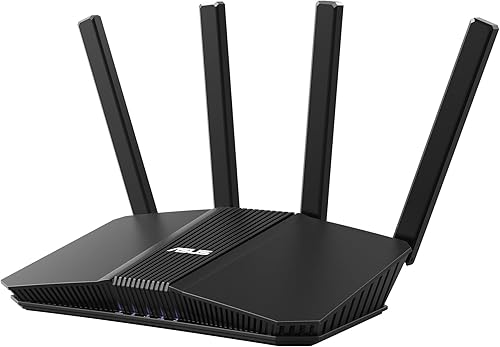
7. RT-BE58U WiFi 7 Router
Best for: Users entering the latest generation of wireless networking.
The ASUS RT-BE58U is an entry-level router that brings modern, next-generation wireless features to a broad audience. It includes Smart Home Master for managing IoT devices and VPNs easily. The listing highlights its ability to maintain stable connections via Multi-link Operation.
Strengths:
- Smart Home Master for IoT setup
- Versatile WAN options with mobile tethering
- Commercial-grade AiProtection Pro security
- AiMesh extendable network support
Trade-offs:
- Lower 3.6 Gbps top speed
- Basic port configuration for entry-level
Living with this router is simple, as it handles your basic security and smart home needs automatically. It isn’t for users with high-bandwidth professional needs, as the speed and port capacity are meant for standard home use.
| Best for | Why |
|---|---|
| First-time WiFi 7 users | Simple setup and management |
| Small apartments | Efficient dual-band coverage |
| Smart home beginners | Smart Home Master features |
8. RT-BE58 Go Travel Router WiFi 7 Dual-Band

Best for: Travelers needing secure and fast WiFi on the go.
The ASUS RT-BE58 Go is a pocket-sized router designed for travel. It allows you to create a secure private hotspot from public WiFi signals and supports 4G/5G mobile tethering. The USB-C power delivery makes it easy to use with your existing laptop or phone chargers.
Strengths:
- Portable design for travel
- Secure private hotspot from public WiFi
- 4G/5G mobile tethering support
- Universal USB-C power delivery
- Includes 3-year manufacturer warranty
Trade-offs:
- Not designed for large home coverage
- Limited wired port options
You’ll carry this in your bag to ensure your privacy at hotels or on cruises. It’s very easy to set up using the ASUS Router app, meaning you can get online securely within minutes. It isn’t for users who need a primary router for a large house, as its range is limited compared to stationary models.
| Best for | Why |
|---|---|
| Frequent travelers | Secure public WiFi access |
| Digital nomads | USB-C power convenience |
| Mobile users | 4G/5G tethering capability |
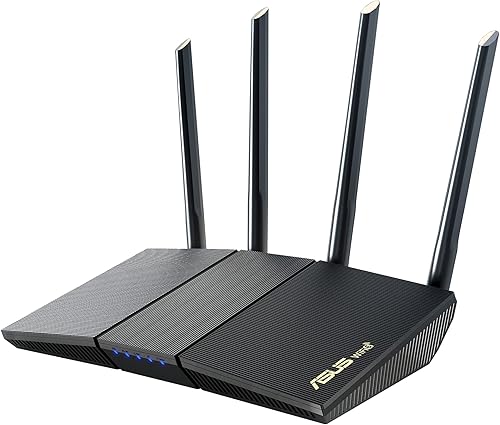
9. RT-AX3000S Dual Band WiFi 6 Extendable Router
Best for: Users needing reliable WiFi 6 performance on a budget.
The ASUS RT-AX3000S provides a solid WiFi 6 experience with decent total speeds of 3000Mbps. It supports OFDMA and MU-MIMO to handle multiple devices at once. The listing emphasizes its compatibility with AiMesh for easy network expansion.
Strengths:
- Efficient WiFi 6 throughput
- AiMesh compatible for easy roaming
- Supports OFDMA and MU-MIMO
- Built-in VPN capabilities
- Instant Guard for secure connections
Trade-offs:
- Established wireless technology (not the latest generation).
- Limited to basic port speeds
You’ll enjoy consistent performance for daily tasks like streaming and browsing. It isn’t for users who want to future-proof with the most current wireless standards.
| Best for | Why |
|---|---|
| Budget-conscious users | Reliable WiFi 6 performance |
| AiMesh users | Easy network expansion |
| General home use | Efficient device handling |
10. RT-AX1800S Dual Band WiFi 6 Extendable Router

Best for: Simplest setup for basic home internet needs.
The ASUS RT-AX1800S is designed for those who want a simple, secure router using established wireless standards. It features five Gigabit ports and commercial-grade security to protect your devices. The listing notes it’s easy to set up and manage, making it a great choice for non-technical users.
Strengths:
- Simple setup process
- Commercial-grade AiProtection Classic
- Five Gigabit ports for wired devices
- High-efficiency wireless connectivity with MU-MIMO.
- Includes ASUS Instant Guard VPN
Trade-offs:
- Lower overall speed than WiFi 7
- Basic feature set for power users
Living with this router means you can enjoy a stable internet connection for your basic home needs without constant maintenance. You’ll appreciate the subscription-free security that protects your devices. It isn’t for power users who need high-speed 10G ports or the most advanced wireless protocols.
| Best for | Why |
|---|---|
| Home internet beginners | Extremely simple setup |
| Small homes | Reliable Gigabit wired ports |
| Security-conscious | Subscription-free protection |
Side by Side
The table below provides a quick comparison of the key specifications for each router to help you decide which model matches your specific home or office networking requirements.
How to Judge One of These
Wireless Standards and Speed
The generation of WiFi (WiFi 6 vs. WiFi 7) dictates how much data your router can move. WiFi 7 introduces 320 MHz channels and faster processing, which reduces lag for demanding tasks. Check your current devices; if you have older phones or laptops, they may not support the newest standards. You can confirm your device compatibility by checking the wireless specifications in your device’s settings menu or the manufacturer’s official support documentation.
Wired Port Connectivity
High-speed wired ports are essential for gaming consoles, PCs, and home servers. Look for 2.5G or 10G ports if you have a fast internet plan or move large files between devices on your network. A router with only 1G ports will limit your speed if your internet service is faster than that. Always verify how many devices you need to plug in directly versus how many you plan to connect via wireless signals.
Security and Software Features
Modern routers offer more than just internet; they provide security, parental controls, and network segmentation. Features like AiProtection help block threats before they reach your devices, while guest networks keep your smart home gear separate from your main traffic. Check if the router includes a subscription-free security suite, as some brands charge monthly fees for these protections. Enjoy seamless roaming with rich, advanced features by adding any AiMesh-compatible router.
Closing
The ASUS RT-BE88U offers high speed and wired capacity, while the ASUS RT-BE58 Go is designed for travelers needing secure access on the move. Once you have identified your primary need, check your modem’s port capacity and pick the router that fits your setup.
Related guides
Frequently Asked Questions
Does this router work with my existing internet provider?
Yes, these routers work with almost all internet providers as long as you have a modem or a gateway from them. You simply connect the router to your modem via the included Ethernet cable to begin the setup. Ensure your modem has an Ethernet output to allow the router to receive the signal for your home network.
What does the first week with a new router look like?
The first week involves plugging the device in and using the brand’s mobile app to complete the initial setup. You’ll set your network name and password, and the router will likely perform a firmware update to ensure it has the latest security features. Once configured, the device will automatically manage your connections without needing daily input from you.
What parts of the router have to be replaced?
Routers themselves don’t have parts that need regular replacement, but you should keep your firmware updated for continued performance. Other than that, the hardware is designed to operate continuously as long as it has power and adequate airflow.
What will this router not do for me?
A router can’t increase the speed of the internet plan you pay for from your service provider. If your plan is slow, the router will provide the best possible distribution of that speed, but it can’t create bandwidth that doesn’t exist.
Is the simplest router here enough for my home?
The simplest model is perfect if you have a standard internet plan and use your network for browsing, streaming, and basic smart home tasks. If you don’t have high-end gaming consoles or a need for ultra-fast local file transfers, you won’t notice the performance gap compared to the premium models. It provides the same security and reliability for everyday home connectivity.
Final Thoughts
Once you’ve settled on the model that fits your space, don’t just plug it in and forget about it. Take a few minutes to update the firmware and customize your security settings. You’ll find that a little extra setup today makes your daily connection much faster and more reliable tomorrow.