
If you own a Hayward Aqua Plus salt chlorinator, you know how important it is to keep your pool water clean and balanced. But did you know that calibrating your salt cell is key to making sure your system works efficiently?
Without proper calibration, your pool might not get the right amount of chlorine, leading to cloudy water or even algae growth. In this guide, you’ll learn exactly how to calibrate your Hayward Aqua Plus salt cell step-by-step. By the end, you’ll have the confidence to maintain crystal-clear water and keep your pool safe for everyone to enjoy.
Let’s dive in and get your system running at its best!
Hayward Aqua Plus Salt Cell Basics
The Hayward Aqua Plus Salt Cell is a key part of saltwater pool systems. It helps keep pool water clean and clear. Understanding its basics makes calibration easier. This section covers its main features and how it works.
Key Features
The Aqua Plus Salt Cell has strong titanium plates. These plates create chlorine from salt in the water. It fits many Hayward pool systems. The cell is designed to last long and resist wear. It needs regular cleaning to keep working well. The unit shows salt levels to help maintain balance.
How It Works
The salt cell uses electricity to turn salt into chlorine. This process sanitizes pool water without adding chemicals. Salt flows over the titanium plates inside the cell. When current passes, it produces chlorine gas. This gas dissolves in the water, killing germs. This keeps the pool safe for swimming. The system automatically adjusts to salt levels.

Credit: www.inyopools.com
Signs Your Salt Cell Needs Calibration
Knowing when your Hayward Aqua Plus salt cell needs calibration is important. A salt cell that is out of calibration can cause poor water quality. It may also shorten the life of your pool equipment. Watch for certain signs to keep your pool running smoothly.
These signs often show up as changes in how your salt system works. Catching these early can save time and money on repairs. Keep your pool water clean and safe by acting on these clues quickly.
Common Issues
Your salt cell may face common problems if calibration is off. One issue is inconsistent chlorine levels in the water. You might notice the water feels less clean or smells different. Salt build-up on the cell plates can also cause errors. This build-up blocks proper salt flow and affects readings.
Another problem is the system shutting off unexpectedly. The control panel may show error codes or warnings. These indicate the salt cell is not working as it should. Over time, the salt cell’s performance will drop if left uncalibrated.
Performance Indicators
Performance indicators help you spot calibration needs. The chlorine output may be lower than normal. Your salt system might struggle to maintain the right salt level. Watch the display for unusual readings or flashing lights. These are signals that the salt cell needs attention.
Pool water testing can confirm if chlorine levels are off. If the salt reading does not match test results, calibration is needed. Regular checks of these indicators keep your system accurate. This ensures your pool stays clean and safe for swimming.
Preparing For Calibration
Preparing for calibration is a key step to keep your Hayward Aqua Plus Salt Cell working well. This step helps ensure accurate salt level readings and improves pool water quality. Taking time to prepare properly makes the calibration process smooth and effective.
Gathering the right tools and following safety rules will protect you and your equipment. This preparation reduces mistakes and saves time.
Required Tools
Have these tools ready before you start calibration:
- Salt test strips or a digital salt meter
- A clean cloth to wipe the salt cell
- Screwdriver or any tool needed to open the cell cover
- Owner’s manual for reference
- Clean water for rinsing
These tools help you check salt levels and keep the cell clean for better readings.
Safety Precautions
Turn off the pool pump and control system before starting. This prevents electric shock and damage.
Wear gloves to protect your hands from pool chemicals. Avoid touching electrical parts with wet hands.
Work in a dry area to reduce the risk of slipping or accidents. Keep children and pets away during calibration.
Step-by-step Calibration Process
Calibrating the Hayward Aqua Plus Salt Cell is essential for efficient pool maintenance. This process ensures the salt levels are accurate, keeping your water clean and safe. Follow these clear steps to calibrate your salt cell quickly and correctly.
Accessing The Control Panel
Start by locating the control panel of your Aqua Plus system. This panel displays all settings and readings. Press the power button to turn it on. Use the menu buttons to navigate to the calibration or settings option. This area lets you adjust the salt levels easily.
Adjusting Salt Levels
Check the current salt reading on the display. Compare it with your pool’s recommended salt level. Use the arrow keys to raise or lower the salt level setting. Adjust slowly and confirm each change. Accurate salt levels improve chlorine production and water quality.
Resetting The Cell
After adjusting salt levels, reset the salt cell for calibration. Find the reset option in the control panel menu. Press and hold the reset button until the display shows confirmation. This step recalibrates the sensor for precise readings. Resetting helps keep your system running smoothly.
Testing Salt Levels After Calibration
Testing salt levels after calibrating your Hayward Aqua Plus salt cell is important. It ensures the system works correctly and keeps your pool safe. Accurate salt levels help the cell produce chlorine effectively. This prevents algae and bacteria growth in the water.
Regular testing protects the cell from damage. It also helps maintain a clear and clean pool. Follow simple steps to test salt levels after calibration. Use the right tools and understand the results.
Using Salt Test Kits
Salt test kits are easy to use and affordable. They measure the salt concentration in your pool water. Take a water sample from the pool. Follow the kit instructions carefully. Usually, you add drops of a testing solution to the sample.
The solution will change color based on salt levels. Match the color to the chart provided in the kit. This shows the salt concentration in parts per million (ppm). Test kits are available in liquid or strip form. Choose one that fits your needs and budget.
Interpreting Results
Check the salt level against the recommended range for your salt cell. The ideal range for Hayward Aqua Plus is usually between 2700 and 3400 ppm. If the salt level is too low, the cell may not produce enough chlorine. Add salt slowly and retest after mixing.
If the salt level is too high, it can harm the salt cell and pool equipment. Dilute the water by adding fresh water to lower salt concentration. Keep testing regularly to maintain salt levels within the right range. This keeps your pool water safe and your salt cell running smoothly.

Credit: www.youtube.com
Troubleshooting Calibration Issues
Calibrating your Hayward Aqua Plus Salt Cell ensures your pool’s salt levels stay balanced. Sometimes, calibration issues occur. These problems can affect the pool’s cleanliness and safety. Troubleshooting helps you fix these problems quickly. Understanding common errors and knowing when to get expert help can save time and avoid damage.
Common Errors
One common error is incorrect salt level readings. This happens if the sensor is dirty or coated with minerals. Clean the sensor with a soft cloth to improve accuracy. Another issue is poor water flow through the cell. Check for blockages in the plumbing or debris in the cell. Low salt concentration may cause the system to fail calibration. Use a salt test kit to confirm proper salt levels. Incorrect installation or loose wiring can also cause errors. Make sure all connections are tight and secure. Resetting the system sometimes resolves minor glitches. Turn off the power, wait a minute, then turn it back on.
When To Seek Professional Help
Seek professional help if calibration errors persist after troubleshooting. A certified technician can inspect and repair complex electrical or mechanical issues. Avoid trying to fix wiring or internal components yourself. Professionals use special tools to diagnose sensor or board problems. Regular maintenance by experts can prevent future calibration problems. Call a technician if the salt cell shows error codes repeatedly. Persistent low salt readings despite proper salt levels also need expert attention. Timely service keeps your pool safe and your salt cell working well.
Maintaining Your Salt Cell
Maintaining your Hayward Aqua Plus Salt Cell is key to keeping your pool clean and safe. A well-kept salt cell works better and lasts longer. Regular care helps avoid costly repairs and ensures the system runs smoothly.
Regular Cleaning Tips
Clean the salt cell every 3 to 6 months. Turn off the pool system before cleaning. Remove the cell and rinse off any dirt or debris with a hose. For tough scale, soak the cell in a mixture of one part muriatic acid to ten parts water. Always wear gloves and eye protection when handling acid. Rinse the cell well after soaking. Never use a wire brush or sharp objects to clean the plates. This can damage the cell.
Extending Cell Lifespan
Check salt levels regularly to keep them within the recommended range. Low salt can harm the cell. Avoid running the system with low pool water levels. High temperatures can shorten cell life. Keep your pool water balanced by testing pH and alkalinity weekly. Replace the cell every 3 to 5 years, depending on use. Store the cell in a dry, cool place during the off-season.
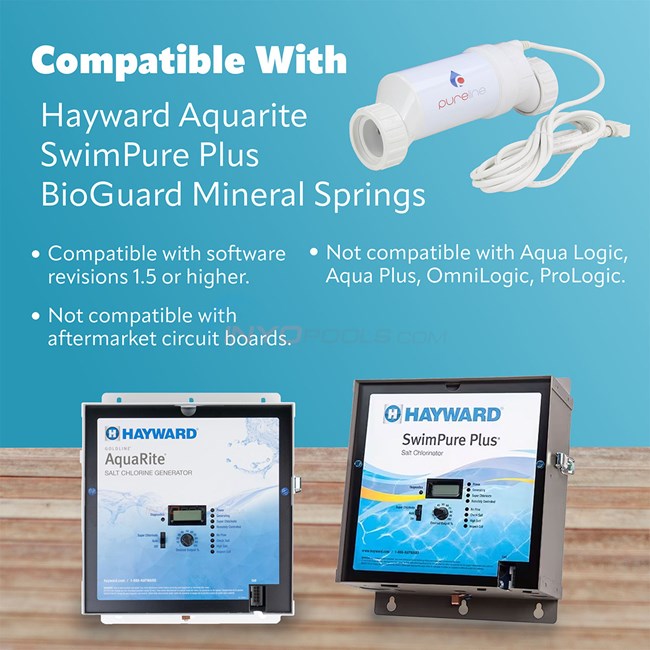
Credit: www.inyopools.com
Frequently Asked Questions
How Do I Know If My Hayward Aqua Plus Salt Cell Needs Calibration?
Check the salt level reading on your control panel. If it shows incorrect or inconsistent values, calibration is needed.
How Often Should I Calibrate My Hayward Aqua Plus Salt Cell?
Calibrate the salt cell every 3 to 6 months or after cleaning the cell for best performance.
What Tools Are Needed To Calibrate The Hayward Aqua Plus Salt Cell?
You only need a salt test kit and access to the control panel for calibration.
Can I Calibrate The Hayward Aqua Plus Salt Cell Myself?
Yes, calibration is simple and can be done by following the control panel instructions carefully.
What Is The Correct Salt Level For Hayward Aqua Plus Salt Cell Calibration?
Maintain salt levels between 2700 and 3400 ppm for accurate calibration and safe pool operation.
Why Is Calibration Important For My Hayward Aqua Plus Salt Cell?
Calibration ensures accurate salt readings, which helps keep your pool water clean and balanced.
What Should I Do If Calibration Does Not Fix My Salt Cell Reading?
Try cleaning the salt cell and retesting. If problems persist, contact a professional for help.
Conclusion
Calibrating your Hayward Aqua Plus salt cell keeps your pool clean and safe. Regular checks help the system work at its best. Follow the steps carefully for accurate results every time. Keep the salt level balanced to avoid damage. Taking a few minutes to calibrate can save you money later.
Enjoy clearer water and less maintenance hassle. Trust the process and stay consistent. Your pool will thank you.