
Are you seeing a flashing green light on your Pentair Intellichlor cell and wondering what it means? This little signal can be confusing, but it’s actually trying to tell you something important about your pool system.
If you want to keep your pool clean and your equipment running smoothly, understanding this light is key. You’ll discover exactly why the green light is flashing and what steps you can take to fix it quickly. Keep reading to avoid costly damage and enjoy a sparkling pool all season long.
Credit: www.youtube.com
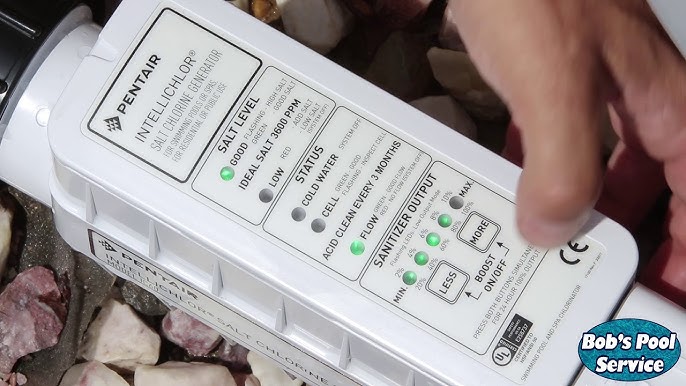
What The Green Light Means
The Pentair Intellichlor cell uses a green light to show its current status. This light helps pool owners know if the system is working properly or if there might be an issue. Understanding what the green light means can save time and prevent damage.
Normal Operation Indicator
A steady green light means the Intellichlor cell is working well. It shows the cell is producing chlorine as it should. This steady glow confirms the system has power and is running correctly. You can trust your pool is being sanitized effectively when the green light stays solid.
When To Be Concerned
If the green light flashes or blinks, this signals a problem. It might mean the cell needs cleaning or there is a flow issue. A flashing green light can also warn of electrical faults or sensor errors. Watch the light carefully and check the system manual for specific trouble codes. Acting fast can avoid bigger problems with your pool system.
Credit: www.reddit.com
Common Causes Of Flashing Green Light
The Pentair Intellichlor cell light flashing green often signals an issue with the system. Understanding common causes helps fix the problem fast. This section explains the main reasons behind the flashing green light. These causes include dirty cell plates, low salt levels, flow issues, and electrical problems.
Dirty Cell Plates
Dirty cell plates stop the Intellichlor from working properly. Calcium and minerals build up on the plates. This buildup blocks the chlorination process. Cleaning the plates regularly keeps the system running well. A flashing green light often means the plates need cleaning.
Low Salt Levels
Salt is essential for the Intellichlor to create chlorine. Low salt levels cause the cell light to flash green. The system cannot produce enough chlorine. Testing salt levels helps find this issue. Adding salt to reach the right amount stops the flashing.
Flow Issues
Water flow is important for the Intellichlor to work. Low or no flow can cause the green light to flash. Blocked or broken pipes reduce water flow. The flow switch might also be faulty. Checking for flow problems can fix the flashing light.
Electrical Problems
Electrical issues affect the Intellichlor’s performance. Loose wires or bad connections cause errors. The control board might have faults too. These problems can trigger the green light to flash. Inspecting electrical parts helps solve the issue.
Step-by-step Troubleshooting
Troubleshooting a Pentair Intellichlor cell light flashing green is simple with clear steps. This guide helps you find and fix common issues fast. Follow each step carefully for best results. No need for extra tools or special skills.
Check Salt Concentration
First, check the pool’s salt level. The Intellichlor needs salt between 2700 and 3400 ppm. Use a salt test kit to measure it. If salt is too low or high, add or remove salt accordingly. Proper salt level keeps the system working smoothly.
Inspect And Clean Cell
Next, look at the chlorinator cell for buildup. Calcium or dirt can block the cell and cause flashing. Remove the cell following the manual instructions. Clean with a mild acid solution or a special cleaner. Rinse it well before reinstalling to avoid damage.
Verify Water Flow
Good water flow is essential for Intellichlor to work. Check that the pool pump and filter run properly. Make sure valves are open and no blockages exist. Low flow triggers the green light to flash. Fix flow issues to restore normal operation.
Reset The System
Resetting the Intellichlor can clear errors causing the green light to flash. Turn off the system and unplug it. Wait for at least one minute to allow a full reset. Plug it back in and turn on the power. Watch the light to see if it stops flashing.
Preventive Maintenance Tips
Keeping the Pentair Intellichlor cell in good shape helps avoid the green light flashing. Regular care keeps your pool system working well. It also extends the cell’s life and improves water quality. Follow these simple preventive maintenance tips to keep things smooth.
Regular Cleaning Schedule
Clean the Intellichlor cell every 3 to 6 months. Remove any calcium buildup or debris. Use a gentle acid wash or a mild cleaner. Avoid harsh chemicals that can damage the cell. Regular cleaning helps maintain strong chlorine production.
Salt Level Monitoring
Check the salt level in your pool often. Keep it within the recommended range, usually 2700 to 3400 ppm. Low salt levels cause the green light to flash. High salt can also harm the cell. Use a salt test kit for accurate readings.
System Inspections
Inspect the entire Intellichlor system monthly. Look for loose wires or corrosion on connectors. Check the power supply and control panel for errors. Fix small issues quickly to prevent bigger problems. A well-maintained system runs more efficiently.
When To Call A Professional
Knowing when to call a professional for your Pentair Intellichlor cell is important. Some issues need expert help to avoid damage or safety risks. This section explains key signs that require a technician’s attention.
Persistent Light Flashing
A green light that keeps flashing non-stop is a warning sign. It may mean the cell is not working properly. Cleaning or resetting might not fix this problem. Persistent flashing signals a deeper issue that needs a professional check. Ignoring it can lead to bigger damage or system failure. A technician can diagnose and repair the root cause safely.
Electrical Component Issues
Electric parts inside the Intellichlor cell can fail or short circuit. This can cause irregular flashing or no light at all. Electrical problems are risky to handle without training. Professionals have the tools and knowledge to fix wiring or component faults. Attempting DIY repairs might cause injury or worsen the problem. Calling a professional ensures safe and proper repair of electrical issues.

Credit: www.reddit.com
Frequently Asked Questions
What Does A Flashing Green Light On Pentair Intellichlor Mean?
A flashing green light means the cell is cleaning itself. This is normal and happens every 24 hours to remove buildup.
How Long Does The Green Light Flash During Cleaning?
The green light usually flashes for about 3 to 5 minutes. This short cycle helps keep the cell working well.
Can A Flashing Green Light Indicate A Problem?
Generally, a flashing green light is not a problem. It shows the system is running its cleaning cycle properly.
Why Does The Intellichlor Cell Clean Itself Regularly?
Self-cleaning removes calcium and minerals from the cell. This keeps the chlorine output steady and efficient.
Should I Turn Off The System If The Green Light Flashes?
No need to turn off the system during the green light flash. Let the cleaning cycle finish to protect the cell.
What If The Green Light Keeps Flashing Continuously?
Continuous flashing could signal a system error. Check the user manual or contact support if it doesn’t stop.
How To Maintain The Intellichlor Cell For Best Performance?
Clean the cell yearly and check water chemistry regularly. Proper maintenance prevents issues and extends cell life.
Conclusion
The green light flashing on your Pentair Intellichlor cell signals a need for attention. Check for common issues like dirty cells or low salt levels. Regular cleaning and proper maintenance keep your system working well. Watch the light and act quickly to avoid bigger problems.
Taking simple steps helps your pool stay clean and safe. Stay calm and follow easy fixes to solve the flashing green light. Your pool will thank you with clear, healthy water.