
You can set your pump speeds and run times to save energy by programming the pentair superflo vst using the control buttons on the drive. This process involves setting three distinct speed programs, each with a specific duration, to keep your pool water clean while lowering electricity usage. It’s best suited for pool owners who want to automate their filtration cycles and reduce costs without needing an external controller.
Preparing your Pentair SuperFlo for programming
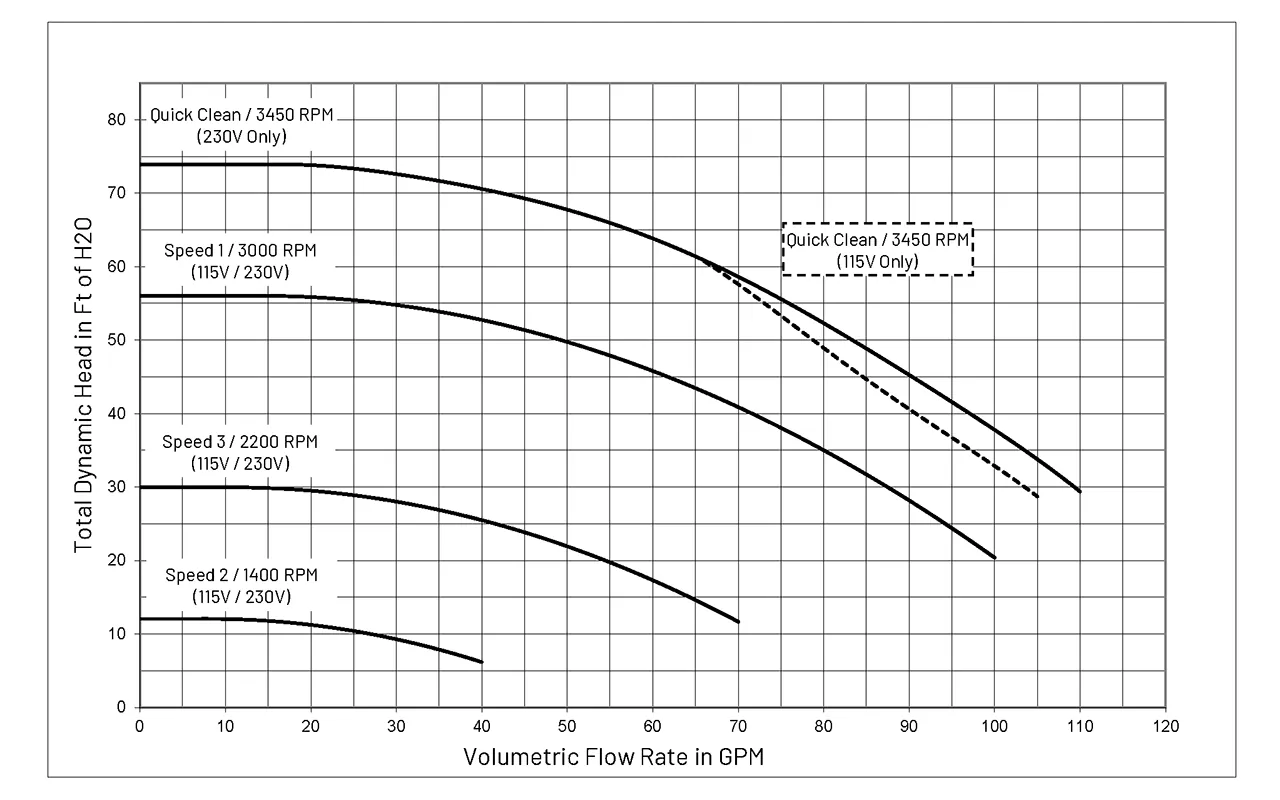
To complete this programming, you need a few items on hand. Having these ready prevents you from needing to stop in the middle of your work.
A flat-head screwdriver is essential for removing the drive cover if you need to inspect wiring. Use a precision-sized driver to avoid stripping the soft metal screws often found on these housings.
Calculate your pool’s total volume in gallons before you begin. You need this figure to determine the turnover rate, which ensures your water stays clear without wasting electricity. If your pump runs too fast for your filter size, you risk blowing out the internal filter grids or cartridges.
Keep the manufacturer’s installation and user guide nearby for specific error code references. These codes often indicate flow issues that are impossible to diagnose by sight alone.
Use a notebook to write down your desired RPM settings and run hours for each program. Many owners forget their specific configuration after a power outage resets the clock.
A flashlight helps you see the digital display clearly if your pump sits in a shaded equipment pad. If the screen appears blank, check the main breaker before assuming the pump has failed.
If you have a digital controller installed, your programming might happen through that device instead of the pump’s onboard keypad. Always verify your pump’s serial number against the manufacturer’s documentation to confirm you have the correct VST model.
If you’re unsure about your electrical connections, contact a licensed electrician. A loose connection at the terminal block creates heat that will melt the pump’s wiring harness within weeks. If the pump hums but refuses to turn, stop immediately and contact a service professional, as the drive or motor may have an internal fault. If the motor smells like burning plastic, cut the power at the breaker to prevent a fire.
Programming your pump speeds
Follow these steps to set your daily cycles. Ensure the pump is powered on and the display shows the current status before you start.
- Press the “Menu” button to enter the main menu.
- Use the “Select” button to scroll until “Programs” appears on the screen.
- Press “Select” again to enter the program menu, then choose “Speed 1.”
- Set your desired RPM for the first cycle using the up and down arrows.
- Press “Select” to confirm the speed and move to the time duration setting.
- Input the number of hours you want the pump to run at this speed.
- Repeat these steps for “Speed 2” and “Speed 3” to complete your daily filtration schedule.
- Press the “Start/Stop” button to save your settings and begin the operation.
Careful: Don’t set your RPM too low for your pool cleaner; if the flow is weak, the cleaner won’t move, and you’ll waste energy. Tip: Start with a higher speed for the first two hours to prime the system, then drop to a lower speed for the rest of the day to save power.
Adjusting for pool usage
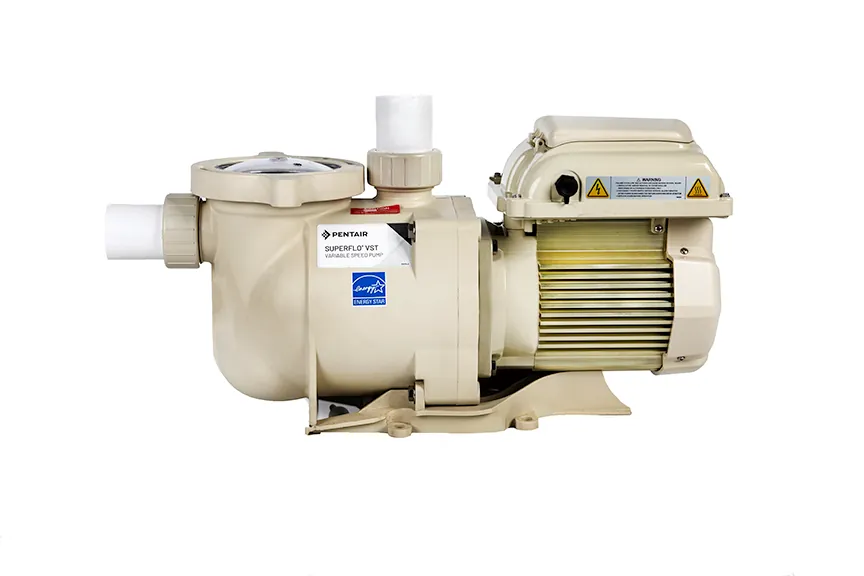
The time and energy required vary based on how you use your pool. Use the table below to adjust your settings based on your specific situation.
| Situation | Typical Run Time | Primary Change | What to Monitor |
|---|---|---|---|
| Daily Filtration | 8–10 hours | Lower RPM | Water clarity |
| Heavy Swimming | 12+ hours | Higher RPM | Skimmer suction |
| Cold Winter | 4–6 hours | Lower RPM | Pipe freezing |
| Adding Chemicals | 2 hours | High speed | Chemical mixing |
Start with a conservative, longer run time and decrease it by one hour per day until you find the minimum time needed to keep the water clear. If the water turns cloudy or develops a green tint, you have crossed the threshold and must immediately increase the cycle by two hours.
Pool owners often make the mistake of running the pump only at night to save on electricity costs. This ignores the fact that UV rays break down chlorine rapidly during the day, leaving your water vulnerable to algae blooms. If you live in a region with high daytime temperatures, prioritize running the pump during the hottest hours to ensure consistent chemical distribution.
If your pool features a salt cell, you must run the pump long enough to generate sufficient chlorine for your specific gallon capacity. A common error is assuming the pump needs to run 24 hours a day to keep the water safe.
In reality, most residential pools only require a full turnover of the water volume once daily. If you notice the water remains clear but the pressure gauge on your filter rises quickly, your pump is running too long and trapping unnecessary debris, which forces you to clean the filter cartridges far more often than necessary.
Verifying your programming
A successful setup shows the pump running at the programmed RPM and the correct time remaining on the display. If the pump doesn’t start or shows an error, it’s often due to a mismatch between the set speed and the system’s ability to maintain prime. This usually happens if the RPM is set below the threshold required to push water through your specific filter system.
To prevent this, ensure your primary speed is high enough to activate your flow switch or pressure gauge. If the pump makes a loud grinding noise or vibrates excessively, stop the unit immediately and check for air leaks in the suction line. Consistent performance relies on clean filter baskets, so clear them weekly to ensure water flows freely.
Check your flow switch by observing the “flow” indicator on the control panel. If the indicator remains dark while the pump is running, your RPM is too low to overcome the head pressure of your plumbing. Increase the speed in increments of 100 RPM until the indicator light activates. Don’t exceed the maximum rated RPM for your specific pipe diameter, as high velocity can lead to cavitation and pipe erosion.
A common mistake is assuming that a lower RPM always saves energy without checking the total system turnover. If you drop the speed so low that the pump fails to cycle the pool volume as often as required, you’ll inevitably face algae blooms; consult your owner’s manual for the recommended frequency based on your specific usage.
You can verify your flow by checking the pressure gauge on your filter tank. If the needle sits below the “normal” range you recorded during your first clean-filter start-up, your pump is moving insufficient water.
Safety rules and maintenance
The primary rule for your pump is to maintain a consistent flow to prevent algae growth and keep the water sanitized. Aim for at least eight hours of operation daily during peak summer months to ensure the entire volume of your pool cycles through the filtration system.
Always keep the filter pressure within the range specified on your filter tank label. If the gauge needle enters the red zone, backwash the filter immediately. Operating above this threshold forces the pump to work against excessive resistance, which leads to premature motor burnout.
After you finish programming, ensure the drive cover is securely closed to protect the electronics from moisture and debris. A loose seal allows humidity to corrode the internal circuit board, a common mistake that often results in a total system failure within two seasons.
Record your final settings in a logbook so you can restore them if a power surge resets the drive. If you notice the pump running hot or smelling of burnt plastic, shut off the power at the circuit breaker immediately. Don’t attempt to restart the unit until the motor housing has cooled to the touch.
Any issues involving internal wiring or motor failure require a qualified pool technician to prevent voiding your warranty or causing permanent damage to the pump. If the pump makes a high-pitched whining sound, check the impeller for debris before calling for service. If the noise persists despite a clear intake, the bearings are likely worn. Replace them promptly to avoid a complete seizure of the motor shaft.
Alternative programming options
External control systems
You can connect the pump to an automation system like the Pentair IntelliCenter. This moves all programming tasks to a central interface, which is useful if you have lights or heaters tied to the same schedule.
Manual override mode
If you have a party and need immediate filtration, use the “Quick Clean” button. This overrides your saved programs to run at a high speed for a set time before returning to your normal schedule.
Time clock integration
Some older pools use a mechanical time clock to cut power to the pump. If you have this, you must keep the clock set to “On” 24/7 so the VST drive always has power to maintain its internal memory.
Frequently asked questions
Can I run my pump 24 hours a day?
Yes, you can run the pump continuously, and doing so at a very low RPM is often more efficient than running it at high speed for a short time.
How long should the pump run for daily cleaning?
Most residential pools need 8 to 10 hours of operation to turn over the entire volume of water once through the filter.
Is it safe to change programs while the pump is running?
Yes, you can adjust the speeds and times while the motor is spinning, and the drive will update its operation immediately.
What happens if the power goes out?
The pump uses non-volatile memory to save your programmed settings, so it will resume your schedule once power returns.
Why is my pump showing an error code?
The pump shows an error code when it detects a communication fault, a temperature spike, or a voltage issue, which you should verify against your manual.
How often should I check the pump settings?
You should check your settings every season or after any major changes to your pool equipment to ensure the flow remains optimal for your filter.
Conclusion
Programming the pump correctly ensures your system runs efficiently year-round. By balancing your RPM settings with your pool’s specific volume, you can maintain clean water while keeping energy costs low. Remember to check your filter pressure gauge regularly, as this is the best indicator that your programmed speeds are providing enough flow for proper filtration.
