
A cascading failure is a chain reaction where the collapse of one component causes others to fail, eventually leading to a total system breakdown. It happens when a single point of error shifts its entire load onto neighboring parts. If those parts are already near their capacity, they fail immediately, which moves the burden further down the line until the whole network stops working.
How a cascading failure happens
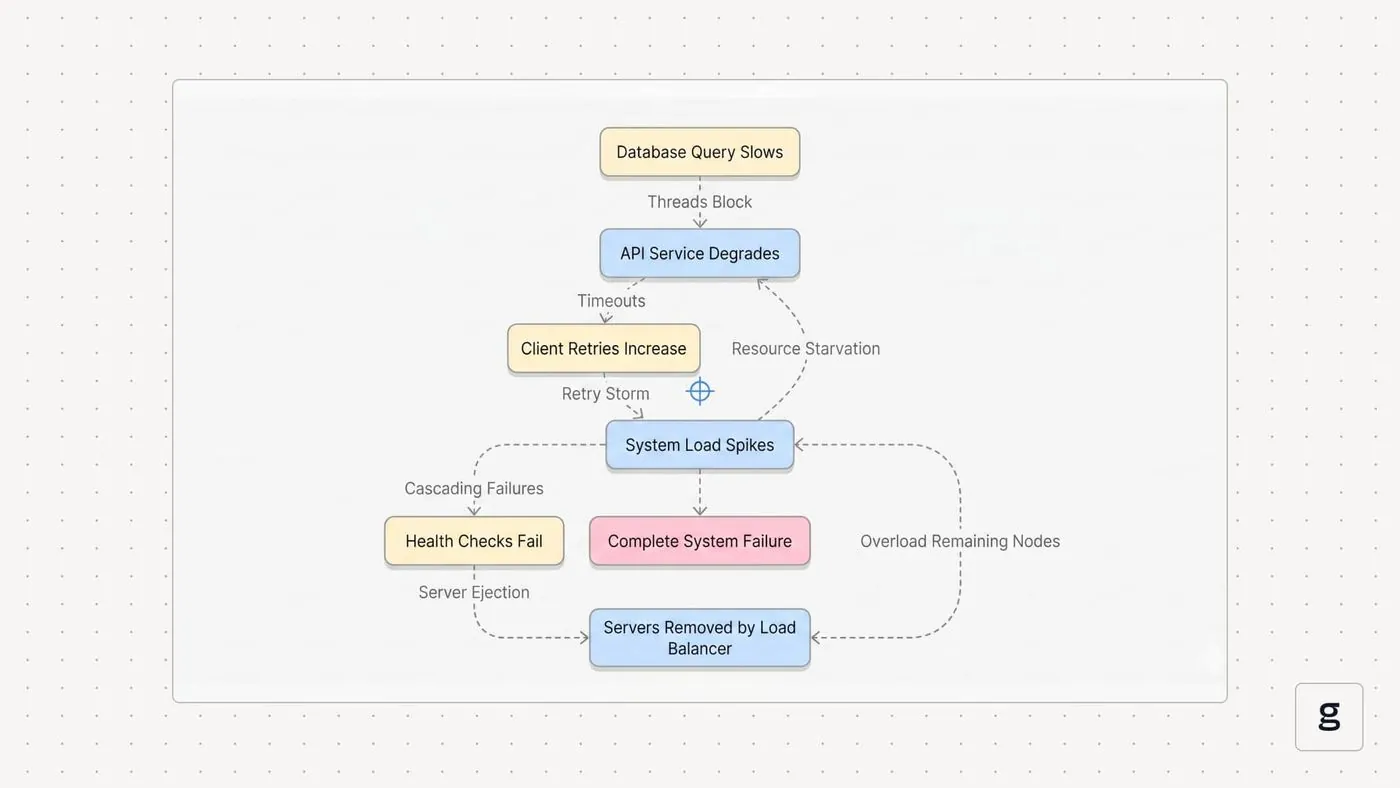
This process is common in power grids, computer networks, and even supply chains. It starts when one element can’t handle the stress put upon it. Instead of stopping, the system tries to reroute the demand to other available nodes. If you have a stable system, it absorbs the shock. If you have a weak link, that link breaks, forcing the next one to take on even more weight than it was designed for.
The speed of this event depends on the connectivity of the system. In highly integrated networks, the failure travels at the speed of data or electricity. According to the Department of Energy, modern power grids rely on automated protection devices to isolate faults before they spread across the entire transmission network. If these devices fail to trigger, the imbalance causes a massive, area-wide blackout within seconds.
Once you cross it, the rerouted demand creates a feedback loop that destroys the next component faster than the system can recalibrate.
The most common mistake is assuming that adding more nodes always increases resilience. In reality, extra connections often provide more paths for a failure to propagate. If your network is highly centralized, prioritize local isolation over total system connectivity.
Factors that change the outcome
| Situation | What changes | What to do instead |
|---|---|---|
| Redundant systems | Load capacity | Use failover nodes |
| Strong isolation | Fault spread | Install circuit breakers |
| High demand | Stress levels | Shed non-essential loads |
| Slow monitoring | Response time | Automate detection systems |
| Manual overrides | Human error | Set hardware limits |
Redundant systems only provide true protection if they run on independent power circuits. If your primary and backup nodes share a single rack-level power distribution unit, a localized surge will kill both simultaneously. Always verify that failover hardware resides in a separate physical zone.
Circuit breakers effectively stop fault spread, but they introduce a hidden risk of cascading failure if set too aggressively. If your system trips at 80% capacity, you may trigger a “thundering herd” effect as nodes attempt to restart simultaneously.
When demand exceeds capacity, the most common mistake is attempting to throttle all traffic equally. This slows response times for everyone, often leading to a total system collapse. Instead, prioritize traffic based on user authentication level. If the request is a background sync, drop it immediately to preserve bandwidth for active transactions.
Automate detection systems only when you have defined clear baseline metrics. If you automate based on raw CPU usage alone, you’ll trigger false positives during routine batch processing. Always anchor your automation to latency percentiles rather than resource consumption.
How to stop a system collapse
-
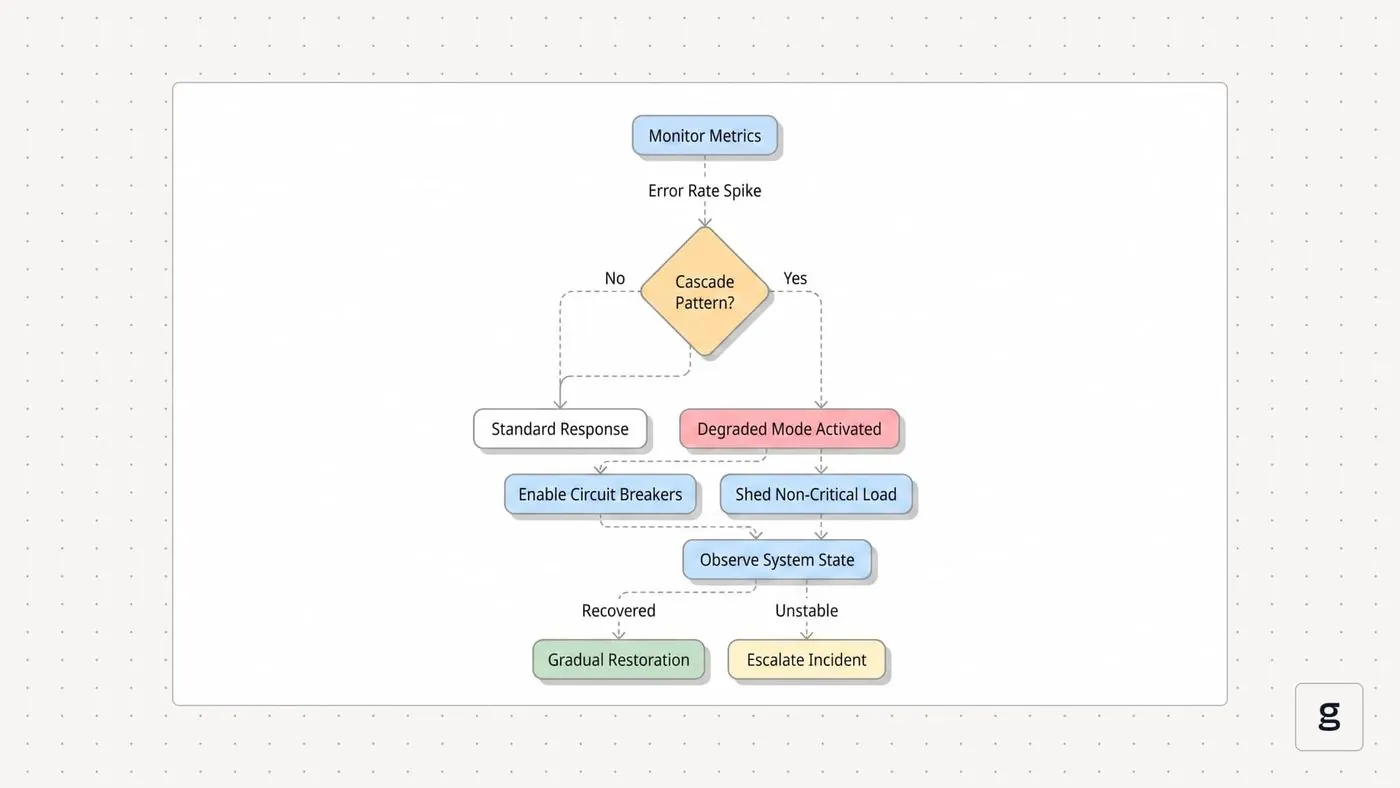
Identify your most critical components that support the highest volume of traffic or load. Map these dependencies visually to see where a single point of failure could cascade across your entire architecture.
-
Install sensors that monitor the health of these parts in real-time to detect early signs of stress. Look specifically for latency spikes or memory leaks, as these often precede a total crash by minutes.
-
This prevents a “thundering herd” effect where a struggling node consumes all available resources before failing.
-
Create isolated zones so that a failure in one area can’t physically reach the next. Use circuit breakers that trip instantly when a zone stops responding to heartbeat signals.
-
Test your system by simulating a failure in one node to see if the others handle the extra load. If the secondary nodes crash during this test, your failover logic is flawed.
Errors that destroy system stability
Ignoring small, frequent warnings creates a “normalization of deviance” where your team stops seeing red flags as threats. When you treat a recurring memory leak as a background noise rather than a systemic symptom, you eventually hit a hard crash that corrupts your database.
Overloading a single circuit relies on the flawed assumption that your average load equals your maximum capacity. If your primary server handles 70% of traffic, a sudden spike in user activity will trigger a cascading failure across the entire stack.
Disabling safety alarms to silence nuisance alerts is a high-stakes gamble. If you find yourself muting a specific alert more than twice a week, don’t turn it off; instead, adjust the threshold to filter out the noise.
Finally, failing to update your disaster recovery plan is a silent failure. If your documentation doesn’t account for new infrastructure, you’ll lose hours during a restoration attempt. Test your recovery steps quarterly.
Frequently asked questions
Can a single software bug cause a total system crash?
A single bug can cause a total crash if it triggers a resource leak that exhausts memory across all connected nodes. When the first node dies, the traffic it was handling hits the secondary nodes, which then crash from the sudden surge. This creates a loop that consumes the entire cluster within minutes of the initial error.
How do I know if my system is at risk?
You’re at risk if your system lacks independent zones or if a failure in one area automatically shifts its load to the rest of the network. Check your architecture diagrams to see if there are “bottleneck” components. If everything flows through one central hub, your system is vulnerable to a single point of failure.
Is it safe to run a system at 90% capacity?
It isn’t safe to run at 90% because you have no buffer to absorb a sudden spike if another node fails. Most engineers aim for 60% to 70% utilization during normal operation. This leaves enough “headroom” to handle the unexpected load of a neighboring component without triggering a wider, uncontrollable chain reaction across your network.
What happens if I ignore the first warning sign?
Ignoring the first sign usually leads to a much larger, more expensive repair that requires a total system restart. The initial warning is your chance to isolate the problem before it moves to healthy parts. Once the failure begins to cascade, you can no longer stop it by fixing the original part; you must shut down the whole system.
Does a larger system fail faster?
A larger system often fails faster because the complexity makes it harder to identify the source of the initial pressure. While large systems have more parts, they also have more connections that allow the error to jump from one section to another. You must rely on automated monitoring to see the failure before it spreads.
How long does a cascading failure take to resolve?
Recovery time depends on whether you have a pre-tested disaster recovery plan, but it typically takes several hours to restore a full network. You must clear the initial fault, verify the integrity of the secondary nodes, and bring the system back online in stages. Never attempt to restart everything at once, as the sudden surge can cause a second failure.
Conclusion
Effective system management requires constant vigilance. If you build your network with strong isolation and automated safety limits, you prevent small problems from becoming major disasters. Keep your load levels low and your monitoring systems active to ensure you catch the first sign of trouble before it has the chance to spread.
