
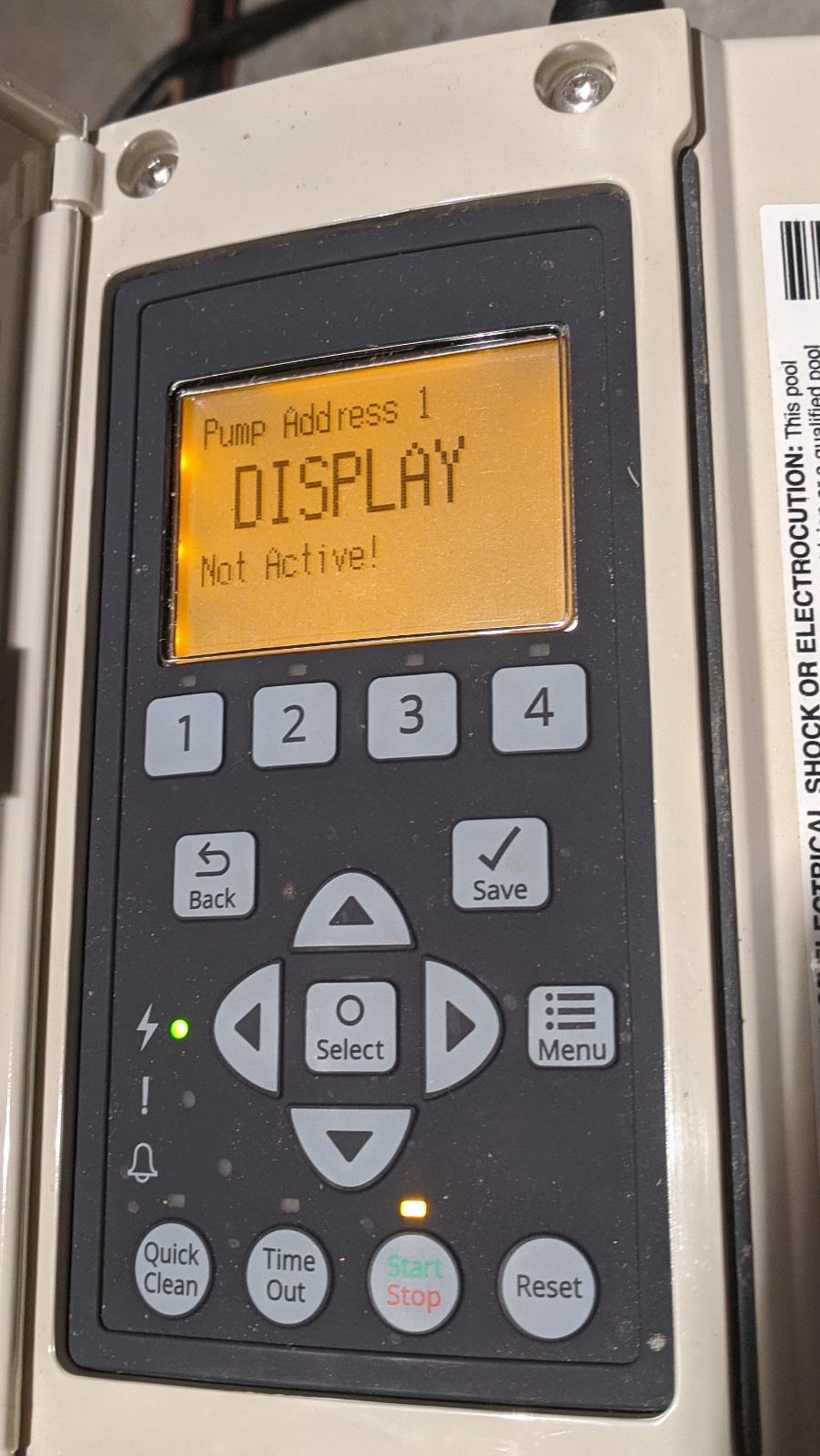
Is your Pentair pump display not active, leaving you puzzled and unsure what to do next? You rely on your pump to keep things running smoothly, so when the screen goes dark, it can feel frustrating and even stressful.
But don’t worry—this issue is more common than you think, and there are simple steps you can take to fix it. You’ll discover clear solutions that will help you get your Pentair pump display back up and running quickly. Keep reading—you’re just moments away from resolving the problem and restoring your pump’s full power.

Credit: forum.arduino.cc
Common Causes For Inactive Pump Display
The Pentair pump display not active issue often frustrates many users. Understanding common causes helps solve the problem faster. Several factors can stop the display from working properly. Identifying these issues is the first step toward fixing them.
Power Supply Issues
A lack of power is a common cause for an inactive pump display. The pump might not receive electricity due to a tripped breaker or blown fuse. Loose power plugs or damaged cords also prevent the display from turning on. Checking the power source is essential before looking deeper.
Faulty Wiring Connections
Wiring problems can stop the display from functioning. Wires may become loose, corroded, or broken over time. Poor connections reduce electrical flow to the display panel. Inspecting wiring for damage or poor contact can help restore the display’s activity.
Control Board Malfunctions
The control board manages the pump’s operations, including the display. If the board has a fault, the display might not work. Circuit damage or software errors can cause these malfunctions. Testing or replacing the control board may be necessary to fix the problem.
Safety Precautions Before Troubleshooting
Before you start fixing the Pentair pump display that is not active, safety must come first. Taking the right safety steps can stop accidents and damage. Always prepare yourself before touching any electrical or water equipment. This keeps you and your pump safe during troubleshooting.
Follow clear safety rules to avoid risks. These simple precautions can save you time and trouble later. Be cautious and ready before you begin any repair work.
Turn Off Power At Source
Always switch off the power at the main source before working on the pump. This stops electrical shocks and short circuits. Find the circuit breaker or power switch and make sure the pump is completely off. Never work on the pump while it has power.
Use Proper Tools And Equipment
Use tools made for electrical work and water pumps. Non-insulated or wrong tools can cause shocks or damage. Wear safety gloves and goggles for extra protection. Check tools for damage before use to avoid accidents.
Avoid Water Contact
Keep water away from electrical parts during troubleshooting. Wet hands or tools increase the risk of electric shock. Dry the area around the pump before starting. Work in a dry environment to stay safe and protect the equipment.
Step-by-step Power Reset Procedures
The Pentair pump display not active issue often relates to power interruptions. Resetting the power can help restore the display. Follow these steps carefully to reset your pump safely and correctly.
Each step focuses on basic power reset methods. These steps are simple and effective for many common problems.
Disconnect And Reconnect Power
First, turn off the pump at the power source. Unplug the pump from the electrical outlet or switch off the circuit breaker. Wait at least 30 seconds. This pause lets the pump’s internal systems reset. Plug the pump back in or switch the breaker on. Check if the display lights up. This simple reset can fix minor power glitches.
Perform A Soft Reset
Locate the reset button on the pump control panel. Press and hold the button for 10 seconds. Release the button and wait for the display to restart. The soft reset clears temporary errors. It does not erase your settings. This step often revives the display without complex steps.
Check Circuit Breakers
Inspect your home’s circuit breaker panel. Look for any breakers that have tripped or switched off. Flip any tripped breaker fully off, then back on. This restores power to the pump. Circuit breakers can trip due to overload or short circuits. Ensuring the breaker is on guarantees power flows to the pump.
Inspecting And Repairing Wiring
Inspecting and repairing wiring is a key step in fixing a Pentair pump display that is not active. Wiring issues often cause display problems. Careful checks help find loose or damaged wires that stop the display from working. Fixing these wiring problems can restore the pump display to normal operation.
Locate Loose Or Damaged Wires
Start by turning off the power to the pump. Look closely at all wiring connected to the display. See if any wires are loose or disconnected. Check for broken or frayed wires. Damaged wires may have exposed metal or missing insulation. Make sure all wires are firmly attached and intact.
Secure Connections
Loose connections cause poor contact and display issues. Tighten all wire connectors and terminals. Push wires fully into their plugs or sockets. Use wire nuts or electrical tape to secure connections if needed. Ensure no wires move when gently tugged. Good connections keep the display powered properly.
Replace Damaged Components
Wires that are broken or heavily worn cannot be fixed. Cut out damaged wire sections with wire cutters. Replace them with new wires of the same gauge. Use wire connectors or solder joints for a strong connection. Check any connectors or terminals for corrosion or damage. Replace these parts if they look bad. New wiring parts help the display work reliably again.
Testing The Control Board
Testing the control board is a key step when the Pentair pump display shows ‘Not Active.’ The control board manages the pump’s functions and communication. Faults here can stop the pump from working correctly. Checking the control board helps find the problem fast.
Identify Control Board Issues
Start by looking for obvious signs of damage. Burn marks, corrosion, or loose wires indicate a problem. Listen for unusual sounds from the pump. These clues point to control board trouble. Use a flashlight to inspect the board closely.
Perform Diagnostic Tests
Use the pump’s built-in diagnostic mode if available. Follow the user manual steps to access this mode. The board may show error codes on the display. Write down these codes for reference. Testing with a multimeter checks voltage and connections. Compare readings to the manual’s specifications.
Replace The Control Board If Needed
If tests show faults, replacing the control board is necessary. Get a new board that matches your pump model. Turn off all power before starting. Remove the old board carefully, noting wire positions. Install the new board and reconnect wires. Power up and check the display for normal operation.
When To Contact Professional Support
Knowing when to contact professional support can save time and prevent damage. Some pump issues need expert skills and tools. Trying to fix these problems alone might cause more harm. Professionals can diagnose and repair efficiently, ensuring your Pentair pump works well again.
Complex Electrical Problems
Electrical faults can be tricky and dangerous. Problems with wiring or circuit boards require expert knowledge. Mistakes can cause shocks or further damage. A certified technician has the right tools and training to handle these safely. Don’t risk injury or costly repairs by guessing.
Warranty And Service Options
Checking your pump’s warranty before repairs is smart. Some repairs may be covered, saving money. Professional service centers know how to work within warranty rules. They use authorized parts that keep your warranty valid. Using unauthorized repair can void warranty and cause issues later.
Finding Certified Technicians
Choosing a certified technician ensures quality service. Certified experts understand Pentair pumps and their systems. They follow proper repair steps and safety standards. Look for technicians with good reviews and proper credentials. Trusting certified pros protects your investment and extends pump life.
Preventive Tips To Avoid Future Power Loss
Preventive tips help keep your Pentair pump working without power issues. Small efforts now stop bigger problems later. Follow these simple steps to avoid future power loss. Protect your pump and save time and money.
Regular Maintenance Checks
Check your pump regularly for any signs of wear. Look for loose wires or broken parts. Clean the pump and remove dirt or debris. Test the pump’s power connection often. Catching problems early prevents unexpected failures.
Protecting Equipment From Power Surges
Power surges can damage your pump’s electronics. Use a surge protector to shield your pump. Avoid plugging too many devices into one outlet. Unplug the pump during storms to avoid spikes. These steps reduce the risk of power loss.
Keeping The Pump Environment Dry
Moisture can cause electrical shorts and corrosion. Place the pump in a dry area away from water. Use covers or shelters to protect it from rain. Check for leaks near the pump regularly. Keeping it dry extends the pump’s life.

Credit: www.youtube.com
Credit: www.troublefreepool.com
Frequently Asked Questions
Why Is My Pentair Pump Display Not Active?
A Pentair pump display may be inactive due to power issues or loose connections. Check if the pump is plugged in and the circuit breaker is on.
How Do I Reset The Pentair Pump Display?
To reset, turn off the power to the pump for 30 seconds and then turn it back on. This often fixes temporary display errors.
Can A Faulty Power Supply Cause Display Problems?
Yes, a bad power supply can stop the display from working properly. Inspect the power source and replace any damaged parts.
What Does It Mean If The Pentair Display Is Blank?
A blank display usually means the pump is not receiving power or the screen is damaged. Test the power and screen connections.
How To Check Connections For An Inactive Pump Display?
Look for loose or corroded wires behind the display panel. Tighten or clean the connections to restore proper function.
Will Updating Firmware Fix The Pentair Pump Display Issue?
Sometimes, updating the pump’s firmware can solve display problems. Check the manufacturer’s website for the latest software version.
When Should I Call A Professional For Display Issues?
Call a technician if basic fixes do not work or if you see error codes. Expert help can prevent further damage.
Conclusion
A Pentair pump display not active can cause confusion and delays. Checking the power source and connections often solves the issue. Resetting the pump might help restore the display. Regular maintenance keeps the pump working well. Understanding simple troubleshooting steps saves time and money.
Keep this guide handy for quick fixes. Your pump will run smoothly again with a little care. Don’t ignore small problems; they can grow bigger fast. Stay calm and follow these easy tips to get back on track.