
Is your Pentair Intelliflo keypad not working, leaving you frustrated and unsure what to do next? You rely on this keypad to keep your pool running smoothly, so when it stops responding, it can throw off your entire routine.
Don’t worry—you’re not alone, and there are simple steps you can take to fix the problem quickly. You’ll discover easy-to-follow tips that will get your Intelliflo keypad back in action, so you can enjoy your pool without stress. Keep reading to find out how to solve this common issue and regain control of your system today.
Common Causes Of Keypad Issues
The Pentair Intelliflo keypad may stop working due to several common issues. Knowing these causes helps you troubleshoot faster. This section explains the main reasons why the keypad might fail.
Each cause affects the keypad differently. Understanding them can save time and effort.
Power Supply Problems
The keypad needs steady power to work properly. Power supply issues often cause it to stop responding. A loose plug or blown fuse can interrupt power flow. Check for tripped breakers or damaged power cords. Low voltage or power surges may also harm the keypad’s function.
Wiring And Connection Faults
Wiring problems are common keypad issues. Loose or broken wires can stop signals from reaching the keypad. Corroded or damaged connectors create poor contact points. Inspect all cables and connections carefully. Proper wiring ensures the keypad communicates correctly with the pump.
Software Glitches
Software errors may cause the keypad to freeze or act strangely. Firmware bugs or outdated software can disrupt normal operation. Resetting or updating the system often fixes these glitches. Sometimes, a simple restart restores keypad functionality.
Physical Damage
Physical damage affects keypad buttons and display. Water exposure, impact, or wear can break parts inside. Cracked screens or stuck buttons stop user input. Protect the keypad from harsh weather and rough handling. Damaged keypads usually need repair or replacement.

Credit: discountpoolmart.com
Basic Troubleshooting Steps
When the Pentair Intelliflo keypad stops working, start with simple checks. Basic troubleshooting can fix many common problems quickly. Follow these steps to identify the issue without needing expert help.
Resetting The Keypad
Resetting the keypad can clear temporary glitches. Turn off the pump at the main power source. Wait about 30 seconds. Turn the power back on. Watch for signs that the keypad powers up again. This often restores normal function.
Checking Circuit Breakers
Check the circuit breaker panel for any tripped switches. A breaker may have turned off due to a surge or overload. Flip the breaker off and back on to reset it. This restores power to the keypad. Ensure no breakers remain in the off position.
Inspecting Wiring
Look for loose or damaged wires connected to the keypad. Turn off power before touching any wiring. Loose connections can stop the keypad from working. Tighten any loose screws. Replace damaged wires to avoid further issues.
Cleaning The Keypad
Dirt and grime can block keypad buttons from working. Use a soft cloth slightly dampened with water. Gently wipe the keypad surface. Avoid harsh chemicals or soaking the keypad. Keeping it clean helps maintain proper function.
Advanced Fixes For Keypad Malfunctions
Advanced fixes for keypad malfunctions require careful steps. These fixes go beyond basic troubleshooting. They involve updates, replacements, and detailed testing. These actions can restore full function to your Pentair Intelliflo keypad. Follow the guidance below for more precise solutions.
Firmware Updates
Firmware controls the keypad’s operations. Outdated firmware can cause errors or slow responses. Updating firmware can fix bugs and improve performance. Check Pentair’s website for the latest firmware version. Use the official software to install updates safely. Keep your device connected to power during the process. A successful update may solve many keypad issues.
Replacing Faulty Components
Sometimes, parts inside the keypad wear out or break. Common faulty components include buttons and wiring. Identify damaged parts by visual inspection or testing tools. Order genuine replacement parts from trusted suppliers. Carefully remove the old parts before installing new ones. Replace components with care to avoid further damage. Replacing bad parts can restore keypad functionality quickly.
Testing Control Board Functionality
The control board manages keypad commands and communication. Faults in this board can cause keypad failures. Use a multimeter to check for power and signal flow. Look for burnt or damaged areas on the board. A faulty control board might need professional repair or replacement. Testing ensures you pinpoint the problem before costly fixes. Proper board function is key to a working keypad.
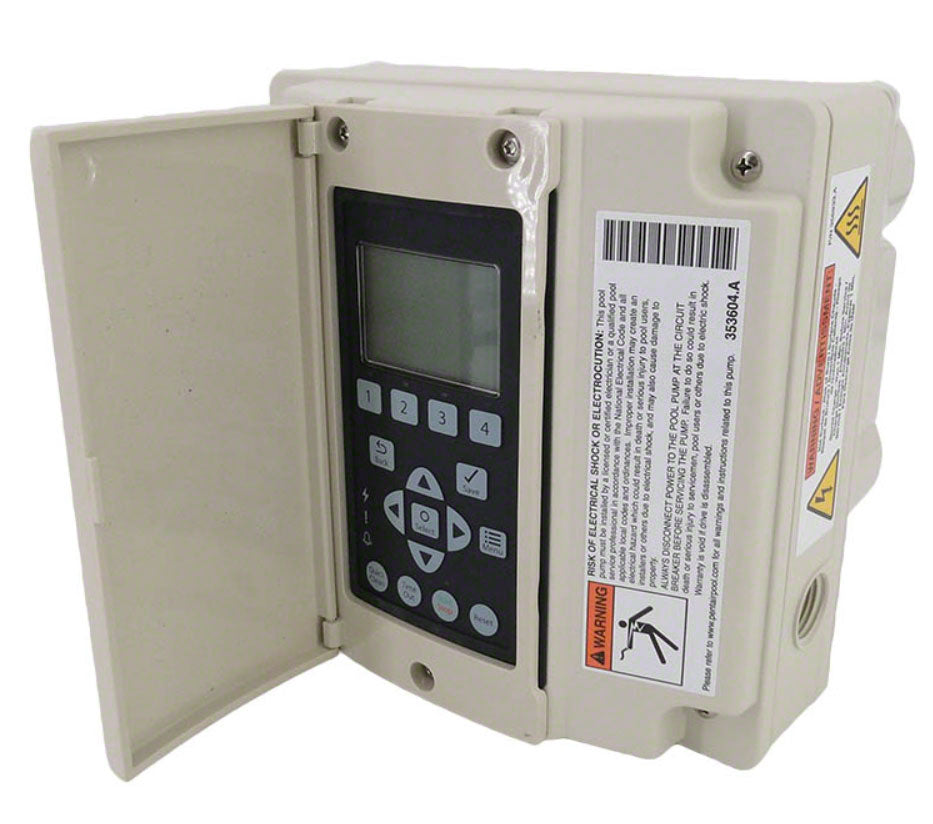
Credit: www.poolweb.com
When To Call A Professional
Knowing when to call a professional for your Pentair Intelliflo keypad saves time and avoids damage. Small problems may seem easy to fix, but some issues need expert care. Acting fast with the right help keeps your pool system safe and working well.
Complex Electrical Issues
Electrical problems with the keypad can be dangerous. Do not try to fix wiring or circuit board faults yourself. Professionals have tools and skills to handle complex electrical tasks. They can find hidden problems and prevent shocks or fires.
Warranty And Service Support
Opening or repairing your keypad without help may void the warranty. Certified technicians work with Pentair’s service rules. They use original parts and keep your warranty valid. This protects your investment and ensures quality repairs.
Safety Precautions
Working with pool equipment involves risks. Water and electricity do not mix well. A trained professional knows safety steps to avoid accidents. They wear protective gear and follow industry standards. This keeps you and your home safe from harm.
Preventive Measures To Avoid Future Problems
Taking steps to prevent problems with your Pentair Intelliflo keypad saves time and money. Small efforts now keep your system running smoothly. These simple actions reduce the chance of future failures. Careful attention helps avoid frustration and costly repairs.
Regular Maintenance Tips
Check your keypad often for dirt and debris. Clean it gently with a soft cloth. Avoid harsh chemicals that can damage the surface. Test the buttons regularly to ensure they respond well. Replace worn-out batteries on time. Schedule professional inspections yearly to catch hidden issues early.
Protecting Against Weather Damage
Keep your keypad shielded from rain and direct sunlight. Use a protective cover designed for outdoor electronics. Avoid placing it near sprinklers or water sources. Extreme temperatures can harm internal parts. Store the keypad indoors during harsh weather or winter months. Proper protection extends the lifespan of your device.
Proper Usage Practices
Press buttons gently to avoid wear and tear. Do not use sharp objects or excessive force. Follow the manufacturer’s instructions for settings and programming. Avoid touching the screen with wet or dirty hands. Turn the system off during power surges or storms. Careful use prevents accidental damage and ensures reliable operation.

Credit: www.youtube.com
Frequently Asked Questions
Why Is My Pentair Intelliflo Keypad Not Responding?
The keypad may lose power or have a loose connection. Check wiring and power supply first to fix the issue quickly.
How Do I Reset The Pentair Intelliflo Keypad?
Press and hold the reset button for 5 seconds. This usually clears minor errors and restores normal function.
Can A Low Battery Cause Keypad Failure?
Yes, low or dead batteries can stop the keypad from working. Replace the batteries to restore power.
What To Do If The Display Is Blank On The Keypad?
A blank display often means no power or a blown fuse. Check the power source and replace the fuse if needed.
How To Fix Unresponsive Buttons On The Intelliflo Keypad?
Dirt or moisture can block button contact. Clean the keypad gently and dry it to improve response.
Does Software Update Affect Keypad Performance?
Outdated software can cause keypad errors. Update the software following the Pentair guidelines to ensure smooth operation.
When Should I Call A Professional For Keypad Issues?
Call a technician if basic fixes fail or wiring is damaged. Professionals can safely diagnose and repair complex problems.
Conclusion
Pentair Intelliflo keypad issues can disrupt your pool routine. Check power connections and reset the keypad first. Clean any dirt or moisture around the buttons. Replace batteries if the display is blank. Sometimes, a simple restart fixes common errors. Contact a professional only if problems persist.
Taking these steps saves time and frustration. Keep your pool system running smoothly with regular checks. Don’t let a faulty keypad spoil your swim plans. Simple care goes a long way.