
When cold weather strikes, your pool equipment faces a real threat: freezing. You don’t want costly damage or unexpected repairs ruining your season.
That’s where the Pentair Easy Touch Freeze Protection Setting comes in. It’s designed to keep your pool safe and running smoothly, even when temperatures drop. If you want to protect your investment and enjoy peace of mind all winter long, understanding how to use this feature is key.
Keep reading to learn exactly how to set it up and make sure your pool stays freeze-free.
Pentair Easy Touch Basics
The Pentair Easy Touch system controls pool and spa equipment with ease. It simplifies managing temperature, lighting, and pumps. This system also includes a freeze protection setting. This feature helps prevent damage during cold weather. Understanding the basics of the Easy Touch system is essential for proper use and maintenance.
Key Features
The system offers automated control for pool pumps and heaters. It monitors water temperature continuously. Users can set timers for lighting and cleaning cycles. Freeze protection activates automatically at low temperatures. The system works with various pool equipment brands. It saves energy by optimizing run times. Remote access lets users control settings from anywhere.
System Components
The main control panel is the system’s brain. It connects to pumps, heaters, and lights. Sensors detect water and air temperature. The freeze protection sensor triggers the system to run pumps. Valves adjust water flow as needed. A power supply keeps all parts running smoothly. Wiring links everything to the control panel securely.
User Interface Overview
The user interface shows system status clearly. Buttons allow easy navigation through menus. The screen displays temperature, time, and equipment status. Freeze protection settings are simple to adjust. Alerts notify users of any issues. The interface supports multiple languages for convenience. Setup guides help users customize their pool system.
Freeze Protection Function
The Pentair Easy Touch system includes a Freeze Protection Function designed to prevent damage during cold weather. This feature helps keep your pool equipment safe by activating heating elements when temperatures drop too low. It ensures your pool stays protected without manual intervention.
How It Works
The system monitors outdoor temperature constantly. When the temperature nears freezing, it turns on the pool pump. Circulating water reduces the risk of pipes freezing and bursting. This automatic action helps avoid costly repairs.
Temperature Thresholds
The Freeze Protection Function activates at preset temperatures. Typically, it starts when the temperature falls below 40°F. You can adjust this setting based on your local climate. This flexibility ensures the system matches your needs.
Activation Triggers
The system activates based on sensor readings. It triggers when sensors detect temperatures below the set threshold. The pump runs for several minutes to keep water moving. It turns off once temperatures rise above the threshold again.
Setting Up Freeze Protection
Setting up freeze protection on your Pentair Easy Touch system helps keep your pool safe during cold weather. This feature prevents pipes and equipment from freezing. It works by turning on the pump and heater when temperatures drop too low. Setting it up correctly ensures your pool stays protected without wasting energy.
Accessing The Settings
Start by turning on your Pentair Easy Touch control panel. Press the “Menu” button to open the main menu. Use the arrows to find the “Freeze Protection” option. Select it by pressing “Enter.” This opens the freeze protection settings screen. Here, you can adjust all necessary controls.
Adjusting Temperature Limits
Set the temperature limits to tell the system when to activate. The default low temperature is usually around 40°F. Change this to your preferred freeze point if needed. Use the arrow buttons to increase or decrease the value. Confirm your choice by pressing “Enter.” This ensures the system reacts at the right temperature.
Customizing Alerts
You can set alerts to warn you about freeze risks. On the freeze protection screen, find the “Alerts” option. Choose how you want to receive notifications, such as on the control panel or by email. Turn alerts on or off based on your preference. This helps you stay informed about cold weather conditions.

Credit: www.youtube.com
Troubleshooting Freeze Settings
Freeze protection is crucial for maintaining your pool equipment during cold weather. The Pentair Easy Touch system has settings designed to prevent freezing damage. Sometimes, these settings might not work as expected. Troubleshooting the freeze settings helps keep your system safe and running smoothly.
Common Issues
Freeze protection might fail to activate. This can cause pipes to freeze and burst. The system may show incorrect temperature readings. Sometimes, the freeze protection cycles too often or not at all. Sensor problems often cause these issues. Check for loose or damaged wires. Dirty or faulty sensors can give wrong signals.
Resetting The System
Resetting the Easy Touch system can fix many problems. Start by turning off the main power. Wait for about 30 seconds. Turn the power back on. This clears minor glitches in the system. After reset, check the freeze protection settings again. Make sure the temperature thresholds are set correctly. Monitor the system for normal operation after reset.
When To Contact Support
Contact support if problems continue after resetting. Persistent sensor errors need expert help. Call support if the system does not respond to commands. Professional advice ensures the freeze protection works properly. Avoid risking damage by delaying help. Support teams can guide through advanced troubleshooting steps.
Maintenance Tips For Winter
Winter can be harsh on your pool system. Proper maintenance helps protect your Pentair Easy Touch controller and pool equipment. These tips keep your system running smoothly through cold months. Follow each step carefully to avoid costly damage.
Preparing Equipment
Start by cleaning all pool equipment. Remove leaves, dirt, and debris from filters and pumps. Check hoses for cracks or leaks. Drain water from all lines to prevent freezing. Cover equipment with weatherproof covers. This shields parts from snow and ice damage.
Routine Checks
Check the Easy Touch controller regularly. Make sure the freeze protection setting is active. Monitor water temperature sensors for accuracy. Inspect electrical connections for corrosion or loose wires. Test the system to confirm automatic freeze protection triggers at low temperatures.
Avoiding Freeze Damage
Maintain a steady power supply to the controller during winter. Keep water flowing through pipes to avoid ice blockages. Increase circulation pump run time if needed. Use pool heaters or heat lamps near sensitive equipment. These steps reduce the risk of frozen pipes and broken components.
Energy Efficiency During Winter
Winter can cause serious damage to pool equipment from freezing temperatures. The Pentair Easy Touch freeze protection setting helps guard your system. It also aims to use energy wisely. Saving energy during cold months keeps costs down. It also helps the environment.
Using the freeze protection setting efficiently means less wasted power. The system runs only when needed. This balance protects pipes and pumps without extra energy use.
Optimizing Settings
Adjust the freeze protection temperature to a sensible level. Set it high enough to stop freezing but not too high to waste heat. Check local weather trends to find the best temperature.
Regularly review your settings as weather changes. Small tweaks can save energy and still keep your pool safe. Avoid running the system all day for freeze protection.
Balancing Protection And Power Use
Freeze protection works best when it runs only during cold spells. Running it constantly wastes energy and increases your bill. Use a temperature sensor to trigger the system only when needed.
Monitor energy use to find a good balance. Protect your equipment without overusing power. This approach extends equipment life and controls costs.
Smart Scheduling
Set your Pentair Easy Touch to run freeze protection during the coldest hours. Nighttime usually demands more protection than daytime. Program schedules to avoid unnecessary energy use.
Use timers or automation features to control operation times. This helps keep energy use low while preventing freeze damage. Smart scheduling simplifies winter pool care.
Safety Precautions
Safety is key when using the Pentair Easy Touch Freeze Protection setting. Protecting your pool equipment from freezing saves money and avoids damage. Taking the right precautions keeps your system running smoothly during cold weather. This section covers essential safety tips.
Ensuring Proper Installation
Install the Easy Touch system according to the manual. Follow all wiring and setup instructions carefully. Use a licensed electrician if needed. Improper installation can cause malfunctions or safety hazards. Check all connections twice before powering on the system.
Backup Power Options
Power outages can stop freeze protection from working. Install a backup battery or generator to keep the system running. Test your backup power regularly. This prevents frozen pipes and damage during unexpected outages. Keep backup power sources in good condition at all times.
Emergency Procedures
Know how to turn off the system quickly in an emergency. Keep contact numbers for pool service technicians handy. Have a plan to manually drain or heat the pool if the system fails. Acting fast can prevent costly repairs. Train family members on emergency steps to take.
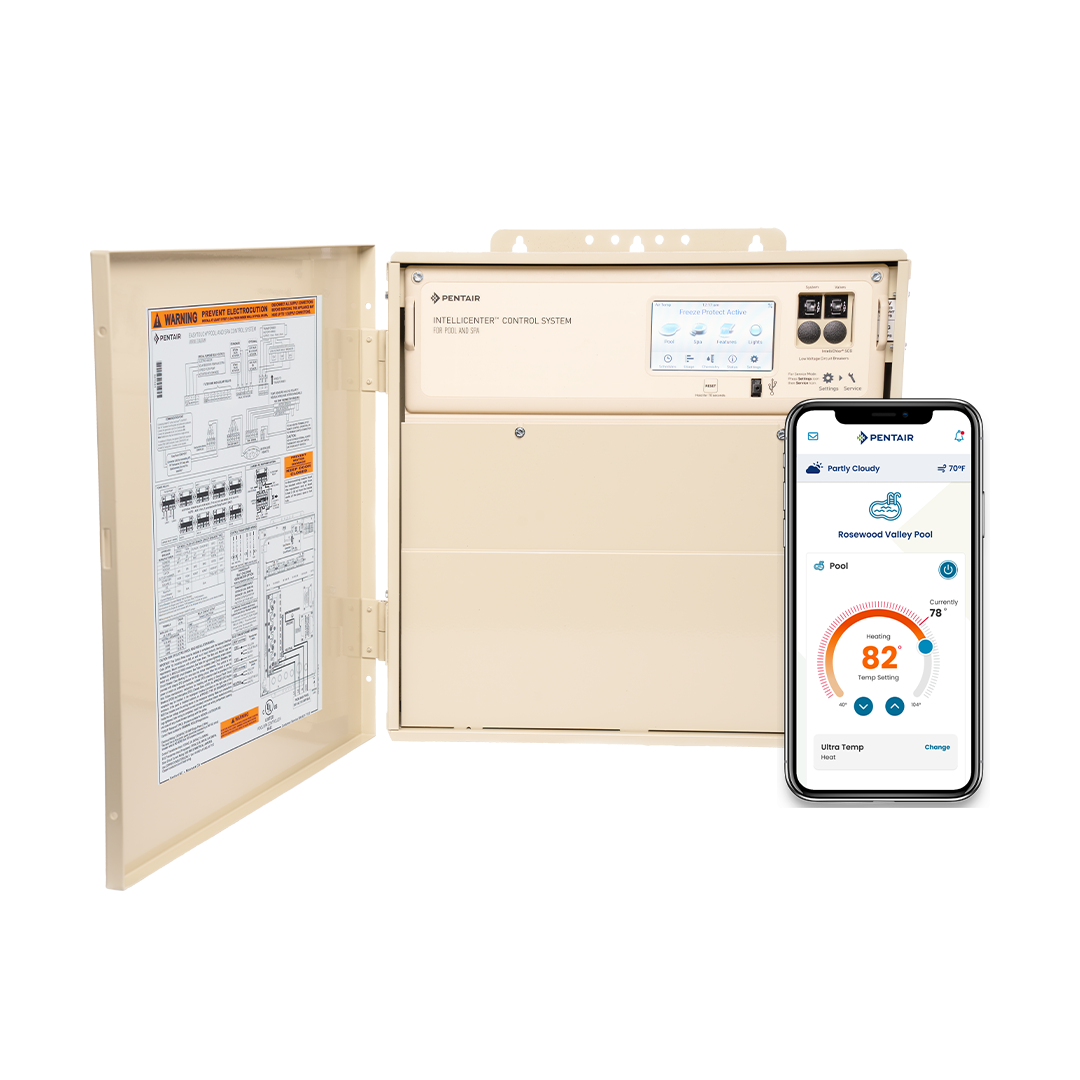
Credit: www.pentair.com

Credit: www.reddit.com
Frequently Asked Questions
What Is The Pentair Easy Touch Freeze Protection Feature?
The freeze protection feature prevents your pool system from freezing in cold weather. It activates the pump and heater automatically when temperatures drop.
How Do I Set Freeze Protection On Pentair Easy Touch?
Go to the main menu, select freeze protection, and turn it on. Set the temperature threshold to start the system.
Why Does Freeze Protection Turn On My Pump?
The pump runs to keep water moving and prevent freezing in pipes. This action helps avoid costly damage during cold weather.
Can I Adjust The Freeze Protection Temperature Setting?
Yes, you can change the temperature at which freeze protection activates. This lets you customize protection based on your local climate.
Does Freeze Protection Work When I Am Away?
Freeze protection runs automatically even if you are not home. It monitors temperature and activates as needed to protect your system.
Will Freeze Protection Increase My Energy Bill?
Freeze protection uses energy only when temperatures drop near freezing. It runs the pump and heater briefly to prevent damage, saving repair costs.
How Do I Know If Freeze Protection Is Active?
The control panel displays a freeze protection icon or message when active. You may also hear the pump start during cold weather.
Conclusion
Setting the Pentair Easy Touch freeze protection is simple and effective. It helps keep your pool equipment safe from cold damage. This feature activates automatically when temperatures drop. You can trust it to protect pipes and pumps. Checking the settings before winter is a smart step.
It saves you from costly repairs later. Easy Touch makes winter care less stressful. A small effort now means peace of mind all season. Stay prepared, and your pool will stay in good shape.