
Is your Intellichlor pool system flashing red and green, leaving you puzzled and unsure what to do next? You’re not alone.
This blinking light can feel like a warning sign that something is wrong, and it often stops your pool from running smoothly. But don’t worry—understanding what these flashing colors mean can help you fix the issue quickly. You’ll discover exactly why your Intellichlor is flashing red and green, what it signals about your pool system, and the simple steps you can take to get everything back to normal.
Keep reading to take control of your pool’s health and enjoy crystal-clear water again.

Credit: www.reddit.com
Intellichlor Light Signals
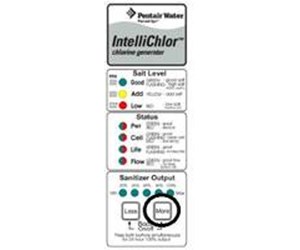
The Intellichlor system uses light signals to show its status. These signals help you understand what the system is doing. The lights flash in different colors. Each color means something different.
Watching the lights can tell you if the system works well. It can also warn you about any problems. Knowing these signals saves time and helps keep your pool clean.
What Red And Green Flashes Mean
A red and green flashing light on the Intellichlor shows a specific alert. This combination usually means the system needs attention. It signals that something is not working right.
Red indicates a warning or error. Green shows the system is trying to operate. Together, they mean the Intellichlor is alerting you to a problem.
Common Causes Of Flashing Lights
Several issues can cause the red and green lights to flash. Low salt levels often trigger this alert. The system needs enough salt to create chlorine properly.
Another cause is poor water flow. If water does not flow correctly, the system cannot work well. Dirt or debris in the filter can block flow.
Electrical problems also cause flashing lights. Loose connections or power interruptions affect the system. Checking these areas can solve the problem quickly.
Basic Troubleshooting Steps
The Intellichlor flashing red and green lights can be confusing. These signals often show that something needs attention. Basic troubleshooting helps identify simple issues. This saves time and avoids costly repairs.
Follow these steps carefully. Each one targets common causes of the flashing lights. Start with power, then salt levels, and finally reset the unit if needed.
Checking Power Supply
First, ensure the unit is getting power. Check the power cord for damage. Make sure it is firmly plugged in. Look at the breaker or fuse box. Reset any tripped breakers or replace blown fuses. A stable power supply is essential for the Intellichlor to work correctly.
Inspecting Salt Levels
Salt levels affect the unit’s operation. Low salt can cause the red and green lights to flash. Use a salt test kit to measure the pool’s salt level. The ideal range is usually between 2500 and 3500 ppm. Add pool salt slowly and retest after a few hours. Proper salt levels keep the system running smoothly.
Resetting The Unit
Sometimes, resetting solves minor errors. Turn off the power to the Intellichlor. Wait about 30 seconds. Turn the power back on. The lights should stop flashing. If the problem remains, further inspection or professional help may be needed. Resetting clears temporary glitches and restarts the system.
Advanced Fixes
Advanced fixes for the Intellichlor flashing red and green light go beyond simple resets. These steps help diagnose deeper issues in your system. Following these can save time and money by avoiding unnecessary replacements. Each fix targets a specific part of the problem.
Cleaning The Cell
Calcium and minerals can build up on the cell. This buildup blocks the flow of electricity. Use a soft brush and a mild acid solution to clean it. Avoid harsh chemicals that can damage the cell. Cleaning restores proper function and often stops the flashing lights.
Testing Water Flow
Proper water flow is crucial for the Intellichlor to work. Low flow causes the red and green light to flash. Use a flow meter or check the flow by hand. Clear any blockages in pipes or filters. Fixing flow issues ensures stable operation and stops alerts.
Replacing Faulty Components
Sometimes parts wear out or fail inside the Intellichlor. Common faulty parts include the power supply or the cell itself. Test each component with a multimeter. Replace any part that shows signs of failure. New parts restore the system and stop flashing lights.
Credit: www.inyopools.com
Preventive Maintenance Tips
Keeping your Intellichlor system in good shape prevents flashing red and green lights. These maintenance tips help your unit run smoothly and last longer. Small efforts now avoid big problems later.
Regular Cleaning Schedule
Clean the Intellichlor cell every month. Use a soft brush and mild acid solution. Remove any buildup or debris carefully. This stops blockages that cause error lights. A clean cell works better and lasts longer.
Monitoring Salt And Ph Levels
Check salt levels twice a week. Keep salt concentration within the recommended range. Test pH levels regularly too. Balanced pH prevents damage and ensures proper chlorine production. Use reliable test strips or kits for accuracy.
Protecting The Unit From Damage
Keep the Intellichlor away from direct sunlight when possible. Avoid physical impacts or heavy objects near the unit. Make sure the area around the system stays dry. Proper protection reduces wear and prevents error signals.
When To Call A Professional
Knowing when to call a professional for your Intellichlor flashing red and green lights saves time and stress. Some problems need expert help to avoid damage. Acting quickly can protect your pool and equipment.
Understanding the signs and choosing the right technician ensures the job is done right. This section guides you on spotting serious issues and finding skilled help.
Signs Of Serious Issues
Flashing red and green lights may mean low salt levels or a dirty cell. Minor problems you can fix yourself. But persistent flashing or error codes show deeper problems.
Unusual noises, overheating, or no chlorine output are warning signs. Water not sanitizing properly can cause algae and bacteria growth. Electrical problems might also trigger the lights.
Ignoring these signs can cause costly repairs. If basic checks do not stop the flashing, call a professional.
Choosing The Right Technician
Pick a technician who knows Intellichlor systems well. Experience with saltwater pool systems is important. Check reviews and ask for references before hiring.
Ensure the technician is licensed and insured. A good technician explains problems and offers clear solutions. Avoid anyone who rushes or gives vague answers.
Getting the right help quickly prevents bigger issues. Trust experts to keep your pool safe and clean.

Credit: www.youtube.com
Frequently Asked Questions
What Does Intellichlor Flashing Red And Green Mean?
The red and green lights on Intellichlor indicate an error or warning. It usually signals a problem with salt level or flow.
How To Fix Intellichlor Flashing Red And Green Lights?
Check salt level and water flow first. Clean or replace the cell if needed to stop the flashing.
Can Low Salt Cause Intellichlor Red And Green Flash?
Yes, low salt can trigger red and green flashing. Make sure salt levels match the unit’s recommended range.
Is Water Flow Related To Intellichlor Flashing Red-green?
Yes, poor water flow can cause the red-green flash. Clean filters and check the pump to improve flow.
Does Intellichlor Flashing Red-green Mean Cell Replacement?
Not always. It may mean the cell is dirty or needs maintenance before replacement.
How Long Does It Take To Fix Intellichlor Red And Green Flash?
Fixing usually takes a few minutes to a couple of hours, depending on the problem and parts needed.
Can Power Issues Cause Intellichlor Red And Green Flashing?
Yes, unstable or low power can cause flashing lights. Check the power source and connections for problems.
Conclusion
The Intellichlor flashing red and green signals a need for attention. Check the salt level and water flow first. Clean the cell if it looks dirty or scaled. Reset the system to clear the error light. Regular maintenance helps keep your chlorinator working well.
Don’t ignore these warning lights for long. Staying on top of issues saves time and money later. Simple steps can fix most problems quickly. Keep your pool water clean and safe with care.