
If you buy something through an Amazon affiliate link on this page, we may earn a commission as an Amazon Associate. There is no extra charge to you.
Choosing the best smart home system requires balancing control, compatibility, and processing methods. These picks are judged on their strengths, trade-offs, and daily maintenance requirements to ensure your devices work together seamlessly.
1. Homey Pro Mini

Best for: Users wanting local control and wide compatibility.
The Homey Pro Mini acts as a central brain for your home, handling automation and device management without needing the internet for every task. It supports major standards like Zigbee, Matter, and Thread, allowing it to bridge gaps between many different brands. You can create complex routines using the Homey desktop app, which gives you granular control over how your devices interact.
Strengths:
- Local data processing for privacy
- Supports Zigbee, Matter, and Thread
- No required monthly subscription fees
- Works with over 1000 brands
- Includes secure local backup options
Trade-offs:
- Bridge sold separately for Z-Wave
- Bridge sold separately for Bluetooth
- Bridge sold separately for Infrared
Living with this hub means you spend less time troubleshooting your internet connection, as it handles most tasks locally. You’ll rely on the Homey app to manage your flows and devices, which requires a bit of initial setup to get your routines exactly how you want them. Once configured, you stop thinking about the hub and simply enjoy the automations you have built.
| Best for | Why |
|---|---|
| Privacy advocates | Local processing keeps data secure |
| Multi-brand households | Integrates with over 1000 brands |
| Automation enthusiasts | Advanced workflows via desktop app |
2. Home Assistant Green

Best for: Advanced users who want total data ownership.
Home Assistant Green is an official piece of hardware designed to run the popular Home Assistant platform out of the box. It’s a small, silent device that packs significant power for its size, allowing you to centralize all your smart home apps into one interface.
Strengths:
- Easy setup with included cables
- Fanless and silent hardware design
- Official Nabu Casa hardware support
- Significant 32GB internal storage capacity
- Highly efficient power consumption
Trade-offs:
- Requires USB add-ons for Z-Wave
- Requires USB add-ons for Zigbee
- Requires USB add-ons for Thread
Using this hub requires a willingness to manage your own smart home environment, as it’s designed for those who want to “automate everything.” You’ll spend time learning the interface to get your devices working in harmony, but once set up, you gain a system that runs on only a few watts. You stop worrying about app clutter and start managing your home from a single, private dashboard.
| Best for | Why |
|---|---|
| Data-conscious users | Keeps all data local |
| Power users | Advanced automation possibilities |
| Minimalist setups | Silent, compact, energy-efficient |
3. Amazon Echo Hub (newest model)

Best for: Families needing a simple, wall-mounted control panel.
The Amazon Echo Hub is a dedicated 8-inch screen that acts as a command center for your Alexa-compatible devices. It’s designed to be mounted on a wall, making it easy for every family member to adjust lights, view cameras, or start routines with a tap. The dashboard is highly customizable, allowing you to resize and rearrange controls to prioritize the devices you use most often.
Strengths:
- Clear 8-inch touch display
- Highly customizable device dashboard
- Built-in Zigbee, Matter, and Thread
- Easy wall-mount installation options
- Privacy-focused mic off button
Trade-offs:
- Ring camera features require subscription
- Cable management accessories sold separately
- Table-top stand sold separately
Living with this hub means you have a constant, visual point of contact for your home security and lighting. You’ll likely spend a few minutes organizing your dashboard to ensure the most important controls are front and center for everyone in the house. You stop fumbling for your phone to check a camera or turn off the lights, as the screen is always ready for a quick interaction.
| Best for | Why |
|---|---|
| Busy households | Centralized, easy-to-use screen |
| Security-focused users | Quick access to camera feeds |
| Alexa users | Seamless integration with Alexa |
4. Ring Alarm 14-Piece Kit (newest model)

Best for: Homes needing a comprehensive, expandable security system.
The Ring Alarm 14-Piece Kit provides a full suite of sensors and a base station to cover multiple rooms and entry points. It’s built to be intuitive, using keypads for arming and disarming, while sending notifications directly to your phone when a sensor is triggered. You can expand the system with additional sensors at any time, making it a flexible choice for growing households.
Strengths:
- Includes sensors for multiple doors
- Intuitive keypad for easy control
- Expandable with additional Ring accessories
- Mobile app notifications for alerts
- Easy to install without wiring
Trade-offs:
- Professional monitoring requires subscription
- Advanced features require monthly plan
- Remote arming requires active subscription
You’ll spend your time managing the system through the Ring app, which keeps you informed even when you’re away from home. You’ll stop worrying about whether you locked the door or left a window open, as the sensors provide constant feedback. Once installed, the system largely runs in the background, only alerting you when it detects something out of the ordinary.
| Best for | Why |
|---|---|
| Larger homes | Includes sensors for many rooms |
| DIY installers | No wiring or drilling required |
| Security-conscious owners | 24/7 monitoring options available |
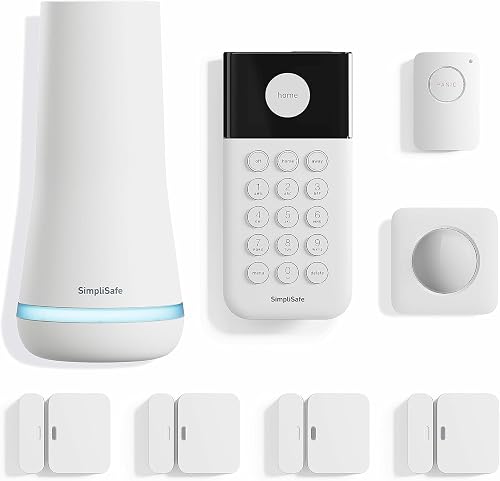
5. SimpliSafe 8 Piece Wireless Home Security System
Best for: Users who want professional security without long-term contracts.
SimpliSafe offers a straightforward security setup that focuses on ease of use and professional monitoring. The system includes a base station, keypad, and various sensors that can be placed around your home without drilling or complex wiring. It’s designed to be user-friendly, allowing you to arm or disarm the system through an app or via voice commands with Alexa and Google Assistant.
Strengths:
- No long-term contracts required
- Simple wireless setup process
- Includes silent panic button option
- Motion sensors are pet-friendly
- Backlit, smash-safe wireless keypad
Trade-offs:
- Professional monitoring requires subscription
- Panic button requires active subscription
- Supported only within the US
Living with this system means you have the assurance that comes with professional agents watching your home. You’ll keep the app on your phone to check status or arm the system, but the hardware itself is designed to be invisible and low-maintenance. You stop worrying about security gaps, as the system provides full room coverage and entry point protection right out of the box.
| Best for | Why |
|---|---|
| Renters | No drilling or wiring needed |
| Pet owners | Motion sensors ignore smaller pets |
| Security seekers | Professional monitoring available |
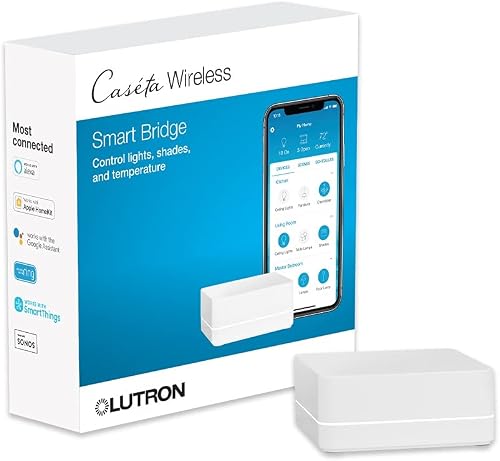
6. Lutron Caseta Smart Hub Compatible with Alexa
Best for: Homeowners focusing on lighting and shade control.
The Lutron Caseta Hub is the core of a specialized system that excels at managing lights and window shades. It uses “Clear Connect” technology, which is designed to avoid interference with your existing Wi-Fi network. The hub is simple to install, plugging directly into your router, and it supports up to 75 devices, allowing you to scale your lighting project at your own pace.
Strengths:
- Avoids interference with Wi-Fi networks
- Supports up to 75 devices
- Works with Apple, Google, Alexa
- Very simple hub setup process
- Replaces older Wink hub functionality
Trade-offs:
- Dimmers and switches sold separately
- Coordinating accessories sold separately
- Limited to lighting and shades
You’ll use this hub to create lighting scenes that match your daily schedule, making your home feel more responsive. You’ll spend time installing the compatible switches, but once they’re synced, the hub works reliably without needing constant attention. You stop worrying about light switches and start enjoying automated dimming or voice-controlled lighting throughout your living space.
| Best for | Why |
|---|---|
| Lighting enthusiasts | Handles lights and shades well |
| Busy homeowners | Reliable, interference-free connection |
| Smart home beginners | Very simple to set up |
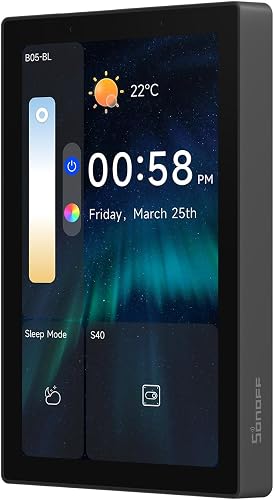
7. SONOFF NSPanel Pro 120 Smart Control Panel
Best for: Users who want a wall-mounted touch interface.
The SONOFF NSPanel Pro is a 4.7-inch wall-mounted control panel that acts as an all-in-one hub for your smart devices. It allows you to view camera feeds, manage energy usage, and adjust your thermostat with a simple tap on the screen. It even includes a web browser, letting you quickly access other online services or information without needing your phone.
Strengths:
- Large 4.7-inch touch display
- Built-in energy usage tracking
- Supports live camera monitoring
- Integrated web browser functionality
- Customizable security arming modes
Trade-offs:
- Requires specific compatible cameras
- Requires manual web page setup
- Limited to SONOFF and compatible devices
Living with this panel means you have a dedicated command station on your wall for quick access to your home’s status. You’ll spend time setting up your preferred widgets and camera feeds on the screen. You stop reaching for your phone for every small task, as the panel puts your most important controls at your fingertips in a permanent, fixed location.
| Best for | Why |
|---|---|
| Visual learners | Large, responsive touch screen |
| Energy-conscious users | Tracks daily energy consumption |
| Tech-savvy households | Includes web browsing capability |
8. Tapo Smart Hub with Built-in Chime

Best for: Users needing a compact hub with doorbell integration.
The Tapo Smart Hub (H200) serves as a small, efficient bridge for your sensors, cameras, and video doorbells. It allows you to connect over 60 devices, creating a unified ecosystem that can trigger alarms or chimes when motion is detected. It also supports local storage via a microSD card, meaning you can save your camera footage without relying entirely on the cloud.
Strengths:
- Supports over 64 total devices
- Built-in chime for doorbells
- Local storage for camera footage
- Low-power protocol for sensors
- Voice control via Alexa/Google
Trade-offs:
- MicroSD card sold separately
- Requires 2.4GHz Wi-Fi network
- Limited to Tapo ecosystem devices
You’ll likely set this up near your router and forget about it, as it works quietly in the background to bridge your sensors and cameras. You’ll need to manage the microSD card if you want to keep long-term recordings, but otherwise, the system is low-maintenance. You stop worrying about missed visitors or triggered sensors, as the hub provides instant notifications and audible alerts.
| Best for | Why |
|---|---|
| Doorbell users | Built-in chime is convenient |
| Storage-focused users | Local microSD card support |
| Compact spaces | Small, unobtrusive design |
Side by Side
The table below helps you compare the key features and capabilities of these smart home hubs to find the right fit for your needs.
How to Judge One of These
Device Compatibility Standards
The most important factor is the communication protocol. Look for support for Matter and Thread, as these are the future-proof standards that ensure devices from different brands work together. You can confirm a device’s compatibility by checking the manufacturer’s official specifications page. The Connectivity Standards Alliance provides detailed information on how these open standards ensure devices work across different ecosystems, which is essential for avoiding a fragmented home setup where apps don’t talk to each other.
Local vs. Cloud Processing
Decide if you want your automations to run locally or via the cloud. Local processing is faster and continues to work if your internet goes down, while cloud systems often offer easier remote access and setup. Check the listing for “local control” or “offline” capabilities. This affects your privacy and the reliability of your home during internet outages.
Ease of Installation
Consider how much time you want to spend on setup. Some hubs are plug-and-play, while others require manual configuration of sensors and routines. If you aren’t comfortable with networking, look for systems that emphasize “easy setup” or “no wiring.” You can verify this by checking if the product requires a professional installer or if the app guides you through the process. A system that’s difficult to set up is more likely to be ignored or underutilized.
Closing
For the most common need, the Amazon Echo Hub offers a familiar, user-friendly interface that brings all your devices into one screen. For the reader whose need is unusual, like deep data control, Home Assistant Green is the better path. Check the official brand pages for the latest compatibility lists before you buy.
Frequently Asked Questions
Will this system work with my current devices?
Most of these hubs support major standards like Zigbee, Matter, and Thread, which cover thousands of devices. To be certain, you should check the manufacturer’s website for their official list of supported brands and models before ordering. If your devices are older or use proprietary protocols, they might not connect directly without an additional bridge or the specific hub from that same brand.
What does the first week look like with a new hub?
The first week usually involves pairing your existing sensors, lights, and cameras to the new hub and setting up your basic routines. You’ll spend time naming devices and organizing them into rooms within the hub’s app. While it takes some effort to configure everything correctly, once the initial setup is complete, the system should run smoothly with only occasional adjustments to your automations.
Do I need to replace or renew anything?
Some systems require a subscription to keep advanced features like professional monitoring or extended cloud storage active. Most hubs themselves don’t need to be replaced, but you should keep your software and firmware updated through the app to ensure your system remains secure and compatible with new devices.
What will this hub not do?
A smart home hub isn’t a magic solution that makes incompatible devices work together if they don’t share a common language. Even advanced hubs have limits on the number of devices they can manage at once or the specific protocols they support out of the box. Always check the hub’s maximum device count and protocol list to ensure it can handle the size and complexity of your intended smart home setup.
Is the simplest pick here enough for me?
A simple, plug-and-play hub is often more than enough if your goal is basic lighting control and simple voice-activated routines. If you don’t have complex automation needs or a massive collection of disparate devices, the easiest setup will save you time and frustration. Only choose a more advanced, DIY-focused hub if you specifically need features like local data storage or custom, deep-level automation that simpler systems can’t provide.
Final Thoughts
Ultimately, your ideal setup should feel like a natural extension of your home rather than a technical chore. Don’t feel like you’ve got to automate everything at once. Start by picking one room to upgrade this weekend, and you’ll soon see how much simpler your daily routine can become.