
Is your Pentair Intellichlor not lighting up when it should? You rely on this smart chlorinator to keep your pool clean and safe, so when the lights go dark, it can be frustrating and confusing.
But don’t worry—you’re not alone, and fixing this issue might be simpler than you think. You’ll discover the common reasons behind the Intellichlor’s light problem and easy steps you can take to get it glowing again. Keep reading to regain control of your pool’s health without stress or guesswork.
Common Causes Of No Light
The Pentair Intellichlor system uses lights to show its status. When the light does not turn on, it can stop you from knowing if your pool is clean. Several common reasons can cause the no-light issue. Understanding these can help you fix the problem faster.
Power Supply Issues
The most common cause is a power supply problem. The Intellichlor needs steady electricity to work. A tripped breaker or a loose plug can cut the power. Check the outlet and circuit breaker first. Make sure the unit is properly connected to power.
Sensor Malfunctions
Sensors tell the system when to light up. If a sensor fails, the light might stay off. Dirt or debris can block sensors. Sometimes, sensors wear out over time. Cleaning or replacing the sensor can solve this issue.
Control Board Problems
The control board controls all functions, including the light. If it is damaged, the light may not work. Water damage or electrical faults can harm the board. Replacing the control board often fixes this problem.
Basic Troubleshooting Steps
When the Pentair Intellichlor system does not light up, start with basic troubleshooting steps. These steps help identify common issues quickly. They also save time before calling for professional help.
Follow these simple checks to find the problem. They are easy to do and require no special tools. Each step targets a different possible cause of the issue.
Checking The Power Source
First, ensure the Intellichlor system is receiving power. Check if the power cord is securely plugged into the outlet. Look for any tripped circuit breakers or blown fuses in your electrical panel. If the outlet has no power, test it with another device. Power issues are a common reason for the system not lighting up.
Inspecting The Control Panel
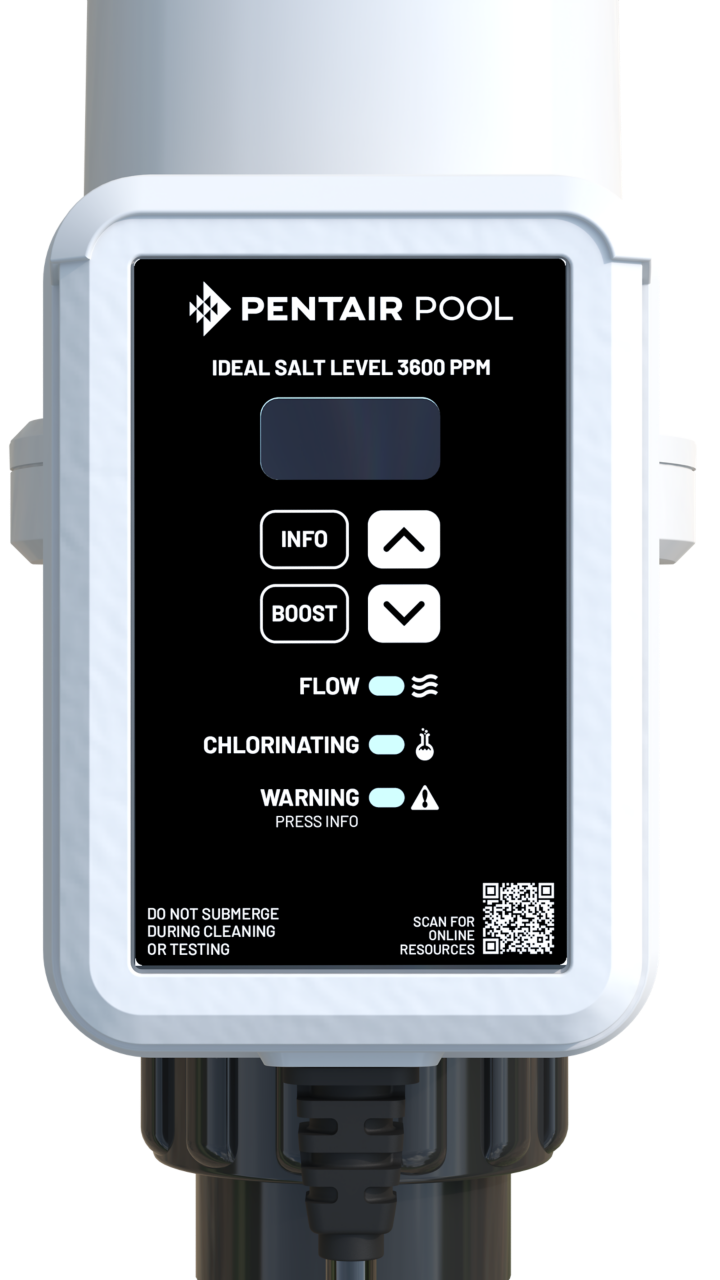
Next, examine the control panel for any visible damage or error messages. Dirt, moisture, or corrosion can affect the panel’s function. Clean the panel gently with a dry cloth if needed. Look for loose wires or connections behind the panel. A faulty control panel can prevent the system from powering on properly.
Resetting The System
Try resetting the Intellichlor system to clear any temporary errors. Turn off the power to the system at the breaker or unplug it. Wait for about one minute to let the system fully power down. Turn the power back on and check if the lights come on. Resetting often fixes minor glitches causing the issue.
Cleaning And Maintenance Tips
Keeping your Pentair Intellichlor clean is key to its proper function. Dirt and buildup can stop it from lighting up. Regular maintenance can help avoid this issue. Follow simple steps to keep your system running smoothly. Clean parts and check water quality often.
Cleaning The Cell And Sensor
The cell and sensor need gentle cleaning. Turn off the power before starting. Use a soft brush and mild cleaner. Avoid harsh chemicals that can damage parts. Rinse thoroughly with fresh water. Dry with a soft cloth before turning the unit back on.
Removing Debris And Corrosion
Check for debris like leaves or dirt on the unit. Remove any blockages carefully. Look for white or green corrosion on metal parts. Use a vinegar solution to gently clean corrosion. Rinse well and wipe dry. This helps prevent further damage and keeps the system working.
Maintaining Proper Water Chemistry
Balanced water chemistry protects the Intellichlor system. Test pool water regularly for pH, chlorine, and salt levels. Keep pH between 7.2 and 7.8. Chlorine should stay within recommended levels. Salt must be at the proper concentration. Good water balance reduces wear and improves performance.
Credit: www.pentair.com
Replacing Faulty Components
Replacing faulty parts is often the key to fixing a Pentair Intellichlor that won’t light up. Small issues with components can stop the system from working properly. Knowing which part to replace can save time and money.
Some parts wear out faster than others. Identifying the faulty part helps get the chlorinator back to normal. Below are common parts to check and replace.
When To Replace The Power Supply
The power supply sends electricity to the Intellichlor unit. If the system shows no lights at all, this part might be dead. Test the power supply with a meter. If it shows no voltage, replacement is needed.
Power supplies can fail due to age or electrical surges. A new power supply restores proper power flow. Always use the correct model for your Intellichlor system.
Changing The Control Board
The control board controls the chlorinator functions. Faulty boards cause erratic behavior or no response. Signs include flickering lights or no display.
Replacing the control board requires careful handling. Disconnect power before starting. Install the new board exactly as the old one. This fixes many common Intellichlor problems.
Upgrading The Sensor
The sensor monitors salt and chlorine levels. A broken sensor can stop the unit from lighting up. Symptoms include incorrect readings or no feedback.
Upgrading the sensor improves accuracy and reliability. Remove the old sensor gently. Fit the new sensor securely. This helps the Intellichlor work efficiently and keeps your pool clean.
Preventive Measures For Longevity
Taking good care of your Pentair Intellichlor helps it last longer. Small actions can keep the system working well and avoid common problems like the light not turning on. Follow simple steps to protect your device and ensure steady pool chlorination.
Regular Inspection Schedule
Check your Intellichlor at least once a month. Look for dirt, corrosion, or loose wires. Clean the cell gently to remove buildup. Early checks stop small issues from growing. Keep a record of inspections to track changes over time.
Using Surge Protectors
Surge protectors guard your Intellichlor against power spikes. These spikes can damage the electronics inside. Install a surge protector near the power source. It adds a layer of safety to your system. This simple step helps avoid costly repairs and downtime.
Professional Servicing
Have a pool technician service your Intellichlor yearly. Experts spot hidden problems and fix them early. They clean parts deeply and test the system fully. Professional care keeps your device running smoothly. It extends the life of your equipment and improves pool safety.
Credit: pooldial.com

Credit: www.youtube.com
Frequently Asked Questions
Why Is My Pentair Intellichlor Not Lighting Up?
The Intellichlor may not light up due to power issues or a faulty display. Check the power source and wiring for any problems.
How Can I Reset My Pentair Intellichlor?
Turn off the power to the unit for a few minutes, then turn it back on. This can clear minor errors and reset the system.
What Causes The Intellichlor Display To Stay Blank?
A blown fuse or loose connection often causes a blank display. Inspect the fuse and wiring to fix this issue.
Can Low Salt Levels Stop Intellichlor From Lighting Up?
Yes, low salt levels can prevent the unit from working properly. Test and maintain salt levels within the recommended range.
Is A Damaged Circuit Board Why Intellichlor Won’t Light Up?
A damaged circuit board can stop the display from lighting up. If other fixes fail, consider having a technician inspect it.
How Do I Check The Power Supply To Intellichlor?
Use a multimeter to test the voltage at the power input. Make sure the unit receives the correct voltage as per the manual.
What Does It Mean If The Intellichlor Light Flashes But Won’t Stay On?
A flashing light often signals a system error or low salt. Check the error codes and salt level to resolve the problem.
Conclusion
Pentair Intellichlor not lighting up can cause pool problems. Check power supply and connections first. Clean the sensor and control panel gently. Reset the system to see if it works again. Replace parts only if necessary and you feel confident.
Regular maintenance helps avoid these issues later. Stay patient and follow the steps carefully. Your pool will be ready and safe to enjoy soon.