
If your Intellichlor system is flashing green and red, you’re probably wondering what it means and how to fix it. These flashing lights can feel confusing and frustrating, especially when you rely on your pool system to keep your water clean and safe.
But don’t worry—you’re not alone, and the solution might be simpler than you think. Keep reading to discover what those flashing lights are trying to tell you and how you can get your Intellichlor back to working smoothly in no time.
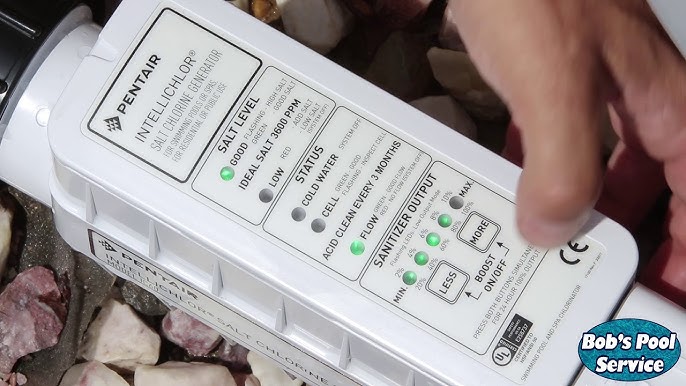
Credit: www.youtube.com
Intellichlor Basics
The Intellichlor system helps keep pool water clean and safe. It uses salt to create chlorine. This chlorine kills germs and keeps water clear. Knowing the basics helps you understand the flashing lights on the device.
The lights tell you how the Intellichlor is working. Green and red lights mean different things. Learning these signals helps you keep your pool in good shape.
How Intellichlor Works
Intellichlor uses salt in the pool water. It changes the salt into chlorine. This chlorine cleans the water. It fights bacteria and algae. The system runs automatically. It keeps the right chlorine level all the time.
The device needs electricity to work. It has a control board that manages the process. Sensors check the water’s salt level and temperature. The system adjusts chlorine output based on these checks.
Normal Light Signals
The Intellichlor shows green and red lights to give status updates. A steady green light means the system is working well. The chlorine level is good. The device is producing chlorine as needed.
A blinking green light shows the system is in standby mode. It means no chlorine is being made right now. This can happen if the water flow is low or the pool pump is off.
A steady red light means there is a problem. It could be low salt, low water flow, or another error. The system stops making chlorine until the issue is fixed. Paying attention to these lights helps keep your pool healthy.
Meaning Of Flashing Green And Red
The Intellichlor system uses lights to show its status. Flashing green and red lights signal a specific problem. These colors help users understand if the system works or needs help. Knowing what these lights mean can save time and avoid damage.
Common Causes
Flashing green and red lights often point to low salt levels. The system needs enough salt to make chlorine. Another cause could be dirty or clogged sensors. This stops the unit from reading salt levels right. Power issues, like low voltage, can also trigger these lights. Check the power supply and connections for faults.
Error Codes Explained
The flashing green and red pattern is an error code. Each flash pattern means a different problem. For example, slow blinking might mean low salt. Fast blinking can signal a sensor error. Some models show a series of flashes to count. Count the flashes to know the exact error. Use the Intellichlor manual to match codes with fixes.
Immediate Troubleshooting Steps
Seeing the Intellichlor flashing green and red can be worrying. This signal usually means the system needs your attention. Acting fast helps keep your pool safe and clean. Start with some simple checks before calling for help.
Power Cycle The Unit
Turn off the Intellichlor unit. Wait about 30 seconds. Turn it back on. This simple reset can clear minor glitches. Watch the lights after restarting. The flashing might stop, showing the unit is working again.
Check Salt Levels
Salt is key for Intellichlor to work properly. Use a salt test kit to check the water. The level should match the manufacturer’s recommendation. Too little salt can cause error lights. Add salt slowly and retest after mixing well.
Inspect Water Flow
Good water flow is vital for Intellichlor. Look for blockages in the pool pump and filter. Make sure valves are open and working. Low flow can cause the lights to flash red and green. Fix any flow issues to restore normal operation.

Credit: www.reddit.com
Cleaning And Maintenance Tips
Keeping your Intellichlor cell clean is key to its proper function. Dirt and buildup cause the green and red lights to flash. This section explains simple cleaning and maintenance tips. Follow these steps to keep your system running smoothly and avoid errors.
Cell Cleaning Process
Turn off the power before cleaning the cell. Remove the cell from the system carefully. Soak the cell in a 4:1 water to muriatic acid solution. Let it sit for about 15 minutes to dissolve buildup. Rinse the cell thoroughly with fresh water. Avoid using hard brushes or sharp tools that can damage the cell. Reinstall the cell once dry and check if the lights stop flashing.
Regular Maintenance Schedule
Check the cell every 1 to 3 months for buildup or debris. Clean the cell as needed to prevent flashing lights. Inspect the system’s connections and wiring during these checks. Keep the cell free of calcium or mineral deposits. Maintain proper water balance in the pool to reduce buildup. Regular maintenance extends the life of your Intellichlor system. Consistent care helps avoid costly repairs and downtime.
Advanced Fixes
Advanced fixes for an Intellichlor flashing green and red light involve more technical steps. These steps target deeper issues beyond basic troubleshooting. Addressing these can restore your system’s proper function.
Careful attention is essential. Take safety precautions before starting any repair.
Resetting The Control Board
Resetting the control board clears errors that may cause flashing lights. Begin by turning off the power to the Intellichlor unit. Wait at least five minutes to let the system fully power down.
Turn the power back on. Watch the indicator lights. A reset often stops the green and red flashing. This step can fix minor glitches without replacing parts.
Replacing Faulty Components
Persistent flashing may signal faulty parts inside the unit. Common culprits include the control board or the power supply. Examine the unit for visible damage or burnt smells.
Swap out any damaged parts with new ones from the manufacturer. This process may need technical skill. Incorrect replacement can cause more damage. Consult a professional if unsure.
Credit: pooldial.com
When To Call A Professional
The Intellichlor flashing green and red lights can signal different issues. Some problems need quick attention. Others are simple and easy to fix. Knowing when to call a professional can save time and money. It also keeps your pool safe.
Not every flashing light means a big problem. But some signs show serious trouble. Professionals have the tools and knowledge to fix these issues safely. This section explains when to get expert help.
Signs Of Serious Issues
Flashing green and red lights that do not stop after reset mean a serious problem. A constant red light with no green can show a sensor failure. Strange noises or leaks near the Intellichlor unit also need urgent help. If the unit does not produce chlorine, your pool water can get unsafe. Electrical problems or burning smells are signs to stop using the system. These signs mean you should call a professional.
Finding Certified Technicians
Choose technicians certified to work with Intellichlor systems. Certified experts know the correct repair steps. They follow safety rules and use the right tools. Look for local pool service companies with good reviews. Ask about their experience with Intellichlor units. Hiring a certified technician ensures your system works well again. It also extends the life of your equipment.
Preventing Future Problems
Preventing future problems with the Intellichlor system is key to keeping your pool safe and clean. Small issues can turn into big repairs if ignored. Taking simple steps today helps avoid flashing green and red light errors later.
Proper care and attention will save time and money. Follow best practices to keep your system running smoothly.
Proper Installation Practices
Install the Intellichlor unit according to the manual. Use correct wiring and connect parts firmly. Avoid loose connections that cause errors. Place the unit away from water splashes and direct sunlight. Ensure the power source matches the system’s requirements. Proper setup reduces risk of flashing green and red lights. It prevents damage from electrical faults or water exposure.
Routine Checks To Avoid Errors
Check the Intellichlor unit regularly for signs of trouble. Look for loose wires, corrosion, or dirt build-up. Clean the cell and housing carefully to maintain performance. Test the system often to spot early warning signs. Replace worn parts before they fail completely. Regular maintenance keeps the system working well and stops error lights from showing up.
Frequently Asked Questions
What Does Intellichlor Flashing Green And Red Mean?
The flashing green and red lights show the system needs attention. It often signals low salt levels or a system error.
How To Fix Intellichlor Flashing Green And Red Lights?
Check the salt level in your pool first. Clean the cell and reset the system if salt is okay.
Can Low Salt Cause Intellichlor Flashing Green And Red?
Yes, low salt is a common cause. The system needs enough salt to generate chlorine properly.
What If Cleaning Intellichlor Cell Doesn’t Stop Flashing?
Try resetting the system by turning it off and on. If flashing continues, the cell or board might need repair.
Does Intellichlor Flashing Green And Red Affect Pool Water?
Yes, it can reduce chlorine production. This may cause cloudy water or algae growth.
How Often Should Intellichlor Cell Be Cleaned?
Clean the cell every 3 to 6 months. Regular cleaning helps prevent flashing errors and keeps the system working.
When To Call A Professional For Intellichlor Issues?
Call a pro if flashing continues after salt check and cleaning. Electrical or cell replacement may require expert help.
Conclusion
The Intellichlor flashing green and red signals a problem with the system. It helps you spot issues early and keep your pool safe. Regular checks can prevent bigger problems later. Follow the troubleshooting steps to fix the flashing lights. Keep your pool water clean and balanced.
This saves time and repair costs. Stay alert to any changes in the lights. Your pool will run smoothly and stay healthy. Simple care makes all the difference.