
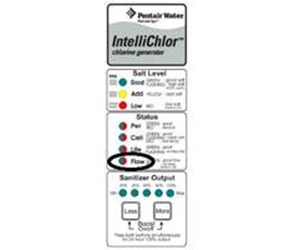
Is your Pentair salt cell flow light showing red? This simple warning can be frustrating and confusing, especially when you want your pool to be perfect.
But don’t worry—understanding why the red light appears is the first step to fixing the issue quickly. You’ll discover what the red flow light means, common causes behind it, and easy solutions you can try right now. Keep reading to get your pool back in top shape and enjoy crystal-clear water without the hassle.
Causes Of Red Flow Light
The Pentair salt cell flow light turns red to signal a problem. This warning helps protect your pool system from damage. Understanding what causes the red flow light can help you fix issues quickly. Several common problems can trigger this alert.
Low Water Flow Issues
Low water flow is a frequent cause of the red flow light. The salt cell needs enough water moving through it to work properly. Blockages or closed valves can reduce flow. Low water flow makes the cell overheat and shuts down the system. Check pipes and valves to ensure water moves freely.
Clogged Salt Cell
Salt cells can get clogged with minerals and debris. This buildup blocks water from passing through the cell. A clogged cell causes the flow light to turn red. Regular cleaning of the salt cell prevents blockages. Use a gentle acid wash to remove scale and dirt safely.
Pump And Filter Problems
The pump and filter play a big role in water flow. A broken pump or dirty filter can reduce water circulation. This triggers the red flow light on the salt cell. Inspect the pump for damage or leaks. Clean or replace the pool filter if it is dirty or clogged.
Air In The System
Air trapped in the pool system can cause the red flow light to appear. Air pockets reduce water flow through the salt cell. Check the pump basket and skimmer for air leaks. Bleed the air out of the system to restore proper flow and clear the warning light.
Checking Water Flow
Checking water flow is important if the Pentair salt cell flow light turns red. This warning means water may not be moving properly through the system. Low or no water flow can stop salt chlorine generation, causing pool problems. You can find the issue by checking parts of the water system. Start with the pump, then the filter, and finally the valves.
Inspecting Pump Operation
Check if the pump is running smoothly. A pump that is off or weak lowers water flow. Listen for strange sounds or vibrations. Look for leaks or blockages near the pump. Make sure the pump basket is clean and clear of debris.
Verifying Filter Condition
Dirty filters reduce water flow. Inspect the filter to see if it needs cleaning. Backwash sand or DE filters if clogged. Cartridge filters should be rinsed or replaced if dirty. A clean filter helps water flow freely through the system.
Assessing Valve Positions
Valves control water direction and flow. Check if any valve is partly or fully closed. Valves in the wrong position can block water flow. Adjust valves to allow water to pass through the salt cell. Confirm all valves are set for normal pool operation.
Cleaning The Salt Cell
Cleaning the salt cell is key to keeping your Pentair system working well. A red flow light often means the salt cell needs attention. Dirt and calcium build-up can block the flow and stop the cell from working.
Regular cleaning helps keep the water clear and the system efficient. The process is simple and can be done at home with basic tools. Follow these steps to clean the salt cell safely and correctly.
Removing The Salt Cell Safely
Turn off the power to your pool system first. This prevents any electric shocks or damage. Next, close the valves on both sides of the salt cell. This stops water from flowing out.
Use a wrench or your hands to unscrew the cell from the plumbing. Keep the cell upright to avoid spilling any salt water inside. Place it on a clean surface for the next step.
Cleaning With Vinegar Solution
Fill a bucket with white vinegar and water in a 1:1 ratio. Submerge the salt cell plates in the solution. Let it soak for 2 to 3 hours to dissolve calcium build-up.
After soaking, gently scrub the plates with a soft brush. Avoid using hard tools that can damage the cell. Rinse the cell well with fresh water to remove any vinegar.
Reinstalling The Salt Cell
Check the cell for any cracks or damage before reinstalling. Screw the cell back into the plumbing securely. Open the valves slowly to let water flow back through.
Turn the power on and watch the flow light. It should change from red to green. This means the salt cell is clean and working properly again.
Fixing Pump And Filter Issues
Fixing pump and filter issues is key to solving the Pentair salt cell flow light red problem. The pump and filter keep the water clean and flowing. Problems here often cause the flow light to turn red. Simple maintenance steps can restore proper flow and clear the warning.
Start by checking the filter and pump. Clean parts work best. Clear blockages and replace worn parts as needed. These fixes improve water flow and keep the salt cell functioning well.
Backwashing The Filter
Backwashing cleans the filter by reversing water flow. This removes dirt and debris trapped inside. Connect a hose to the waste line before starting. Run the backwash cycle until the water runs clear. This process clears blockages that reduce flow.
Removing Debris From Pump Basket
Turn off the pump before opening the pump basket. Remove leaves, hair, and dirt from inside. A clean basket lets water flow freely. Check the basket weekly during heavy pool use. Replace the basket if it is cracked or damaged.
Replacing Worn Pump Parts
Worn parts like seals or impellers reduce pump efficiency. Inspect parts for cracks or wear. Purchase replacements from a trusted supplier. Follow the manufacturer’s instructions to install new parts. Proper repairs restore water flow and prevent further damage.
Eliminating Air Locks
Air locks can cause the Pentair salt cell flow light to turn red. This happens when air gets trapped inside the system. Air blocks the water flow and stops the salt cell from working correctly. Removing air locks is important for smooth operation and clear water.
Bleeding Air From The System
Start by turning off the pump. Open the bleed valve on the filter. Let the air escape until water flows steadily. Close the valve tightly to stop leaks. Turning the pump back on helps push out any leftover air.
Checking For Leaks
Inspect all pipes and connections for water drops. Leaks let air enter the system and cause air locks. Tighten any loose fittings or replace damaged parts. A dry system keeps air out and water flowing well.
Ensuring Proper Water Levels
Check the pool water level regularly. Low water causes air to enter the pump and salt cell. Fill the pool to the right level, usually halfway up the skimmer. Proper water levels keep the system full and free of air pockets.
Credit: www.inyopools.com
Resetting The Salt Cell System
Resetting the Pentair salt cell system can fix many common issues. It helps clear errors and refresh the unit’s settings. This step is important when the salt cell flow light is red. A red flow light usually means a problem with water flow or the system itself.
Resetting the system is simple. It involves turning the power off and on, running tests, and watching the flow light. These actions help ensure the system works properly again. Follow the steps below to reset your salt cell system safely and effectively.
Power Cycling The Unit
Start by turning off the power to the salt cell system. Wait about 30 seconds to 1 minute. This pause lets the system fully shut down. Turn the power back on after the wait. Power cycling can clear minor errors and reset sensors. Check if the red flow light changes to green. If not, move to the next step.
Running Diagnostic Tests
Most Pentair systems have built-in diagnostic tests. These tests check water flow and salt cell health. Follow your system’s manual to start the diagnostics. The test helps find specific problems causing the red light. Note any error codes shown during the test. This information guides you on what to fix next.
Monitoring Flow Light Status
After resetting and testing, watch the flow light closely. The light should turn green or blue, meaning normal flow. A red light means the issue remains. Check for blockages or low water flow in the system. Keep monitoring until the light stays steady and green. This confirms the salt cell system is working well again.
Preventive Maintenance Tips
Preventive maintenance helps keep your Pentair salt cell working well. This stops the flow light from turning red. Regular care extends the life of your pool system. It also keeps your water clean and safe. Follow these simple tips to avoid common problems.
Regular Cell Cleaning Schedule
Clean the salt cell every 3 to 6 months. This removes calcium and other build-ups. Use a mild acid solution for cleaning. Avoid harsh chemicals that can damage the cell. Always follow the manufacturer’s instructions carefully. Keeping the cell clean helps maintain proper flow and function.
Routine Filter Checks
Check your pool filter weekly. A clogged filter reduces water flow to the salt cell. Clean or replace filters as needed. Clear water flow prevents the flow light from turning red. This simple step keeps your system running smoothly.
Maintaining Proper Water Chemistry
Test your pool water regularly. Balance pH, chlorine, and alkalinity levels. Proper chemistry protects the salt cell from damage. Use quality test kits for accurate results. Balanced water reduces scale build-up and improves flow. This keeps the red flow light off.
Credit: www.reddit.com

Credit: pooldial.com
Frequently Asked Questions
What Does A Red Flow Light On Pentair Salt Cell Mean?
A red flow light indicates low water flow through the salt cell. It signals a problem with water circulation.
How To Fix Pentair Salt Cell Flow Light When It Is Red?
Check for clogged filters and clean them. Ensure the pump is running properly and water is flowing.
Can A Dirty Salt Cell Cause The Flow Light To Turn Red?
Yes, dirt and debris can block water flow. Cleaning the salt cell often resolves the issue.
Does Low Water Pressure Trigger The Red Flow Light?
Yes, low water pressure can cause the flow light to turn red. Check the pump and valves.
Is The Red Flow Light Dangerous For The Salt Cell?
The red light warns of low flow, which can damage the salt cell if ignored. Act quickly.
How Often Should I Check The Pentair Salt Cell Flow Light?
Check it weekly to catch flow issues early. Regular checks keep the system running smoothly.
What If The Red Flow Light Stays On After Cleaning?
Inspect the pump and pipes for blockages or damage. Call a professional if the problem continues.
Conclusion
A red flow light on your Pentair salt cell means action is needed. Check the water flow and clean the cell if dirty. Make sure the pump runs properly for good water circulation. Ignoring the red light can cause damage to your system.
Keep your pool water clean and safe by responding quickly. Simple steps can prevent costly repairs and keep your pool running smoothly. Stay alert and maintain your salt cell regularly for the best results.