
Is your Dolphin Nautilus pool cleaner not working the way it should? You rely on it to keep your pool sparkling clean without the hassle.
When it stops running smoothly, it can be frustrating and confusing. But don’t worry—you’re in the right place. This guide will help you quickly spot common problems and fix them yourself. By the end, you’ll have your pool cleaner back in action, saving you time and effort.
Keep reading to get your Dolphin Nautilus working like new again!

Credit: www.youtube.com
Common Issues With Dolphin Nautilus
The Dolphin Nautilus pool cleaner is a popular tool for keeping pools clean. Despite its reliability, users may face some common problems. These issues can affect the cleaner’s performance and overall experience. Understanding typical problems helps in quick fixes and smooth operation.
Power Problems
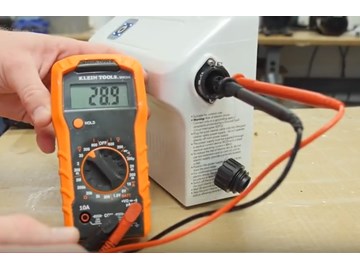
Sometimes the Dolphin Nautilus does not turn on. Check the power supply and plug first. Ensure the power cord is not damaged or unplugged. The power unit may overheat and stop working temporarily. Resetting the unit often solves this issue. Inspect the power switch and circuit breaker if problems continue.
Poor Cleaning Performance
The cleaner may miss debris or leave dirt behind. Check if brushes are worn out or clogged. Dirty filters reduce cleaning ability and must be cleaned regularly. Pool surface type can affect cleaning results. Run the cleaner for a full cycle to improve performance. Ensure proper water flow and pressure for best results.
Movement And Navigation Errors
The Dolphin Nautilus can get stuck or move oddly in the pool. Tangled cables often cause restricted movement. Clear any knots or debris from the cord. Check the wheels and tracks for damage or dirt buildup. The cleaner’s sensors may need cleaning to improve navigation. Reset the robot to help recalibrate its path.
Filter And Debris Issues
Filters can become clogged with leaves and dirt. A dirty filter reduces suction power and cleaning efficiency. Remove and rinse the filter after each use. Replace the filter if it becomes damaged or worn out. Large debris may block the intake, so clear the area before cleaning. Regular maintenance prevents filter problems and extends cleaner life.
Credit: www.inyopools.com
Power And Connectivity Fixes
Power and connectivity problems often cause the Dolphin Nautilus pool cleaner to stop working. These issues are common and easy to fix. Checking the power supply, resetting the cleaner, and inspecting the power cord can solve most problems. Follow these simple steps to get your cleaner back to work quickly.
Checking The Power Supply
Start by ensuring the power outlet works. Plug another device into the same outlet. If it does not work, try a different outlet. Make sure the power switch is on. Check for any tripped circuit breakers. A stable power source is vital for the cleaner to function.
Resetting The Cleaner
Turn off the cleaner and unplug it from the power source. Wait for about 30 seconds before plugging it back in. Press the reset button if your model has one. This step can clear minor electronic glitches. It often restores normal operation quickly and easily.
Inspecting The Power Cord
Look over the entire length of the power cord. Check for cuts, cracks, or exposed wires. A damaged cord can cause power loss or short circuits. Avoid using the cleaner if the cord is damaged. Replace the cord or have it repaired by a professional for safety.
Improving Cleaning Efficiency
Improving the cleaning efficiency of your Dolphin Nautilus pool cleaner ensures a spotless pool. Small fixes can boost its performance. Regular care keeps the cleaner working well. Understanding simple steps helps maintain its power and speed. Follow these tips to get the best cleaning results.
Cleaning The Filter
The filter traps dirt and debris during cleaning. A clogged filter lowers suction power. Remove the filter basket carefully. Rinse it with a hose to clear debris. Check for tiny holes and tears. Replace the filter if damaged to maintain good flow. Clean the filter after every few uses.
Removing Blockages
Blockages affect the cleaner’s movement and suction. Check the intake and brushes for stuck leaves or twigs. Clear away any debris found. Look inside the wheels and axles for trapped dirt. Use a soft brush or cloth to clean these parts. Removing blockages helps the cleaner glide smoothly and clean better.
Adjusting Cleaning Cycles
Different pools need different cleaning times. The Dolphin Nautilus offers cycle options to fit your pool size. Choose longer cycles for larger or dirtier pools. Short cycles work for small or cleaner pools. Adjust settings on the control panel easily. Proper cycle length saves energy and improves cleaning results.
Resolving Movement Problems
Movement problems can stop your Dolphin Nautilus pool cleaner from working well. The cleaner might get stuck or not cover the whole pool. Fixing these issues helps the cleaner move freely and clean better. Follow these steps to solve common movement problems quickly.
Clearing Wheels And Tracks
Check the wheels and tracks for dirt or debris. Small leaves, hair, or algae can block them. Remove the cleaner from the pool and wipe the wheels and tracks. Make sure nothing stops their rotation. Clean wheels help the cleaner move smoothly across the pool surface.
Resetting Navigation Sensors
Navigation sensors guide the pool cleaner’s path. Sometimes, sensors can get confused or dirty. Turn off the cleaner and unplug it from power. Gently clean the sensors with a soft cloth. Plug the cleaner back in and restart it. This reset helps the cleaner find its way properly in the pool.
Ensuring Proper Pool Coverage
Check if the pool cleaner covers all areas of the pool. Uneven coverage can cause movement issues. Adjust the cleaner’s settings if needed. Make sure the cleaner is suitable for your pool size and shape. Proper coverage means the cleaner moves correctly and cleans every corner.
Maintaining And Replacing Parts
Maintaining your Dolphin Nautilus pool cleaner ensures it runs smoothly and lasts longer. Regular care helps avoid costly repairs and keeps your pool spotless. Replacing worn parts and cleaning filters are key steps to keep your cleaner efficient.
Replacing Brushes And Tracks
Brushes and tracks wear out over time from constant use. Check them every few weeks for signs of damage or wear. Remove old brushes by pulling them off gently. Snap new brushes into place firmly. For tracks, loosen screws holding them. Slide off the worn tracks and replace with new ones. Secure tracks tightly to prevent slipping. Worn brushes or tracks reduce cleaning power and speed.
Checking And Changing Filters
Filters trap dirt and debris from your pool water. Check filters after every few cleaning cycles. Remove the filter cartridge and rinse it with a garden hose. If the filter looks torn or clogged, replace it. Clean filters improve water flow and suction power. Use only filters designed for your Dolphin Nautilus model. Dirty or damaged filters cause the cleaner to stop working properly.
Routine Maintenance Tips
Perform quick checks before and after each pool cleaning. Remove debris from the cleaner’s intake and brushes. Inspect power cords for cuts or damage. Store the cleaner in a shaded, dry area. Avoid leaving it in direct sunlight for long periods. Clean the cleaner’s exterior with fresh water regularly. Follow the manufacturer’s guide for scheduled deep cleaning. Simple maintenance keeps your Dolphin Nautilus running at its best.

Credit: www.youtube.com
When To Contact Support
Knowing when to contact support for your Dolphin Nautilus pool cleaner saves time and frustration. Not all problems need expert help, but some do. Recognizing these issues early can prevent more damage. Below are signs and tips on when to reach out for professional assistance.
Identifying Serious Issues
Serious problems often show clear signs. The cleaner may stop moving or make strange noises. Water leaks or electrical faults can be dangerous. If the device does not respond after resets, support is needed. Ignoring these issues can worsen damage.
Warranty And Service Options
Check your Dolphin Nautilus warranty before seeking help. Most models have a limited warranty covering parts and repairs. Contact authorized service centers for warranty claims. They offer genuine parts and trained technicians. Using warranty service protects your investment.
Preparing For Professional Help
Before calling support, gather key information. Know your model number and purchase date. Note the problem’s details and any troubleshooting steps taken. Keep the cleaner’s manual handy. Clear descriptions help technicians diagnose and fix issues faster.
Frequently Asked Questions
How Do I Reset My Dolphin Nautilus Pool Cleaner?
Unplug the cleaner from the power source first. Wait for 30 seconds, then plug it back in. This simple reset often fixes minor issues.
Why Is My Dolphin Nautilus Not Moving Properly?
Check for debris or tangled hoses that may block movement. Also, ensure the cleaner’s wheels and tracks are clean and free.
How Do I Clean The Filter Basket In Dolphin Nautilus?
Remove the filter basket from the cleaner. Rinse it thoroughly with water to remove dirt and debris. Regular cleaning keeps it efficient.
What Causes The Dolphin Nautilus To Stop Cleaning Mid-cycle?
Power interruptions or a clogged filter can cause this. Inspect the power supply and clean the filter basket before restarting.
How Often Should I Replace The Dolphin Nautilus Brushes?
Replace brushes every 6 to 12 months depending on use. Worn brushes reduce cleaning performance and can damage pool surfaces.
Why Is My Dolphin Nautilus Not Climbing The Pool Walls?
Check if the brushes are worn or the wheels are dirty. Clean or replace parts to restore climbing ability.
How Do I Troubleshoot The Dolphin Nautilus Power Supply Issues?
Ensure the power supply is plugged in and turned on. Check for any visible damage to cables or connectors.
Can I Fix Dolphin Nautilus Error Codes Myself?
Refer to the user manual for specific error codes. Many codes indicate simple fixes like cleaning filters or resetting the cleaner.
Conclusion
Dolphin Nautilus pool cleaner problems can be fixed with simple steps. Check the filter and brushes often for dirt or wear. Make sure the cleaner moves freely in the pool. Resetting the cleaner can solve many common issues. Small fixes save time and keep your pool clean.
Regular care helps the cleaner work its best. Troubleshooting helps you enjoy a clear, fresh pool. Don’t let minor problems stop your pool fun. Keep your Dolphin Nautilus running smoothly all season.