
Is your Pentair pool heater display not working? It can be frustrating when you want to enjoy a warm swim, but the screen stays blank or shows errors.
You might feel stuck, unsure of what to do next. Don’t worry—this issue is more common than you think, and there are simple steps you can take to fix it. Keep reading to discover easy solutions that will get your pool heater display back up and running quickly.
Your relaxing pool time is just a few fixes away!

Credit: github.com
Common Causes
The Pentair pool heater display not working is a common problem. It stops users from seeing important information. Several reasons cause this issue. Knowing these helps in quick fixes. Here are the most common causes of display problems.
Power Supply Issues
The display needs steady power to work well. A loose plug or broken power cord can cut power. Sometimes, circuit breakers trip and stop electricity flow. Check the power source and connections first. No power means no display.
Faulty Display Panel
The display panel itself may be damaged. Exposure to water or heat can harm it. Cracks or worn parts stop the screen from showing info. Replacing the panel may be necessary if it is faulty.
Wiring Problems
Wires connect the display to the heater system. Broken or loose wires cause signal loss. Corroded wires also block communication. Inspect wires for damage and secure connections. Proper wiring is key for display function.
Control Board Failures
The control board controls the display and heater. Faults in the board can stop the display from working. Power surges or age can damage the board. Repair or replacement might fix the problem.

Credit: www.youtube.com
Initial Checks
When your Pentair pool heater display stops working, start with simple checks. These initial steps help find easy fixes before calling a technician. Often, the problem is a small issue that you can solve yourself. Follow these basic steps to check your heater’s power and reset it safely.
Verify Power Connection
Check if the heater is plugged in properly. Make sure the power cord is secure and not loose. Look for any damage on the cable or plug. A disconnected or damaged power source stops the display from working. Plug the heater into a different outlet if needed. This helps confirm if the problem is with the power supply.
Inspect Circuit Breakers
Find your home’s electrical panel and look for the heater’s breaker. The breaker might have tripped due to a power surge or overload. If the breaker is off, switch it back on. Sometimes, turning the breaker off and on resets the power flow. A tripped breaker can cause the display to shut down.
Reset The Heater
Turn off the heater using the main switch or unplug it from the power source. Leave it off for about five minutes. This pause clears any temporary errors in the system. After waiting, turn the heater back on or plug it in. Check if the display lights up and works normally. Resetting often fixes minor glitches in the display.
Simple Fixes
Simple fixes can bring your Pentair pool heater display back to life fast. These basic steps require little time or special tools. Many display problems result from small issues you can solve yourself.
Try these easy methods before calling a technician. They help save money and get your pool heater running smoothly again.
Replace Batteries
Old or weak batteries often cause the display to stop working. Check your heater’s manual for battery location. Remove the old batteries carefully. Insert new ones that match the size and type. Test the display after replacement. This simple step solves many power problems.
Clean Display Screen
Dirt and grime can block the screen’s visibility. Use a soft cloth slightly dampened with water. Gently wipe the display surface to remove dust and smudges. Avoid harsh chemicals or abrasive materials. A clean screen improves readability and sensor function.
Secure Loose Wires
Loose or disconnected wires may disrupt the display’s power or signals. Turn off the heater before checking wires. Inspect connections behind the display panel. Push any loose wires back into place. Tighten connectors if needed. Proper wiring keeps the display working well.
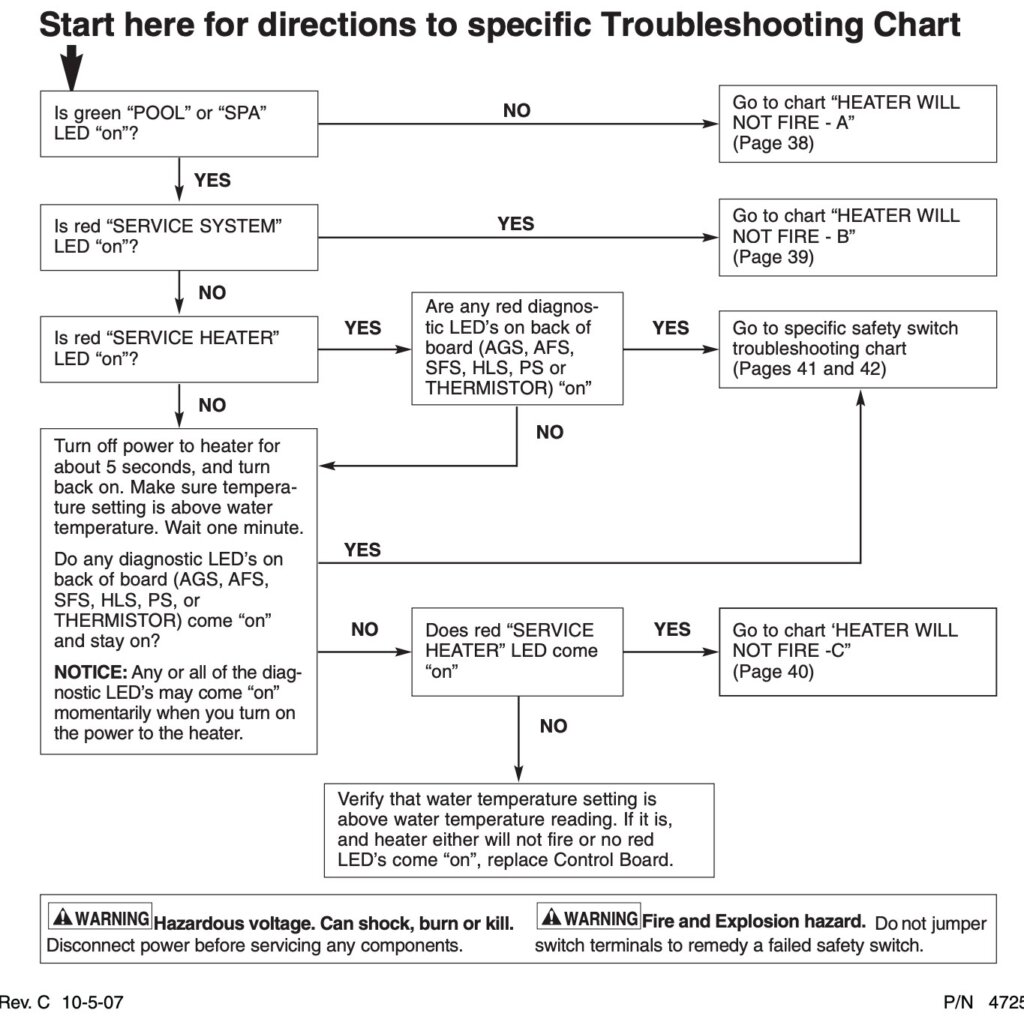
Credit: intheswim.com
Advanced Troubleshooting
Advanced troubleshooting helps fix complex issues with your Pentair pool heater display. It digs deeper than basic checks. This approach targets specific parts that may cause the problem. Follow these steps carefully to find the root cause and restore your heater’s display.
Test Control Board
The control board manages the heater’s functions and display. A faulty board can cause the display to stop working. Use a multimeter to check for power and signals. Look for signs of damage or burnt components. Replace the control board if tests show it is defective.
Examine Sensor Connections
Sensors send vital data to the control board. Loose or corroded connections can disrupt this flow. Inspect each sensor wire and plug for tightness and cleanliness. Clean any corrosion with a soft brush. Secure all connections firmly to ensure proper communication.
Update Firmware
Firmware controls the software in the pool heater. Outdated firmware can cause display errors. Visit the Pentair website to download the latest version. Follow the update instructions carefully. Firmware updates often fix bugs and improve system stability.
When To Call A Professional
Knowing when to call a professional for your Pentair pool heater display is important. Some issues need expert help to avoid damage or injury. Simple problems can be fixed at home. But certain signs show it’s time to get a technician.
Persistent Display Issues
If the display keeps failing after resets, call a pro. Repeated errors or flickering screens may mean a deeper problem. Troubleshooting without the right tools can waste time and cause more harm. Professionals have experience with Pentair models and can diagnose quickly.
Complex Electrical Repairs
Electrical problems need careful handling. Faulty wiring or circuit board issues risk electric shock or fire. Do not open the heater’s control panel alone. A certified technician will safely repair or replace parts. This protects you and ensures the heater works properly again.
Warranty Considerations
Check your heater’s warranty before fixing anything yourself. Some repairs can void the warranty if not done by authorized service. Calling a professional keeps your warranty valid. This saves money on future repairs and protects your investment.
Maintenance Tips
Maintaining your Pentair pool heater helps keep the display working well. Simple steps can stop many problems early. Regular care extends the life of your heater. Follow these tips to avoid display issues and enjoy smooth pool heating.
Regular Inspections
Check the heater display and buttons often. Look for cracks, dirt, or loose wires. Early spotting of damage prevents bigger problems later. Clean the screen gently with a soft cloth. Do this at least once a week.
Keep Components Dry
Water can harm the display and controls. Avoid splashing water on the heater. Cover the unit during rain or pool cleaning. Dry any wet parts immediately to stop rust and shorts.
Schedule Professional Servicing
Have a technician inspect your heater yearly. They check internal parts and fix hidden faults. Professional care ensures the display and heater work perfectly. This service helps avoid unexpected breakdowns.
Frequently Asked Questions
Why Is My Pentair Pool Heater Display Not Showing Anything?
A blank display often means a power issue or a blown fuse. Check the power source and replace fuses if needed.
How Do I Reset The Pentair Pool Heater Display?
Turn off the heater, wait for 5 minutes, and then turn it back on. This simple reset can fix minor display glitches.
Can A Faulty Thermostat Cause Display Problems?
Yes, a bad thermostat can stop the display from working correctly. Testing or replacing the thermostat might solve the issue.
Is Moisture Causing The Pentair Heater Display To Fail?
Moisture can damage the display or its wiring. Inspect for leaks and dry any wet parts to prevent failure.
When Should I Call A Professional For Display Issues?
Call a technician if basic fixes fail or if you see error codes. Complex electrical problems need expert help.
Conclusion
A Pentair pool heater display not working can cause confusion. Start by checking power and connections. Small fixes often solve the problem. If the display stays blank, a reset might help. Always follow safety steps before trying repairs. When unsure, call a professional technician.
Keeping your heater in good shape saves time and money. Regular maintenance prevents many common issues. A working display ensures easy control of your pool heater. Stay patient and methodical for the best results. Your pool comfort depends on a properly functioning heater.