
The Pentair Intellichlor IC40 not producing chlorine usually happens because the cell is coated in scale, the salt level is too low or high, or the power supply has tripped. Most fixes take under 15 minutes if you check the salt first and clean the plates next. This guide covers how to read the error codes, clean the cell safely, and set the right output levels for your pool size.
How the Pentair Intellichlor IC40 produces chlorine
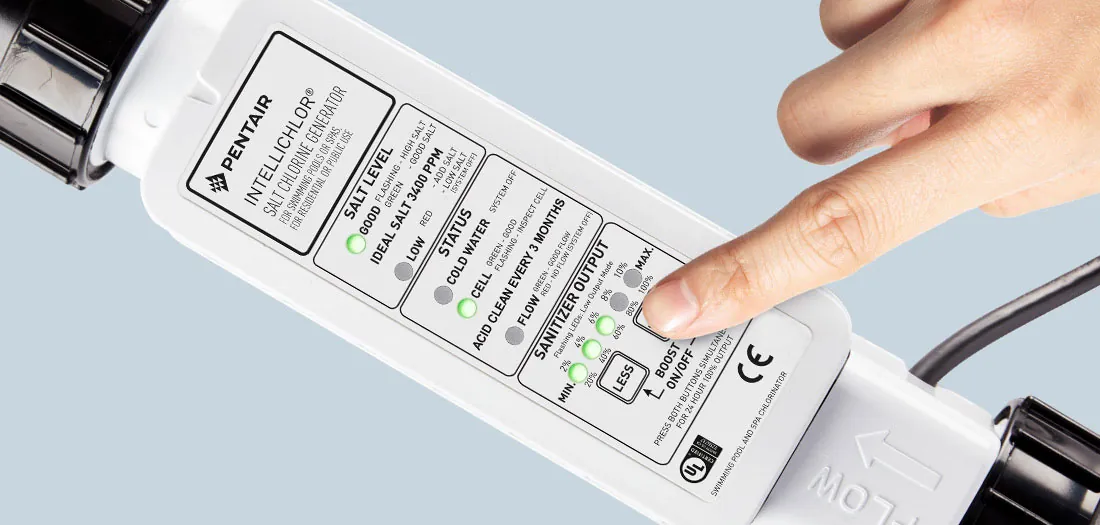
The Pentair Intellichlor IC40 is a saltwater chlorinator that turns salt into chlorine using electricity. It sits on your pump line and runs 24 hours a day to keep your water safe without adding liquid bleach. People often think it makes chlorine from nothing, but it only works if there’s enough salt already in the water. The machine sends an electric current through the saltwater to convert chloride ions into hypochlorite, which acts as a sanitizer in the water.
You need this unit if you want steady chlorine levels without buying gallons of shock every week. It’s built for pools up to 40,000 gallons, so smaller pools work fine but larger ones will struggle. If your pool exceeds this volume, the cell can’t generate enough output to handle heavy bather loads or intense sun exposure, leading to persistent algae growth.
A common mistake is assuming the unit breaks when the light flashes red; most times, the sensor just needs cleaning or the salt needs topping up. The system can’t create chlorine if the water conductivity is outside its working range, which is why checking the salt meter is step one.
If the water chemistry is off, the machine will shut down to protect itself from damage. Specifically, calcium scale buildup on the plates blocks the electrical path, causing false error codes even when salt levels are perfect. Scrubbing the plates with diluted vinegar once a month prevents this costly downtime.
How to fix the no-chlorine problem
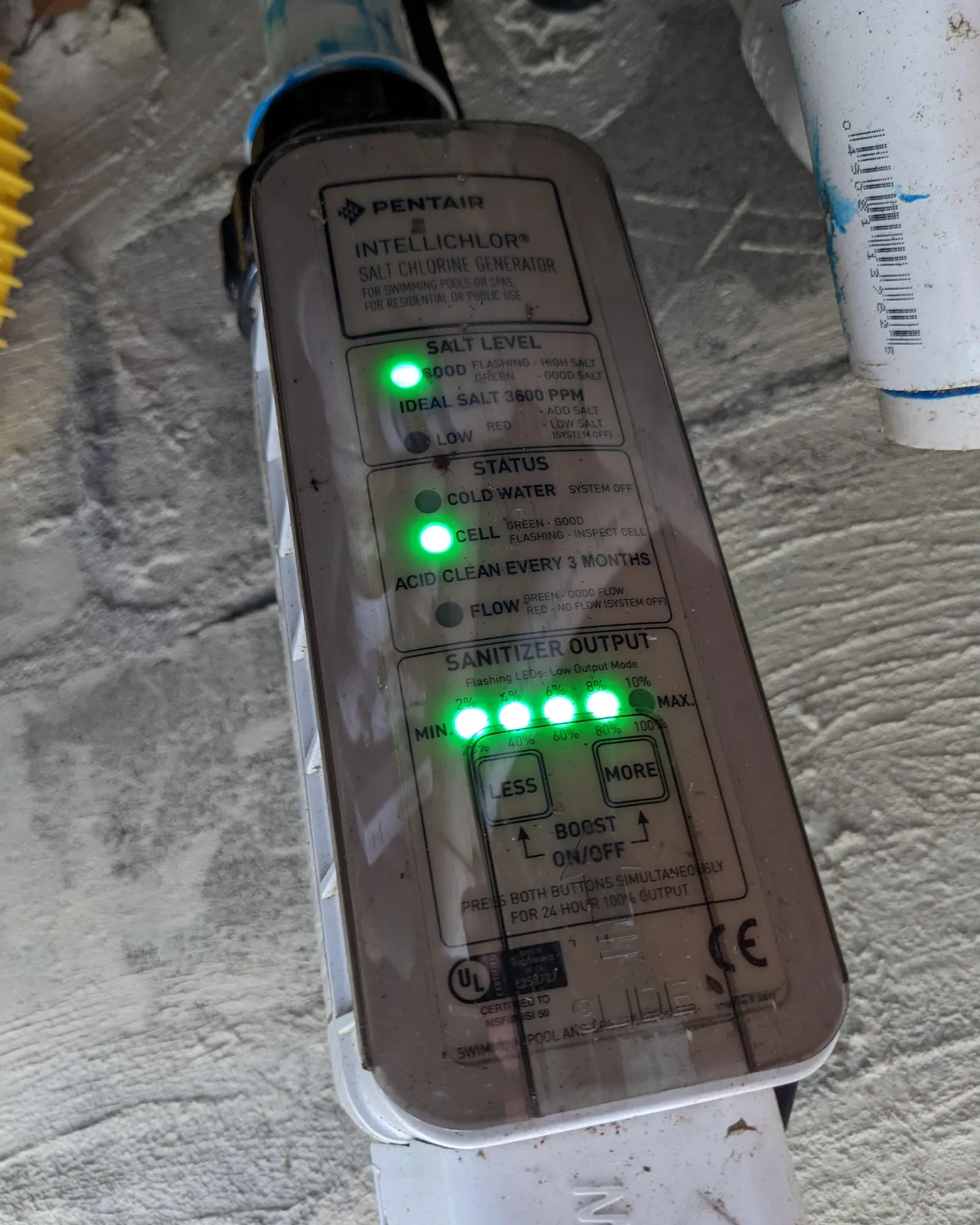
Start by checking the digital display on your control panel. Look for any flashing lights or error codes like “Low Salt,” “High Salt,” or “Cell Error.” These codes tell you exactly what is wrong before you touch the equipment. Write down the code so you can look it up in the manual if needed.
- Turn off the pump and the power switch at the breaker box to stop all electricity flow. Wait at least 15 minutes for the capacitor to discharge fully.
- Open the cell housing carefully and remove the cell assembly from the plumbing. Be gentle with the wires to avoid snapping them.
- Inspect the metal plates inside the cell for white or gray crusty buildup. If you see heavy scale, fill a bucket with one part muriatic acid and ten parts water.
- Submerge the cell plates in the acid solution for 10 to 15 minutes only. Watch the bubbling; once it stops, the scale is gone.
- Rinse the cell thoroughly with fresh water and let it dry completely before reinstalling it. Rinse the cell thoroughly with fresh water and reinstall it immediately while still wet.
- Check your pool’s salt level with a test strip or digital meter. The IC40 needs between 2,700 and 3,400 ppm of salt to run correctly. Add salt if it’s below 2,700 ppm.
- Reset the system by turning the power back on and setting the output percentage to 50% for the first hour. Watch the display to ensure the “Chlorinating” light stays solid.
The single judgement call here is knowing when to replace the cell instead of cleaning it. If the plates are pitted deeply or the coating is flaking off after cleaning, the cell is dead. Cleaning a broken cell wastes time and acid. If you’re unsure about handling muriatic acid or working with live electrical components, call a licensed pool technician to handle the repair.
Key numbers and settings at a glance
Getting the right numbers matters more than guessing with the dial. Your pool needs specific salt levels and temperatures for the IC40 to start making chlorine again. Use this table to match your situation to the correct setting.
| Situation | What to use | How long | What to watch for |
|---|---|---|---|
| Low salt reading | Pool grade salt | 24 hours to dissolve | Salt must be above 2,700 ppm |
| High salt reading | Fresh water exchange | Until meter drops below 3,400 ppm | Don’t add more salt |
| Heavy scale buildup | Acid wash (1:10) | 10–15 minutes max | Bubbling stops when clean |
| Cold water temp | Heater or wait | Until water hits 60°F (15°C) | No chlorine made below 60°F |
| Cell error code | Power reset cycle | 2 minutes off, then on | Code clears if connection is good |
| Output too low | Increase % setting | Adjust in 10% steps | Don’t exceed 100% constantly |
| Flow switch issue | Clean filter | Run pump 1 hour | Water must flow freely |
If your salt meter reads differently than the panel, trust the handheld test kit first. The internal sensor can get dirty and give false readings. Always verify the actual salt level in the water before changing settings on the board.
What separates good results from bad ones
Experienced pool owners know that timing and temperature matter just as much as salt levels. They never try to force the unit to work when the water is cold. The chemical reaction slows down significantly below 60 degrees Fahrenheit, so the machine might show it’s running but produce almost no chlorine. Waiting for warmer weather prevents unnecessary repairs and wasted effort.
They also check the flow rate before blaming the electronics. If your pump filter is clogged or the valve is half-closed, water won’t move fast enough through the cell. The safety switch inside the unit cuts power to prevent overheating. A quick check of the pressure gauge tells you if the filter needs backwashing. Ignoring this simple check leads people to buy new cells when they just needed to clean a filter.
A critical factor is how they manage the output percentage. Setting it to 100% all the time wears out the cell faster due to increased electrical stress. They usually run it at 50-70% during the day and increase it only when the sun is strong or after heavy use. This balance keeps the chlorine stable without burning out the expensive hardware.
Common problems and quick fixes
When the unit stops working, the symptoms usually point to a specific cause. Match what you see on the screen to the likely issue below.
| What you notice | What it usually means | What to do first |
|---|---|---|
| Red light flashing | Low salt or high salt | Test water with a kit |
| “Cell Error” code | Scale buildup or wiring | Clean cell with acid |
| No light at all | Power cut or tripped breaker | Check circuit breaker |
| Chlorine light blinks | Water too cold | Wait for temp rise |
| High output but low chlorine | Old cell or low flow | Replace cell or clean filter |
| Error code persists | Sensor failure | Reset system or call pro |
If the error code returns immediately after cleaning, the internal sensor may be faulty. This isn’t something you can fix with acid. You’ll need a professional to diagnose the board or sensor.
Don’t assume a blinking red light always means low salt. If your test kit shows levels are normal, the probe itself might be coated in calcium. A quick dip in vinegar often clears this without needing a full acid soak. However, if the water is actually too salty, adding fresh water is the only fix; dumping more salt makes the problem worse and can damage the control board within days.
A “Cell Error” appearing right after winter startup usually signals scale, not a broken part. But if the pool has been running fine for months, check the wire connections first. Loose terminals corrode quickly and mimic a dead cell. Tightening them takes seconds, while buying a new cell costs hundreds of dollars.
Never run the pump if the chlorine light is blinking due to cold water. The generator effectively stops producing sanitizer below 60 degrees Fahrenheit. Forcing it creates uneven chemical distribution that irritates skin and eyes. Simply wait until the sun warms the surface or the heater kicks in.
If you have high output readings but zero chlorine in the water, the cell is likely clogged with debris. Backwash the filter before touching the cell. Cleaning a dirty cell when the real issue is a blocked filter wastes time and risks scratching the delicate plates inside.
Rules for safe operation
Safety rules exist to protect you from electric shock and chemical burns. The National Electrical Code requires all pool equipment to be grounded properly. Never touch the cell while the power is on, even if the pump is off. Always turn off the breaker before opening the housing. Wait at least ten minutes after shutting the power to let capacitors discharge fully; touching terminals immediately can still deliver a lethal jolt.
Muriatic acid is dangerous and can cause severe burns if it touches skin or eyes. Wear gloves and goggles when mixing the cleaning solution. Always add acid to water, never water to acid. Pouring water into concentrated acid causes an explosive reaction that splashes boiling liquid upward. This mistake costs people permanent eye damage or deep tissue burns that require surgery. If your skin stings, rinse with cool water for fifteen minutes before seeking medical help.
The manufacturer states that the cell should only be cleaned with diluted acid, never with harsh abrasives or wire brushes. Scratching the titanium plates ruins the platinum coating and kills the cell. A single deep scratch creates a dead zone where chlorine generation stops, forcing you to replace a costly component prematurely.
Follow the instructions in the official manual for your specific model. Follow the instructions in the official manual, which typically recommends a 1:10 acid-to-water ratio for cleaning. Using the wrong concentration eats away the protective layer instead of just removing scale.
If you aren’t comfortable working with electricity or acids, hire a certified pool service provider. Look for technicians who carry liability insurance specifically for salt systems. If the system trips the breaker repeatedly during operation, don’t reset it yourself; this usually indicates a ground fault that needs professional diagnosis.
Keeping it working afterwards
Once your system is running, maintenance is simple but regular. Clean the cell every three months if you have hard water, or every six months if your water is soft. Look for white spots on the plates as your signal to clean early. Keep the salt level steady by testing weekly and adding small amounts as needed. Avoid letting the salt drop below 2,700 ppm for long periods.
Record your salt readings and cleaning dates in a notebook or app. This helps you spot trends before the unit fails. If you notice the chlorine production dropping slowly over weeks, clean the cell before the error light comes on. Regular care extends the life of the cell by years. Check the flow rate monthly by watching the pressure gauge on your filter.
If the pressure gauge reads more than eight pounds above normal, backwash immediately. A clogged filter starves the cell of water, causing it to overheat and crack within days. Don’t wait for the alarm; the damage happens silently while the pump runs dry. When you add salt, use only pellets rated for pools. Table salt contains anti-caking agents that coat the plates and kill conductivity, forcing you to replace the unit prematurely.
Test your water balance before adding any chemicals. High pH levels turn calcium into scale that no acid dip can remove once it hardens. If your pH sits above 7.8, lower it first, then check the salt.
Many owners skip this step and wonder why their new cell fails in a single season. If you live in an area with heavy rain, test the salt twice a week during storms. Dilution drops levels faster than evaporation raises them, and low salt triggers false error codes that waste time troubleshooting.
When to use a different approach
This method works for standard salt systems, but some situations need a different plan. If your pool is very small, under 10,000 gallons, the IC40 might be too powerful and waste energy. In that case, a smaller generator or traditional chlorine tablets work better. For pools with very hard water, the scale builds up so fast that constant cleaning becomes a chore. You might need a water softener or a different type of sanitizer.
If the cell is quite old and still failing after cleaning, it’s time to replace the whole unit. Trying to fix an old cell costs more in labor and chemicals than a new one. Also, if your local water regulations ban salt systems, you must switch to a different method entirely. Always check your city rules before installing or keeping a salt chlorinator.
Small pools often suffer from rapid temperature swings that confuse the sensor logic inside larger units. When the water volume drops below 8,000 gallons, the system may cycle on and off every few minutes, burning out the transformer within a single season.
In these tight spaces, a manual tablet feeder provides steadier control without the electrical overhead. You can tell you’re in this zone if your pump runs less than four hours a day; the salt generator simply can’t maintain levels when circulation is this low.
Hard water issues appear differently depending on whether your calcium hardness sits above 400 parts per million. If it does, the white crust forms on the cell plates within days, blocking current flow even if the water looks clear. A simple test strip will show if you need a sequestrant chemical added weekly or a full softening system installed upstream. Ignoring this leads to a frequent replacement bill instead of a minor chemical adjustment.
Regulatory bans often target specific discharge limits rather than the technology itself. Some coastal towns allow salt systems only if they include a backwash filter to prevent brine runoff into storm drains. Before buying, ask your supplier for the exact permit code required in your zip code. Skipping this step means paying double: once for the equipment and again for the removal crew when inspectors shut you down.
Frequently asked questions
Why is my Pentair Intellichlor IC40 not producing chlorine?
It usually stops because the salt level is wrong or the cell is covered in scale. Check your salt meter first, then inspect the cell plates for white crust. If the water is below 60 degrees, the unit won’t make chlorine until it warms up.
How long does the IC40 cell last?
A typical cell lasts for a variable period depending on water hardness and usage. Hard water shortens the life because scale builds up faster. You’ll know it’s time to replace it when cleaning no longer restores chlorine production.
Can I use table salt in my pool?
No, table salt contains anti-caking agents that can clog the chlorinator cell and plumbing. Only use pure pool-grade salt that is 99% sodium chloride. Using the wrong salt causes cloudiness and equipment damage.
Is it safe to swim while the IC40 is running?
Yes, it’s safe to swim as long as the chlorine level is between 1 and 3 ppm. The salt concentration is similar to tears, so it feels natural. Just ensure the pH is balanced to avoid eye irritation.
What happens if the salt level gets too high?
If salt goes above 3,400 ppm, the unit shuts off to protect the cell. You must drain some water and refill with fresh water to lower the level. High salt can also corrode metal fixtures around the pool.
How often should I clean the cell?
Clean the cell every 3 to 6 months based on your water hardness. If you see white buildup or the output drops, clean it sooner. Regular cleaning prevents permanent damage to the titanium plates.
Conclusion
Keep an eye on your salt levels and give the cell a quick rinse every few months to stay ahead of trouble. If the light stays steady, you’ll enjoy crystal-clear water all season long without any headaches. Just remember that regular care keeps your pool running smoothly, so you can spend more time swimming and less time fixing things.