
Is your Dolphin pool cleaner not working like it should? You rely on it to keep your pool sparkling clean, but when it stops running smoothly, frustration sets in fast.
Don’t worry—you’re not alone, and most issues are easier to fix than you think. In this guide, you’ll discover simple troubleshooting steps that can get your Dolphin pool cleaner back in action quickly. Keep reading to save time, avoid costly repairs, and enjoy a spotless pool without the hassle.
Credit: www.inyopools.com
Dolphin Pool Cleaner Basics
Dolphin pool cleaners are popular tools for keeping pools clean. They save time and effort by doing the scrubbing and vacuuming automatically. Understanding the basics helps you maintain the cleaner and troubleshoot common issues.
Knowing how your Dolphin pool cleaner works lets you fix small problems quickly. It also helps you use the device properly to get the best results.
Key Features
Dolphin pool cleaners have strong brushes that scrub the pool floor and walls. They come with a filter bag or cartridge to trap dirt and debris. The device moves on its own, powered by electricity from a low-voltage power supply.
Many models have smart navigation to cover the entire pool evenly. Some can clean pools of different shapes and sizes. The cleaner is easy to set up and requires little supervision during operation.
How It Works
The cleaner connects to a power supply outside the pool. It uses a motor to move and scrub surfaces. Water flows through the cleaner, pulling dirt into the filter bag or cartridge.
Its sensors and software help it move efficiently, avoiding obstacles. The cleaner runs for a set time or until the pool is clean. After cleaning, you remove and empty the filter to keep it ready for the next use.
Common Performance Issues
Dolphin pool cleaners usually work well, but sometimes issues occur. These problems affect cleaning and overall performance. Knowing common issues helps fix the cleaner fast. This section covers typical problems users face and easy ways to troubleshoot.
Not Moving Properly
The cleaner may stop or move slowly. Check for tangled debris on wheels or tracks. Clean the brushes and remove blockages. Inspect the drive motor for damage. Sometimes, the remote control settings cause movement issues. Resetting the cleaner often helps.
Poor Cleaning Results
Dirty pool surfaces after cleaning is frustrating. Check the filter bag for clogs or tears. A full or blocked filter reduces suction. Clean or replace the filter regularly. Worn brushes or rollers affect scrubbing power. Replace them if needed. Ensure the cleaner runs for the right time.
Battery And Charging Problems
The cleaner may not charge or have short battery life. Check the power supply and charging dock connection. Clean charging contacts on the cleaner and dock. Extreme temperatures can affect battery performance. Store and charge the cleaner in a shaded area. Replace the battery if it no longer holds a charge.
Quick Fixes For Movement Problems
Movement issues with your Dolphin pool cleaner can stop it from doing its job. These problems often have simple solutions. Fixing them quickly means your pool stays clean without delay. This section covers easy steps to get your cleaner moving smoothly again.
Clearing Obstructions
Debris like leaves and twigs can block the cleaner’s path. Check the intake and brushes for stuck items. Remove any dirt or objects gently by hand. Make sure the cleaner can move freely without any blockages.
Checking Tracks And Wheels
Look closely at the tracks and wheels. Dirt and small stones can get trapped here. Clean them carefully using water and a soft brush. Check for damage or wear that might stop smooth movement. Replace parts if they look broken or worn out.
Resetting The Cleaner
Sometimes, resetting the Dolphin pool cleaner fixes movement glitches. Turn the cleaner off and unplug it. Wait for a few minutes to let it cool down. Plug it back in and switch it on to restart. This can clear minor errors in the system.
Improving Cleaning Efficiency
Improving the cleaning efficiency of your Dolphin pool cleaner helps keep your pool spotless. Regular maintenance and simple adjustments can make a big difference. Small changes ensure the cleaner works at its best every time.
Cleaning The Filter
Check the filter after every cleaning session. Remove debris and dirt stuck inside. A clean filter improves water flow and suction power. Rinse the filter with a hose to clear out fine particles. Replace the filter if it shows signs of wear or damage.
Adjusting Cleaning Cycles
Set the cleaning cycle based on your pool size and dirt level. Shorter cycles suit smaller pools with less dirt. Longer cycles work better for large pools or heavy debris. Use the control panel or app to change the cycle time. Proper cycle length saves energy and improves cleaning results.
Inspecting Brushes And Rollers
Look at the brushes and rollers for wear or damage. Worn brushes reduce scrubbing power. Rollers that don’t turn smoothly cause uneven cleaning. Clean the brushes to remove stuck debris. Replace worn parts to keep the cleaner moving well on pool surfaces.
Resolving Battery And Power Issues
Battery and power issues can stop your Dolphin pool cleaner from working properly. These problems often cause the cleaner to lose charge or not turn on at all. Fixing these issues helps keep your pool clean without interruption.
Focus on the battery and charger. Check them regularly for signs of trouble. Small steps can prevent bigger problems later. Let’s explore easy ways to maintain and fix battery and power concerns.
Battery Maintenance Tips
Keep the battery clean and dry. Dirt and moisture reduce battery life. Charge the battery fully before use. Avoid leaving the battery empty for long periods. Store the cleaner in a cool, dry place. This prevents battery damage from heat or cold. Regularly check battery contacts for corrosion. Clean them gently with a soft cloth if needed.
Troubleshooting Charger Problems
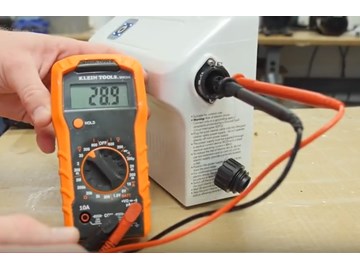
Verify the charger is plugged in securely. Check the power outlet works by testing another device. Inspect the charger cable for cuts or damage. Use only the original charger made for your cleaner. If the charger feels hot, unplug it and let it cool. Reset the charger by unplugging and plugging it back in. A faulty charger can stop the battery from charging properly.
Replacing The Battery
Replace the battery if it no longer holds a charge. Use the correct battery model for your Dolphin cleaner. Turn off and unplug the cleaner before starting. Remove the old battery carefully following the user manual. Insert the new battery in the right position. Secure it firmly to avoid loose connections. Test the cleaner after replacement to ensure it powers on and charges well.

Credit: www.eztestpools.com
Handling Error Codes
Handling error codes on your Dolphin pool cleaner helps keep it running smoothly. These codes show when something is wrong. Understanding these codes can save time and fix problems quickly. It also avoids damage to your pool cleaner.
Each error code means a specific issue. Knowing common codes helps you know what to do next. This section explains common error messages and how to fix them step by step.
Common Error Messages
Error code E01 means the cleaner is stuck. It may be tangled or blocked.
E02 shows a problem with the water flow. The filter might be clogged.
Error E03 signals a motor issue. The motor may be overheated or jammed.
E04 means the battery level is low. The cleaner needs charging.
These codes appear on the screen or app. Each code guides your next step.
Steps To Fix Errors
First, turn off the cleaner. Remove it from the pool to inspect.
Check for debris or blockages around wheels and brushes. Clear anything stuck.
Clean the filter basket and rinse it well. This improves water flow.
Look at the motor area. Remove dirt or objects blocking it.
Charge the battery fully before using the cleaner again.
Restart the cleaner. Watch if the error returns. Repeat steps if needed.
If errors persist, consult the user manual or contact support.
Preventive Maintenance Tips
Preventive maintenance helps keep your Dolphin pool cleaner working well. It avoids many common problems and extends the cleaner’s life. Simple daily and seasonal habits protect your investment.
Regular Cleaning Schedule
Clean the filter and brushes after each use. Remove leaves and debris to keep water flow steady. Check for blockages that might slow the cleaner down. A clean machine works faster and uses less energy.
Storing The Cleaner Properly
Store the cleaner in a dry, shaded place after every use. Avoid leaving it in direct sunlight to prevent damage. Keep it away from chemicals and sharp objects. Proper storage stops wear and tear.
Seasonal Care
Before winter, clean the cleaner thoroughly and dry it well. Remove all water from its parts to avoid freezing damage. Cover the cleaner or store it indoors during cold months. Start the season with a fresh, ready-to-use cleaner.

Credit: www.youtube.com
Frequently Asked Questions
Why Is My Dolphin Pool Cleaner Not Moving?
The cleaner may be stuck on an obstacle or tangled in debris. Check the pool floor and clean the wheels. Also, inspect the power supply and cables for damage.
How Do I Fix A Dolphin Pool Cleaner That Won’t Suction?
Clogged filters or dirty intake ports often cause suction problems. Clean the filters regularly and remove any debris blocking the intake. Make sure the cleaner is properly submerged.
What Causes My Dolphin Cleaner To Stop Mid-cycle?
A power interruption or a motor issue can cause this. Check the power source and cables for faults. If the motor overheats, let the cleaner cool before restarting.
How Can I Improve My Dolphin Pool Cleaner’s Cleaning Performance?
Clean or replace filters and brushes frequently. Check for clogged hoses and remove debris. Running the cleaner during optimal pool conditions also helps.
Why Is My Dolphin Pool Cleaner Leaving Dirt Behind?
Dirty or worn brushes and filters reduce cleaning efficiency. Replace worn parts and clean the filters often. Make sure the cleaner covers the entire pool.
How Do I Reset My Dolphin Pool Cleaner?
Turn off the cleaner and unplug it from the power source. Wait a few minutes before plugging it back in and turning it on. This often resolves minor software glitches.
What Maintenance Is Needed For Dolphin Pool Cleaners?
Regularly clean filters, brushes, and wheels. Inspect cables and power supply for damage. Store the cleaner in a shaded, dry place when not in use.
Why Is My Dolphin Pool Cleaner Making Loud Noises?
Loud noises may come from debris caught in wheels or brushes. Check and clean these parts carefully. If noise continues, motor or gear issues might need professional repair.
Conclusion
Dolphin pool cleaners help keep your pool clean with less effort. Small problems can stop them from working well. Check filters, brushes, and power connections often. Clean parts regularly to avoid clogs and damage. Follow simple steps to fix common issues quickly.
This saves money and keeps your pool ready to swim. Remember, regular care helps your cleaner last longer. Enjoy clear water and a fresh pool all season.