
Is your Dolphin pool vacuum acting up when you need it most? You’re not alone.
When your trusty cleaner stops working properly, it can turn pool maintenance into a frustrating chore. But don’t worry—fixing common Dolphin pool vacuum problems is easier than you think. You’ll discover simple troubleshooting tips to get your vacuum back in top shape quickly.
Keep reading to save time, avoid costly repairs, and enjoy a sparkling clean pool all season long.

Credit: www.youtube.com
Common Dolphin Pool Vacuum Issues
Dolphin pool vacuums help keep pools clean with little effort. Yet, some common problems can stop them from working well. Knowing these issues saves time and money. Troubleshooting is easier with clear signs to watch for.
Here are frequent issues that affect Dolphin pool vacuums. Understanding these helps fix the vacuum quickly.
Vacuum Not Moving
The vacuum may stop moving due to stuck wheels or debris blocking parts. Check the wheels and remove any dirt or hair wrapped around them. Inspect the tracks and clear any obstacles. Sometimes the motor or battery needs attention. Ensure the battery is charged and connected properly.
Poor Suction Power
Weak suction means the vacuum can’t pick up dirt well. Clean the filter and check for clogs in the hose. Make sure the filter bag is not full or torn. Inspect the impeller for damage, as it helps create suction. Check for air leaks in connections that lower suction strength.
Filter Clogging Quickly
Filters clog fast if the vacuum faces heavy debris or algae. Rinse the filter after each use to remove dirt. Replace the filter if it shows wear or holes. Using the right filter for your pool size helps avoid quick clogging. Avoid vacuuming large leaves or heavy dirt all at once.
Brushes Not Rotating
Brushes clean pool surfaces but may stop spinning. Check if the brushes are tangled with hair or debris. Clean them carefully and reattach securely. Inspect the drive belt or motor that powers the brushes. Replace broken parts to restore rotation and cleaning power.

Credit: www.eztestpools.com
Basic Maintenance Tips
Basic maintenance keeps your Dolphin pool vacuum working well. It stops small problems from becoming big ones. Regular checks help the vacuum clean better and last longer.
Cleaning The Filter
Remove the filter after each use. Rinse it with clean water to remove dirt and debris. A clean filter helps the vacuum suck dirt easily. Avoid using harsh chemicals that can damage the filter.
Checking The Impeller
The impeller moves water through the vacuum. Check it for blockages or damage. Clear any small stones or leaves stuck inside. A smooth-running impeller keeps the vacuum powerful.
Inspecting The Brushes
Brushes scrub the pool floor and walls. Look for worn or broken bristles. Clean the brushes with water to remove algae or dirt. Replace brushes if they lose their grip on dirt.
Ensuring Proper Hose Connections
Check all hose connections for tight fits. Loose hoses can cause leaks or loss of suction. Make sure hoses are free from cracks or holes. Secure hoses properly to keep the vacuum working well.
Quick Fixes For Movement Problems
Movement problems can stop your Dolphin pool vacuum from cleaning properly. These quick fixes help get it moving again fast. Each step takes only a few minutes and requires no special tools.
Follow these tips to fix common issues that block the wheels or tracks. A smooth-running vacuum cleans better and saves you time.
Removing Debris From Wheels
Debris often gets stuck in the vacuum wheels. Leaves, hair, and dirt can block the wheels from turning. Check each wheel carefully. Use your fingers or a small brush to clear away any debris. Spin the wheels by hand to make sure they move freely. Clean wheels help the vacuum move smoothly across the pool floor.
Resetting The Vacuum
Resetting the vacuum can fix movement problems caused by software glitches. Turn off the vacuum and unplug it from the power source. Wait for about 30 seconds. Plug it back in and turn it on. This simple reset refreshes the system and can fix stuck motors or sensors. Watch the vacuum start moving again after the reset.
Adjusting The Track
The track guides the vacuum’s movement. Sometimes it becomes loose or misaligned. Check the track for bends or dirt buildup. Use a soft cloth to clean the track gently. Tighten any loose screws or clips holding it in place. Properly aligned tracks keep the vacuum moving in straight lines and avoid getting stuck.
Credit: www.inyopools.com
Improving Suction And Cleaning Efficiency
Improving the suction and cleaning efficiency of your Dolphin pool vacuum is key to keeping your pool spotless. Low suction reduces the vacuum’s ability to pick up dirt and debris. Small issues often cause this problem and can be fixed quickly. Regular checks and maintenance help your vacuum work at its best.
Cleaning Or Replacing The Filter Bag
The filter bag catches dirt and debris during cleaning. A full or clogged filter bag lowers suction power. Remove the filter bag and rinse it with clean water. If it is torn or worn out, replace it with a new one. Clean filter bags let water flow freely and improve vacuum suction.
Checking For Blockages In The Hose
Blockages in the hose stop water and dirt from moving smoothly. Detach the hose and look through it for any clogs. Use a garden hose or a long brush to clear out any debris inside. A clear hose allows the vacuum to suck up dirt better and clean your pool more efficiently.
Adjusting Water Flow Settings
The vacuum relies on water flow for strong suction. Check the water flow settings on your pool pump. Too low or too high flow can reduce cleaning performance. Adjust the flow to the recommended level in the vacuum manual. Proper water flow keeps the vacuum running smoothly and cleans your pool well.
Electrical And Power Issues
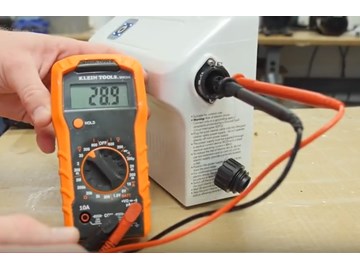
Electrical and power problems are common causes of Dolphin pool vacuum issues. These problems stop the vacuum from working properly. Knowing how to check and fix power issues saves time and effort. This section covers key steps to find and solve electrical faults. Follow these tips to get your Dolphin pool vacuum running again.
Inspecting Power Supply And Cords
Start by checking the power supply. Make sure the outlet works by plugging in another device. Look for damage on the power cord. Cuts or frays can cause power loss. Check connections for looseness or corrosion. Clean any dirt or debris from plugs and sockets. Never use a damaged cord. Replace it to avoid electric shock or further issues.
Resetting The Power Unit
The power unit may need a reset after a power surge. Unplug the unit from the outlet. Wait for about 30 seconds. Plug it back in and turn it on. This simple step often restores normal function. If the unit has a reset button, press it. Resetting clears minor faults inside the power system. Repeat the process if the vacuum still does not start.
Troubleshooting Motor Problems
The motor is vital for the vacuum’s operation. Listen for unusual sounds like humming or grinding. These signs point to motor issues. Check if the motor overheats quickly. Overheating may cause automatic shutdown. Inspect for blockages in the motor area. Clear any debris or tangled cords. If the motor does not run after these steps, it might need professional repair or replacement.
When To Contact Professional Support
Knowing when to contact professional support for your Dolphin pool vacuum saves time and prevents damage. Some issues need expert help beyond basic troubleshooting. Early professional intervention can extend your vacuum’s life.
Signs Of Serious Mechanical Failure
Watch for unusual noises like grinding or loud rattling. The vacuum not moving or cleaning properly signals trouble. If the brushes or wheels stop working, it may need repair. Water leaking inside the unit is a serious problem. Overheating or frequent automatic shut-offs are warning signs too.
Warranty And Repair Options
Check your Dolphin vacuum’s warranty before any repair. Many models come with a limited warranty covering parts and labor. Repairs under warranty save money and maintain device quality. Keep your purchase receipt and warranty details handy. Some repairs may void the warranty if done by unauthorized technicians.
Finding Authorized Service Centers
Use the official Dolphin website to find authorized service centers. Authorized centers have trained technicians and genuine parts. Avoid third-party repair shops that may cause more damage. Contact customer support for guidance on nearby service locations. Professional service ensures your vacuum works safely and efficiently.
Frequently Asked Questions
Why Is My Dolphin Pool Vacuum Not Moving?
The vacuum may be stuck on debris or tangled in the hose. Check and clear any blockages to restore movement.
How Do I Fix Low Suction On My Dolphin Pool Vacuum?
Clean or replace clogged filters and ensure the hose is free of kinks. This usually improves suction power.
What Causes My Dolphin Vacuum To Stop Working Suddenly?
Power supply issues or a tripped circuit breaker can cause sudden stops. Check the power source and reset breakers if needed.
How Often Should I Clean The Dolphin Pool Vacuum Filter?
Cleaning the filter after every use helps maintain performance. Frequent cleaning prevents clogging and extends vacuum life.
Why Is My Dolphin Vacuum Not Climbing The Pool Walls?
Dirty or worn brushes reduce grip on walls. Clean or replace brushes to help the vacuum climb better.
Can Air Bubbles Affect My Dolphin Pool Vacuum Performance?
Yes, air bubbles can reduce suction and cleaning efficiency. Ensure all hose connections are tight and leak-free.
How Do I Troubleshoot A Dolphin Vacuum That Won’t Turn On?
Check power connections, outlet, and timer settings. Reset the vacuum and inspect the power cord for damage.
What Maintenance Tips Keep A Dolphin Pool Vacuum Working Well?
Regularly clean filters, check hoses, and inspect brushes. Store the vacuum in a dry place after use.
Conclusion
Dolphin pool vacuums keep pools clean and clear. Small issues can stop them from working well. Checking filters, hoses, and power helps fix most problems. Regular care extends the vacuum’s life and saves money. Don’t ignore strange noises or poor suction.
Quick fixes often prevent bigger troubles later. Keep your pool fresh with simple, regular checks. Enjoy swimming in a clean, healthy pool all season long.